Command-line mode
Start a saved job from a batch file, Task Scheduler, a CI step or a command prompt.
Last updated August 24, 2026
Applies to the rebuilt app, so far shipped for Firebird & SQL Server, Firebird & PostgreSQL, SQL Server & MySQL, SQL Server & PostgreSQL, MySQL & PostgreSQL, SQLite & SQL Server, SQLite & MySQL. Any other pair still runs the previous interface - read Command-line mode for the previous interface instead.
A saved job holds both connections, the table selection and the options. Run it by name. There is nothing else to pass. The workflow guide covers the job screen.
- Save the job
- Where jobs are stored
- Run it
- Output and logs
- Exit codes
- Running several jobs
- Scheduled jobs
- Passwords
- The job file
Save the job
Configure the conversion and press Save job, top right. The job name is beside the button; the pencil renames it. That is the name you run.
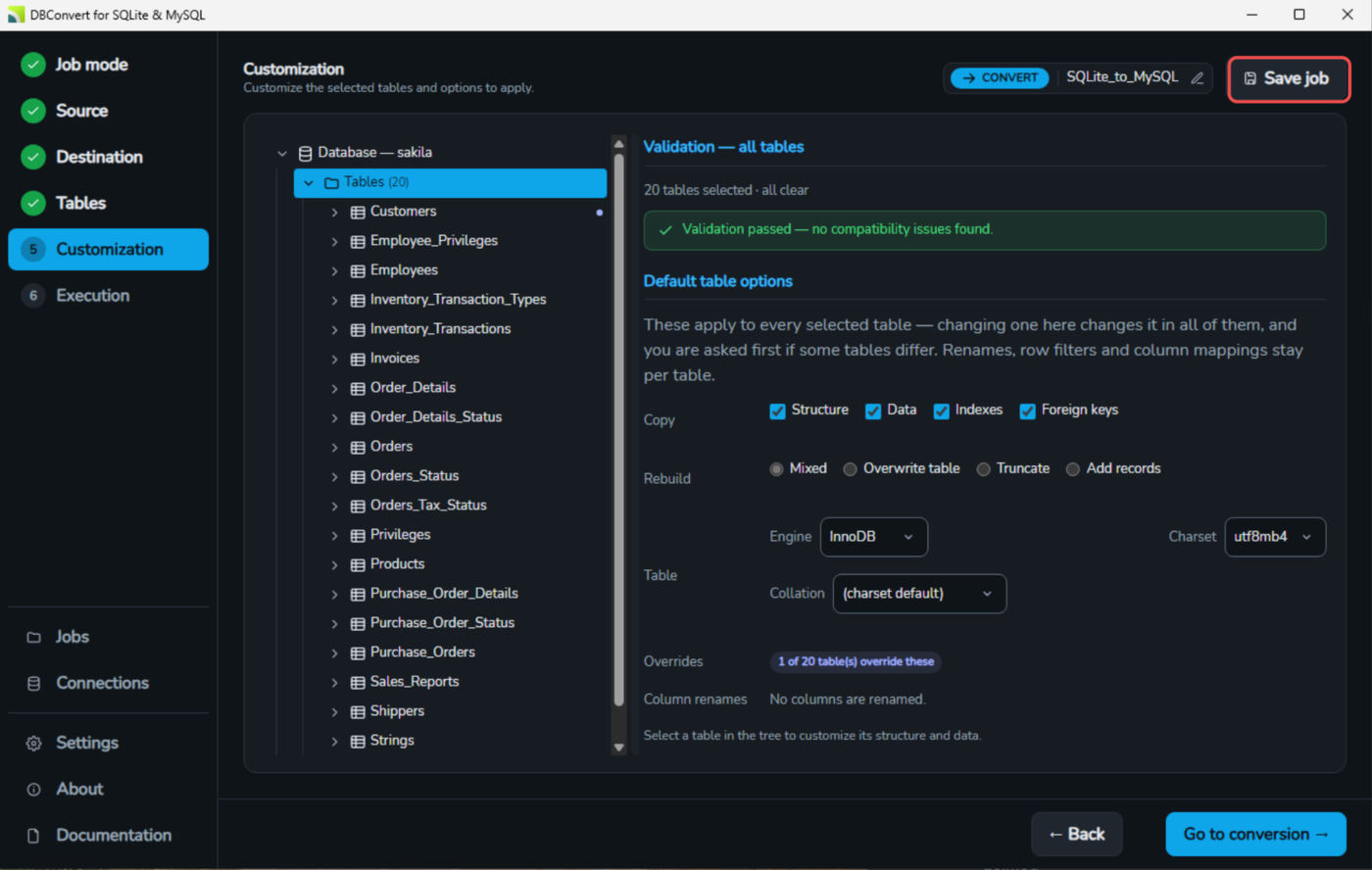
A job saved by an older version has to be opened and saved once first.
Where jobs are stored
| What | Where |
|---|---|
| The job, as the command line reads it | %LOCALAPPDATA%\DBConvert\jobs\<job name>.jsonl |
| The log of each command-line run | %LOCALAPPDATA%\DBConvert\jobs\<job name>.log |
| The log of a run started in the app | %LOCALAPPDATA%\DBConvert\logs\ |
| A scheduled task: its job file, its log and its schedule | %LOCALAPPDATA%\DBConvert\scheduled\ |
| Connection passwords | the Windows credential store, never the files above |
Older builds save jobs but write no .jsonl, and the Save job button looks the same. A job with no file cannot be run by name until it is saved again on a build that writes one.
Run it
"C:\Program Files\DBConvert\DBConvert for SQLite and MySQL\DBConvert_SQLite_MySQL.exe" --run-job "Nightly orders"Each pair installs its own executable under %ProgramFiles%\DBConvert\. The Start menu shortcut opens that folder's application.
--run-job is matched exactly, in lower case.
Legacy spelling. Batch files written for earlier versions used /Session:, which still does the same thing and needs no rewriting.
DBConvert_SQLite_MySQL.exe /Session:"Nightly orders"
DBConvert_SQLite_MySQL.exe /Session: "Nightly orders"
The space after the colon is optional, and the switch may be spelled in any capitalisation.
Output and logs
No application window opens. The run writes to the console it was started from:
2026-08-24 12:47:21  === job run: Nightly orders ===
2026-08-24 12:47:23  Copying data for table 'orders'.
2026-08-24 12:47:25  Elapsed 00:00:02. Inserted: 41902 of 41902.
2026-08-24 12:47:25  run finished: ok (exit 0)
Redirection works as usual: --run-job "Nightly orders" > run.txt. Under Task Scheduler, a shortcut or Explorer there is no console, and the log is the only record. Every run is appended to it.
Exit codes
| Code | Meaning |
|---|---|
0 | completed successfully |
1 | failed, or no job by that name |
2 | completed, but some rows or objects were rejected |
3 | cancelled - not reachable from the command line |
Code 2 is not a failure. Scripts usually branch on it separately:
@echo off
set APP=C:\Program Files\DBConvert\DBConvert for SQLite and MySQL\DBConvert_SQLite_MySQL.exe

"%APP%" --run-job "Nightly orders"

if %ERRORLEVEL% EQU 0 echo done
if %ERRORLEVEL% EQU 1 (echo FAILED & exit /b 1)
if %ERRORLEVEL% EQU 2 echo finished with rejected rows - see the log
Read the code from a batch file, not from an interactive prompt: Windows does not make a shell wait for a windowed program, so the prompt returns before the run finishes and %ERRORLEVEL% still holds the previous value.
A run still going after six hours is stopped: exit 1, run timed out in the log.
Running several jobs
@echo off
set APP=C:\Program Files\DBConvert\DBConvert for SQLite and MySQL\DBConvert_SQLite_MySQL.exe

"%APP%" --run-job "Customers"  || exit /b 1
"%APP%" --run-job "Orders"     || exit /b 1
"%APP%" --run-job "Archive"    || exit /b 1
|| stops on code 1 and on code 2. To continue after rejected rows, use the if %ERRORLEVEL% form above.
Scheduled jobs
Scheduling a job in the app registers a Windows Task Scheduler task. The task runs:
DBConvert_SQLite_MySQL.exe --run-scheduled "Nightly orders"Same exit codes.
Passwords
A job saved by the app holds no password. Each connection is a connectionId, and the secret is read from the Windows credential store at run time. The job must therefore be saved on the machine, and under the Windows account, that will run it.
A job file written by hand has no id to look up, so its password is in the file, in plain text. That file is a secret: keep it out of version control, or hold the password in the CI secret store and write the file at build time.
If a secret is missing, the run reports which connection, then continues with what the file holds. A password that was required fails at connect time with the server's own error.
The job file
One JSON object per line, executed in order. start comes last; a file without it exits 1 with no start command in the file.
| Line | What it does |
|---|---|
connect | one per side, role is source or dest. SQLite takes path; MySQL takes host, port, user, password, database |
setOptions | one per table: what to copy, and what to do with a table that already exists - overwrite drops and recreates it, truncate empties it, neither appends |
setMapping | optional - renames a table (rename) or its columns (fields) |
start | the tables to process, operation (convert or sync) and threads |
A minimal job
The shortest file that runs. Everything not named here takes the engine's default:
{"action":"connect","role":"source","dbType":"sqlite","path":"C:\\data\\shop.sqlite","id":1}
{"action":"connect","role":"dest","dbType":"mysql","host":"127.0.0.1","port":3306,"user":"root","password":"secret","database":"shop","id":2}
{"action":"setOptions","table":"people","copyStructure":true,"copyData":true,"copyIndexes":true,"copyForeignKeys":true,"overwrite":false,"truncate":false,"id":3}
{"action":"start","tables":["people"],"threads":1,"operation":"convert","id":0}
Save it in the jobs folder as My job.jsonl and --run-job "My job" runs it.
This file carries the password in plain text - see Passwords. To use the credential store instead, save the job once in the app and edit the file it produced: the connectionId is already there.
What the app writes instead
A file saved from the app is the same four kinds of line with everything spelled out. Its connect carries every connection field, used or not, including the ssh and ssl blocks, and the keys come out in alphabetical order:
{"action":"connect","connectionId":"conn_43306618d95e","database":"Chinook","dbType":"mysql","host":"10.0.2.2","id":2,"lineFeedWin":true,"password":"","path":"","port":3306,"role":"dest","ssh":{"auth":"password","enabled":false,"host":"","keyPassword":"","keyPath":"","password":"","port":22,"user":""},"ssl":{"ca":"","cert":"","cipher":"","enabled":false,"key":"","verify":false},"user":"root","versionNew":true}The connectionId does not replace those fields. It names the credential-store entry the password is read from; the connection itself is written out in full.
Each selected table gets a setMapping line as well as its setOptions, renamed or not, and setOptions carries the table defaults chosen in the app:
{"action":"setMapping","fields":[],"id":3,"rename":"","table":"Employee"}
{"action":"setOptions","charset":"utf8mb4","copyData":true,"copyForeignKeys":true,"copyIndexes":true,"copyStructure":true,"engine":"InnoDB","id":4,"overwrite":false,"table":"Employee","truncate":false}
The start line carries the rest of the run:
{"action":"start","bidirectional":false,"bulk":true,"chunkSize":200000,"id":0,"maxBulk":100,"operation":"convert","snakeCase":false,"syncMethod":"compare","tables":["Employee","Customer","Invoice"],"threads":1}None of it is required in a file you write yourself.