How database synchronization works
How DBConvert keeps two databases in step - the Insert / Update / Drop sync types and how bidirectional sync differs from one-way.
Last updated September 12, 2026
Database synchronization keeps two databases in step over time by replicating changes between them. Unlike a one-shot conversion, sync runs repeatedly - only the rows that changed since the last run are moved.
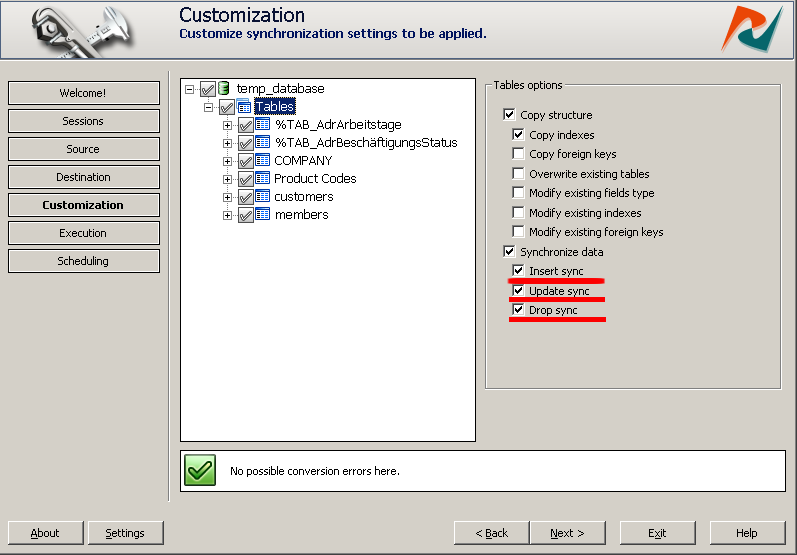
Requirement: every synchronized table must have a primary key, or a unique (non-composite) index. Without one, a sync run cannot tell which rows are the same on both sides. For FoxPro / DBF source tables that have no primary key, mark the unique index yourself: select the table on the Customization stage and tick the unique checkbox on the index that holds unique values, otherwise the sync fails to match rows.
Insert / Update / Drop / Mixed sync
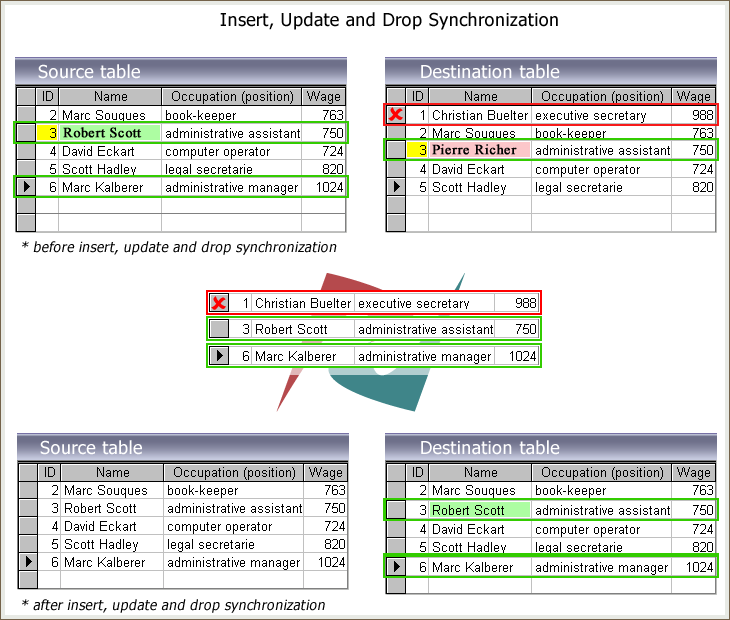
The three sync types can be enabled independently or combined. Each handles one kind of change.
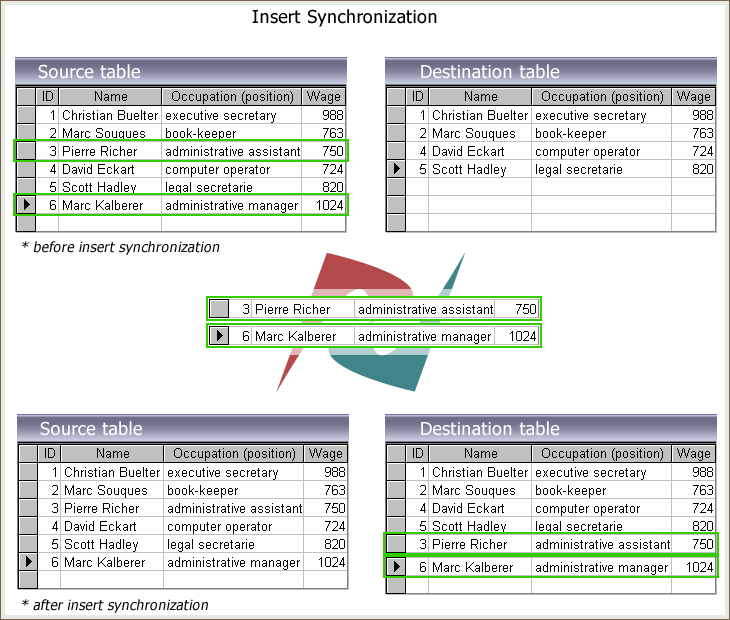
Insert sync
New rows in the source - rows whose primary-key value does not yet exist in the target - are inserted on the target.
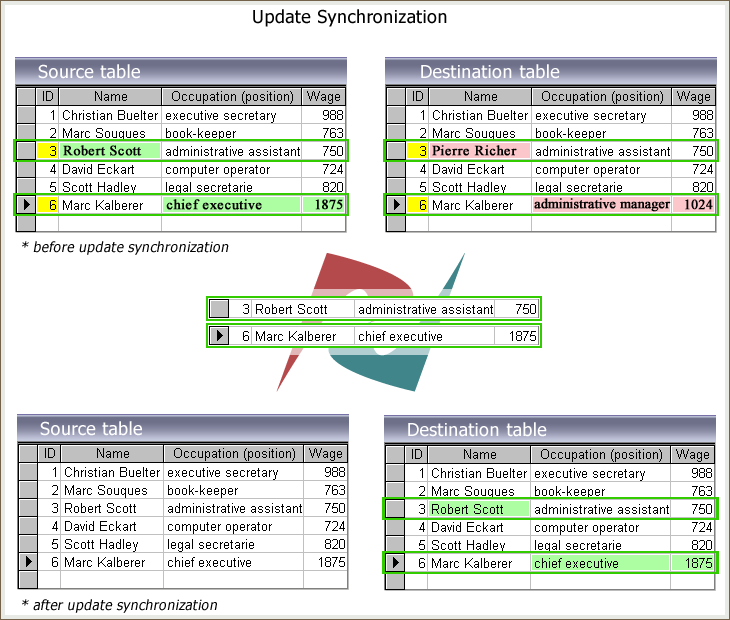
Update sync
For rows that exist on both sides with the same primary key, the values are compared and the target-side row is replaced when the source row has changed.
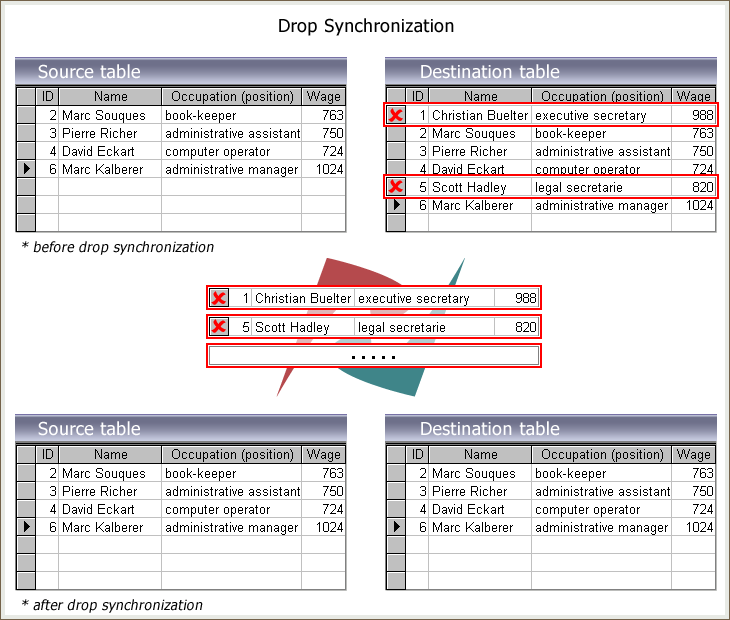
Drop sync
Rows that no longer exist in the source are deleted from the target. Use with care - this lets the sync delete target rows.
Mixed sync
Enable Insert, Update, and Drop together to keep the target a complete mirror of the source - new rows appear, changed rows are updated, deleted rows are removed.
Bidirectional synchronization
One-way sync moves data from a primary database to a secondary; changes on the secondary do not flow back. Bidirectional sync replicates changes in both directions, so both databases stay identical even when each receives independent writes.

Requirements
- Back up both databases before the first bidirectional run.
- Bidirectional sync requires triggers. Enable Bidirectional sync at the customization stage - Trigger-based sync is then enabled automatically.
- Do not change the system clock manually on either server. Change timestamps from the history table decide which side holds the most recent value. If the clock was changed, clear the history tables and re-add triggers.
Supported direction pairs
- Oracle and MySQL
- Oracle and SQL Server
- MySQL and SQL Server
- SQL Server and PostgreSQL
- MySQL and PostgreSQL
- Oracle and PostgreSQL
How it works
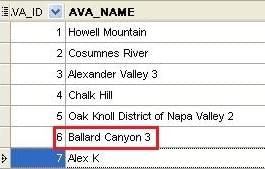
Two tables start with the same data. Row #6 changes on each side independently; row #7 also changes on both sides, but the changes on side #2 happen first.
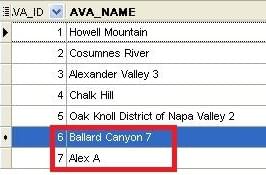
After a bidirectional sync run, both tables hold the most recent value for each row, decided by the change timestamp. Row #6's later change wins; row #7's later change wins on the opposite side.
One-way vs bidirectional
One-way sync is for replicas: reporting copies, offline backups, feeding data into a downstream system. Writes on the secondary are ignored.

Bidirectional sync is for active-active setups: multi-region deployments, branch offices, multi-master scenarios where both databases accept writes.
FoxPro / DBF note: all FoxPro-related products support one-way synchronization only - there is no bidirectional option when FoxPro is one side of the sync.
Both modes use the same sync types (Insert / Update / Drop) under the hood - bidirectional sync simply applies them in both directions and resolves order by timestamp.
For continuous, near real-time replication, see trigger-based synchronization.