MySQL errors and timeouts
Errors raised by MySQL during a DBConvert run, with the fix for each.
Last updated November 24, 2026
This page collects the MySQL-side errors that most often surface in a DBConvert run, together with the fix for each.
- Error 1062: Duplicate entry for key
- Error 1005: Can't create table
- Error 2003: Can't connect to server
- Error 2013: Lost connection during query
- Query timeout expired
Error 1062: Duplicate entry for key
Raised when a sync tries to insert a row whose primary or unique key already exists on the target side.
Fix:
- Every synchronizing table must declare at least one unique or primary key field. Without a unique key, the synchronizer cannot tell which rows are new and which already exist.
Error 1005: Can't create table
MySQL refuses to create a target table whose definition is inconsistent with an existing referenced table.
Common causes:
- The referenced table is not InnoDB. Foreign keys require InnoDB on both sides.
- The referenced field is not unique.
- The referenced field has a different type from the referring field.
On MySQL versions older than 5.0, the same error also means that no index is declared on the referenced field.
Error 1071: Specified key was too long
MySQL limits how many bytes an index key may use. An index on a long VARCHAR column can exceed that limit, especially with multi-byte character sets (utf8, utf8mb4), producing "max key length is 767 bytes" (or 255/3072 depending on version and row format).
Fix: on Tables & mapping, shorten the indexed column length or change the target character set, or drop the oversized index on the target. See Field, index, and foreign-key options.
Error 1406: Data too long for column
A source value is longer than the target column can hold - common when a wide type such as SQL Server varbinary(MAX) or a large text field is mapped to a smaller MySQL type.
Fix: map the target column to a larger type (for example LONGBLOB or LONGTEXT) using data-type mapping before running. See Type mapping for every such column, or Field options for one.
Error 2003: Can't connect to server
MySQL is unreachable from the machine running DBConvert. The error normally points at one of three things:
- The MySQL user has no privileges to connect from this host. Have the DBA grant access for the source machine's IP, or create a user with
'%'as host. - A firewall on either side is dropping the connection on port 3306. Open the port (or use SSH tunneling).
- The MySQL server itself is not listening on the expected interface. See Connect MySQL / MariaDB.
Error 2013: Lost connection during query
MySQL closed the connection while DBConvert was still reading or writing a large table. This is typically a server-side timeout, not a network issue.
Fix: ask the DBA to raise wait_timeout and net_read_timeout on the server.
Query timeout expired
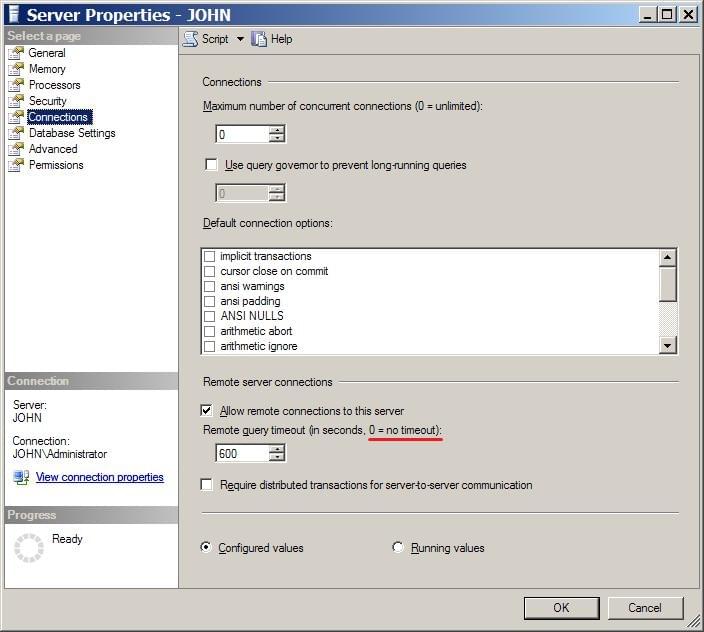
Long-running cross-engine migrations that involve SQL Server can hit "Query timeout expired" when SQL Server cancels a remote query.
Fix: set Remote query timeout on the SQL Server side to 0 (unlimited). The default is 600 seconds, which is often too low for a full table copy.
Characters lost: emoji and 4-byte symbols
Emoji and other 4-byte Unicode characters arrive empty or mangled when the target column uses plain utf8, which in MySQL only stores up to 3 bytes per character.
Fix: on Tables & mapping, set Charset to utf8mb4 in MySQL table options. See Set options for all selected tables.