Connect Supabase
Which Supabase endpoint a desktop tool can actually reach, and what the failures look like when it cannot.
Last updated August 19, 2026
Supabase is a standard PostgreSQL database with auth, realtime, storage and generated APIs built around it, so DBConvert connects to it as it would to any Postgres server. The catch is not the protocol - it is that Supabase offers three different endpoints and the one the dashboard shows first is the one least likely to work from a desktop machine. For the generic workflow, see Source and destination connections.
- Which endpoint to use
- Get the database password
- Connection fields
- The two errors you will hit
- Connection limits on small projects
- Backups on the Free plan
- SSL
- Coming from Lovable Cloud
- What was tested
Which endpoint to use
Open Connect in the top bar of your project and pick the Direct connection string tab. It offers three connection methods, and they are not interchangeable:
| Method | Host | Port | Username | Network |
|---|---|---|---|---|
| Direct connection | db.<ref>.supabase.co | 5432 | postgres | IPv6 by default; IPv4 is a paid add-on |
| Transaction pooler | aws-1-<region>.pooler.supabase.com | 6543 | postgres.<ref> | IPv6 by default; IPv4 is a paid add-on |
| Session pooler | aws-1-<region>.pooler.supabase.com | 5432 | postgres.<ref> | IPv4 proxied at no charge |
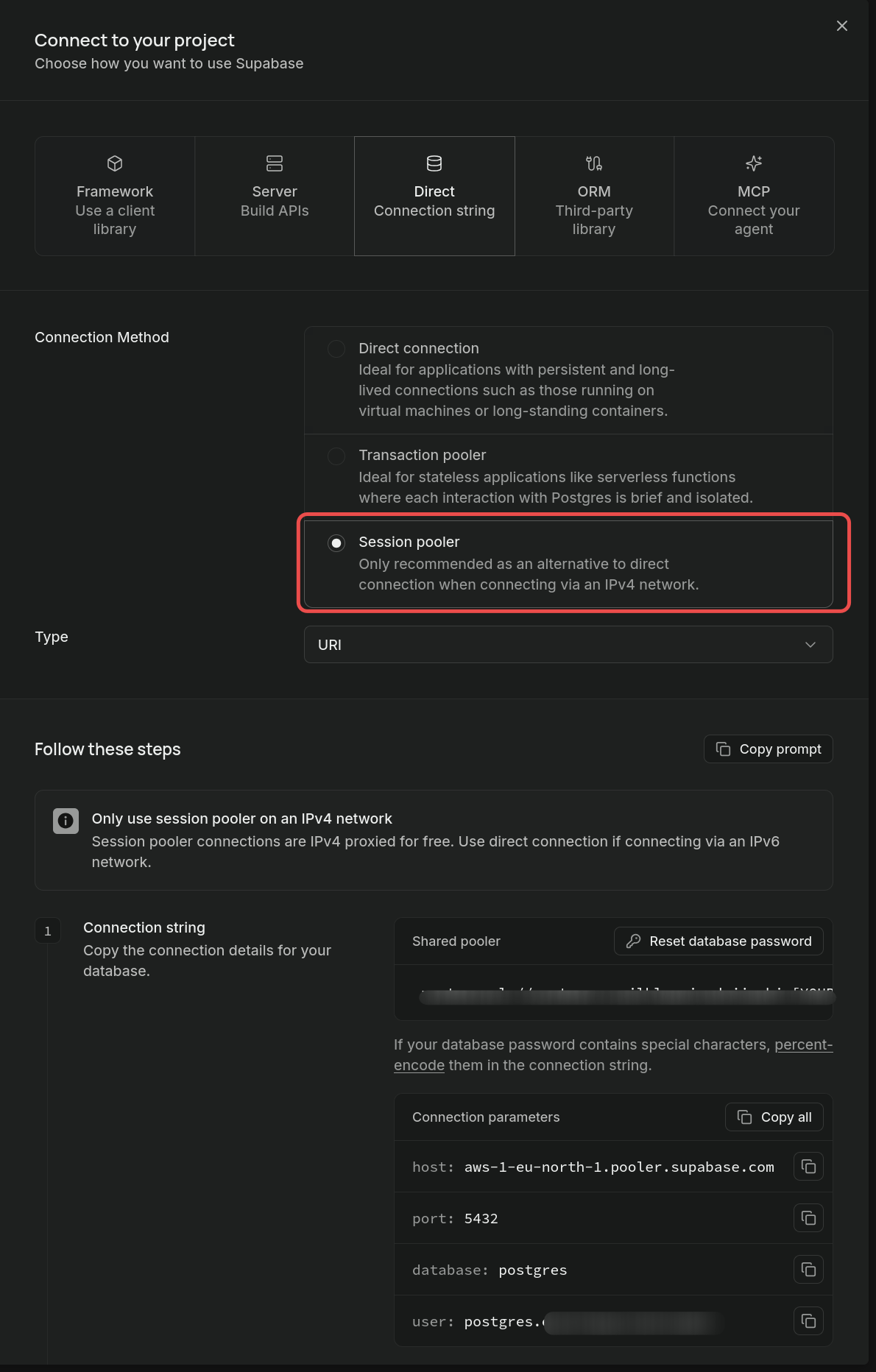
Supabase spells the rule out on that panel: "Session pooler connections are IPv4 proxied for free. Use direct connection if connecting via an IPv6 network."
Use the session pooler unless your network has IPv6. All three endpoints resolve to IPv6 by default, and only the session pooler is proxied over IPv4 for free - Supabase sells a dedicated IPv4 address as an add-on for the other two. Most Windows desktops on an office or home connection have no IPv6 route, which makes the session pooler the only endpoint that answers.
Note the username. The pooler identifies your project from the user name, so it must be postgres.<ref>, where <ref> is the project reference from the host name (also shown as Project ID in Project Settings). Plain postgres only works on the direct host.
Get the database password
Supabase shows the database password once, when the project is created, and never again. From the docs page in the dashboard: "The database password isn't viewable after creation. Resetting it will break any existing connections."
If you do not have it, reset it - the button sits in the Connect dialog next to the connection string, and again under Database → Settings → Database password. Two things to know before you click:
- The reset invalidates the old password, so anything already connected with it stops working. On a project that is serving an application, plan for that.
- The new password is displayed only until you reload the page - the dialog labels it "New password shown until refresh". Copy it immediately, or you will be resetting it again.
Connection fields
For the session pooler, fill in the DBConvert connection form like this:
| Field | Value |
|---|---|
| Hostname | aws-1-<region>.pooler.supabase.com - copy it from the Connect dialog |
| Port | 5432 |
| Username | postgres.<ref> - with the project reference, not plain postgres |
| Password | The database password, not an API key or a service role key |
| Database | postgres |
| Schema | public |
Click Test connection before going further. A correct session pooler setup reports Connection successful.
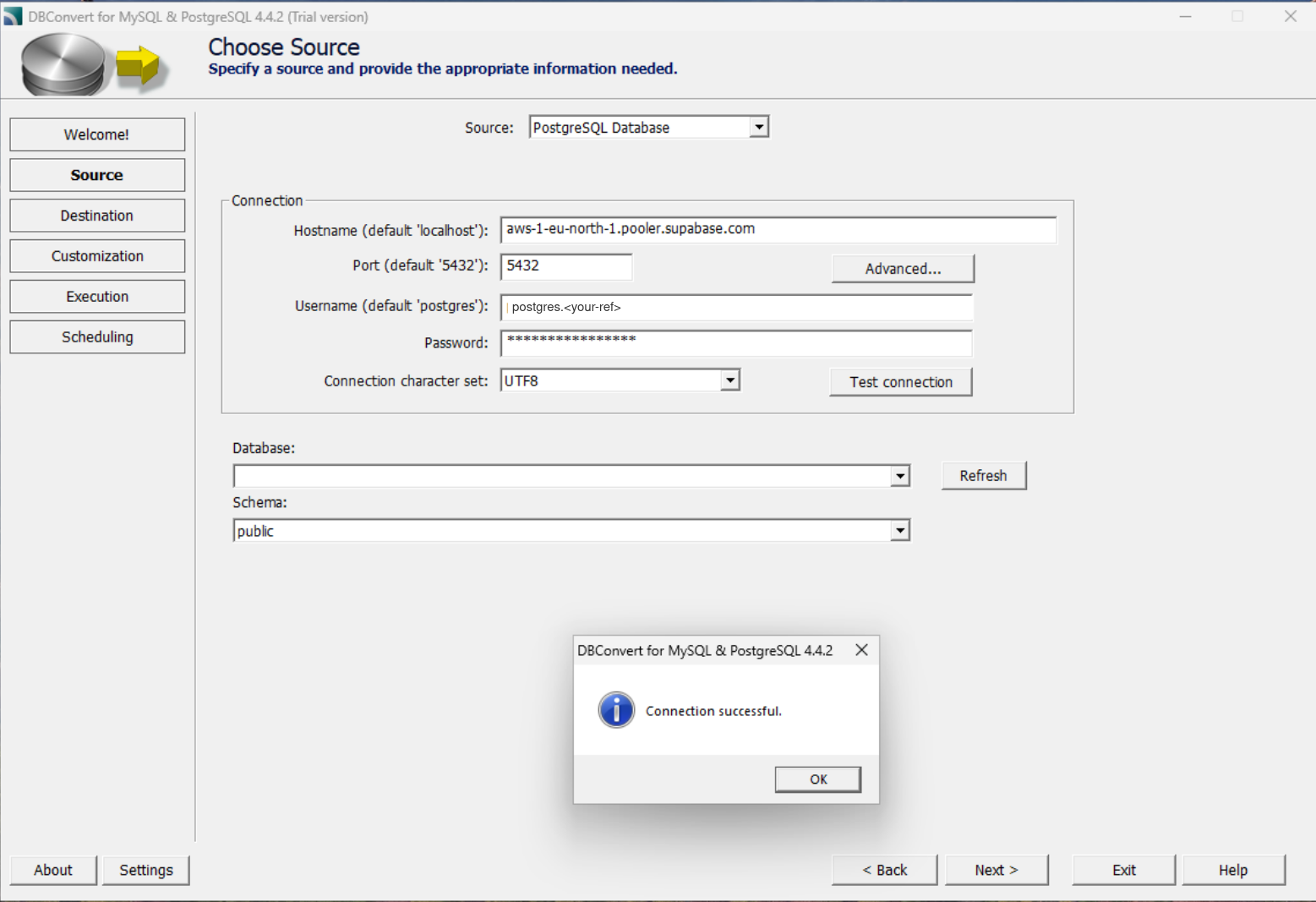
The two errors you will hit
Connection timed out
could not connect to server: Connection timed out (0x0000274C/10060)
Is the server running on host "db.<ref>.supabase.co"
(2a05:...) and accepting TCP/IP connections on port 5432?
This is the direct host on a network without IPv6. The address in brackets is the giveaway: it is an IPv6 address, because that is the only kind the direct host publishes. Nothing is wrong with the server, the firewall or the password - there is simply no route to that address from your machine, so the connection attempt runs to timeout.
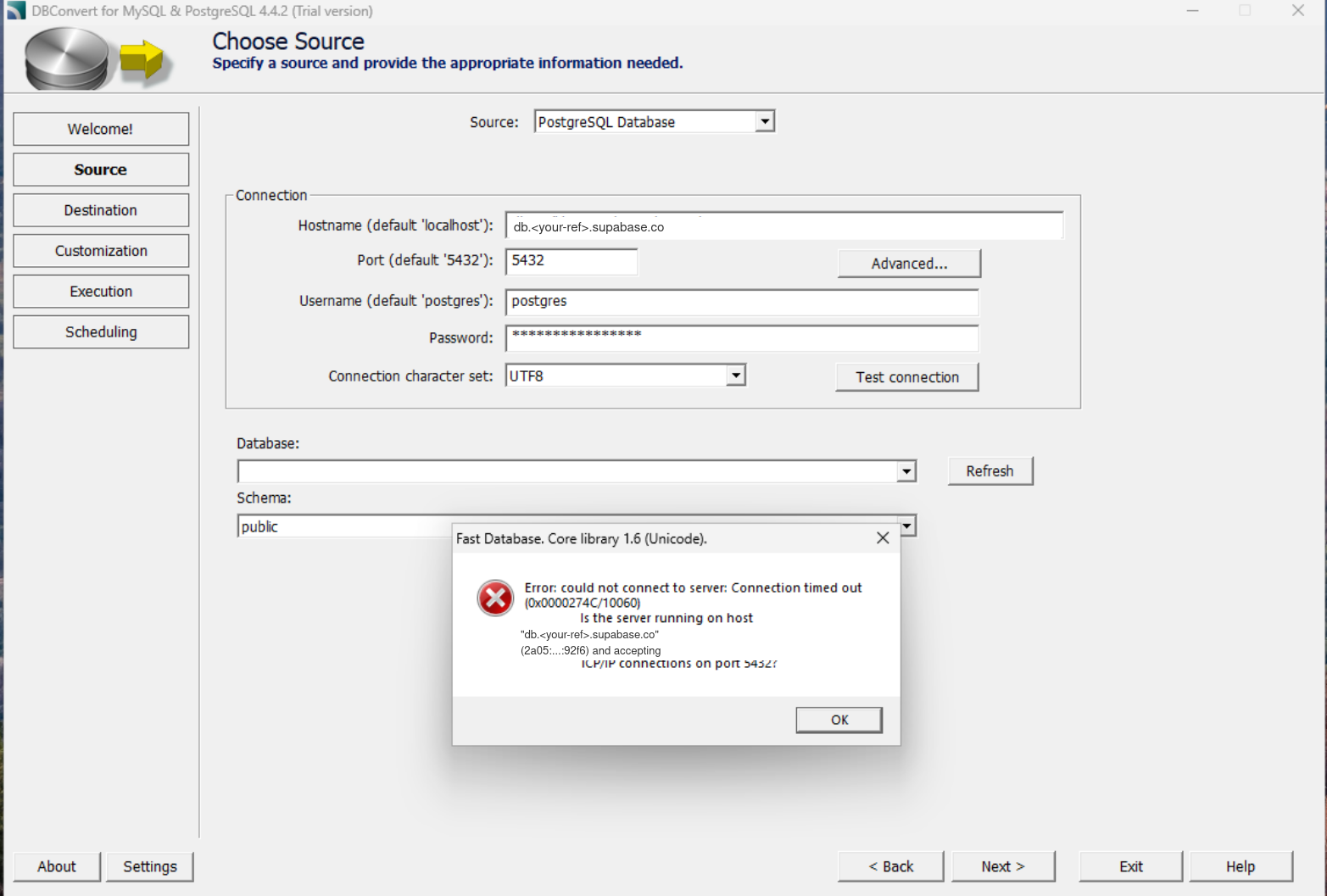
Switch to the session pooler host and remember to change the username as well.
No tenant identifier provided
FATAL: (ENOIDENTIFIER) no tenant identifier provided
(external_id or sni_hostname required)
This is the pooler host with the username left as plain postgres. The pooler works out which project you mean from the user name, and without the .<ref> suffix it has nothing to go on. Change the username to postgres.<ref>; the host, port and password stay as they are.
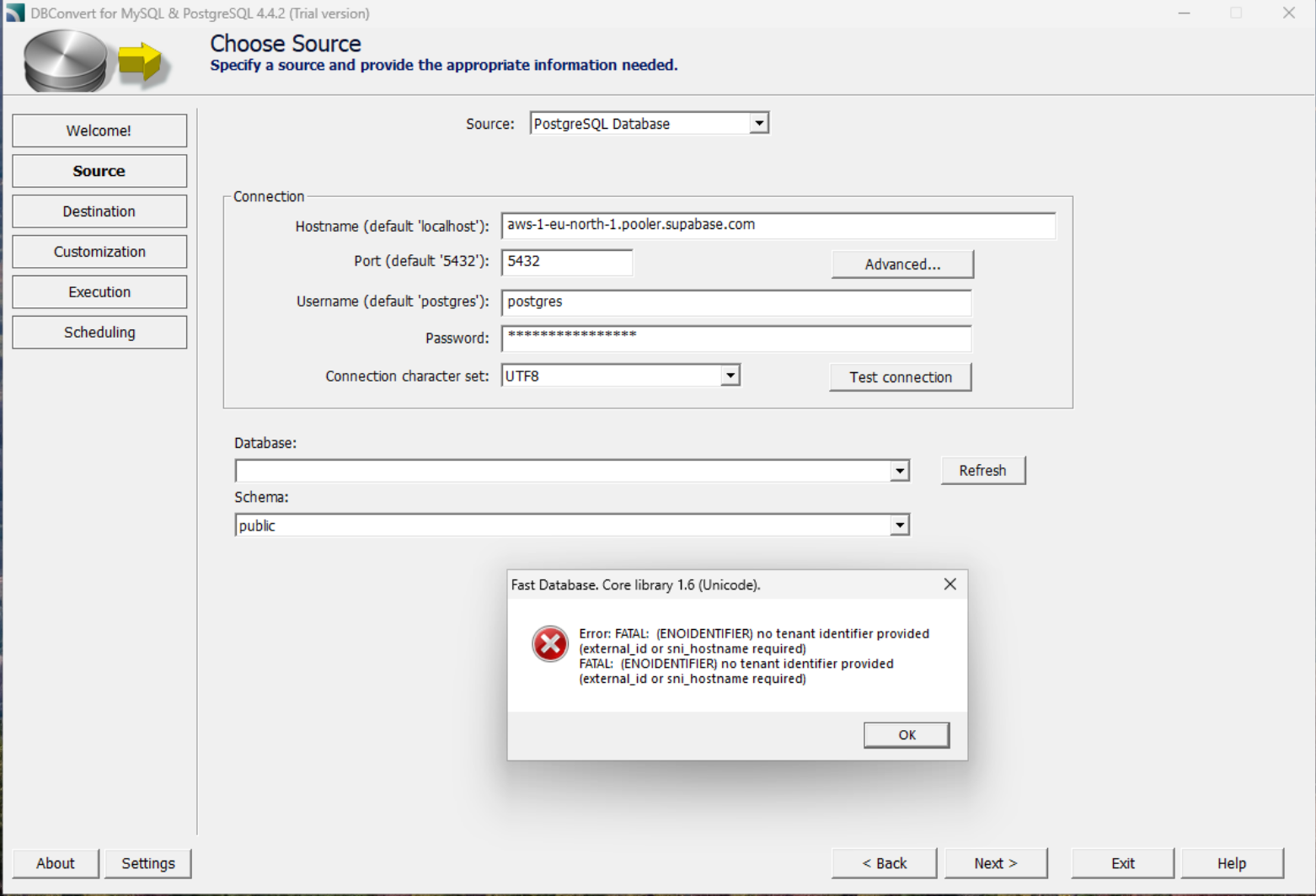
It is the natural mistake to make, because the Direct connection tab shows the username as plain postgres and only the pooler tabs show the longer form.
Password authentication failed for user "postgres"
failed SASL auth: FATAL: password authentication failed
for user "postgres" (SQLSTATE 28P01)
Read this one carefully, because it names the wrong culprit. You typed postgres.<ref>, but the pooler strips the project reference out of the username and authenticates against Postgres as plain postgres - so the name in the message says nothing about what you entered. The password is what is wrong.
Almost always it is a password that has since been reset: any reset takes effect immediately and invalidates the one saved in your tool. Copy the connection string again with the Copy button rather than selecting it by eye - the field is visually truncated, so a hand-copied password loses its tail. And if the password contains @ : / ? # [ ] %, either percent-encode it in the URI or skip the URI and fill the fields in by hand.
Reaching this error is progress, incidentally: it means the host resolved, the network reached it and the server answered. Only the credentials failed.
Connection limits on small projects
Under Database → Settings → Connection pooling, a project on the smallest compute size (Nano, which is what the Free plan gives you) defaults to a pool size of 15 connections, with max client connections fixed at 200. Both scale with compute size; the pool size is editable, the client limit is not.
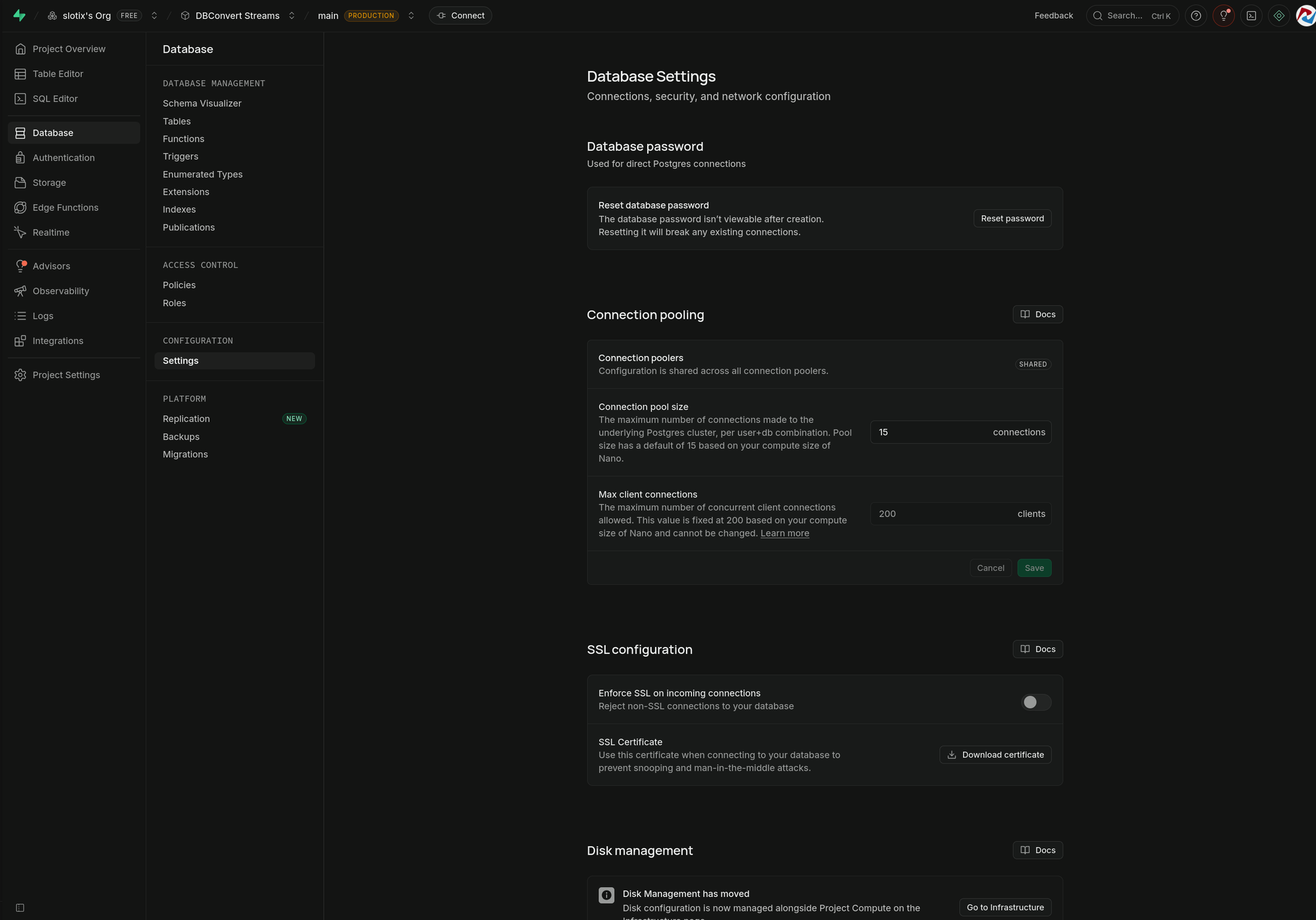
This matters because DBConvert can process large tables in parallel, opening more than one connection at a time. On a Nano project the pool is shallow, so if a large job behaves oddly, lower the parallelism before looking anywhere else.
SSL
Under Database → Settings → SSL configuration, Enforce SSL on incoming connections is off by default, so a plain connection is accepted. For anything holding real data, turn it on and download the certificate from the same panel - see Secure connections for where the certificate goes.
Backups on the Free plan
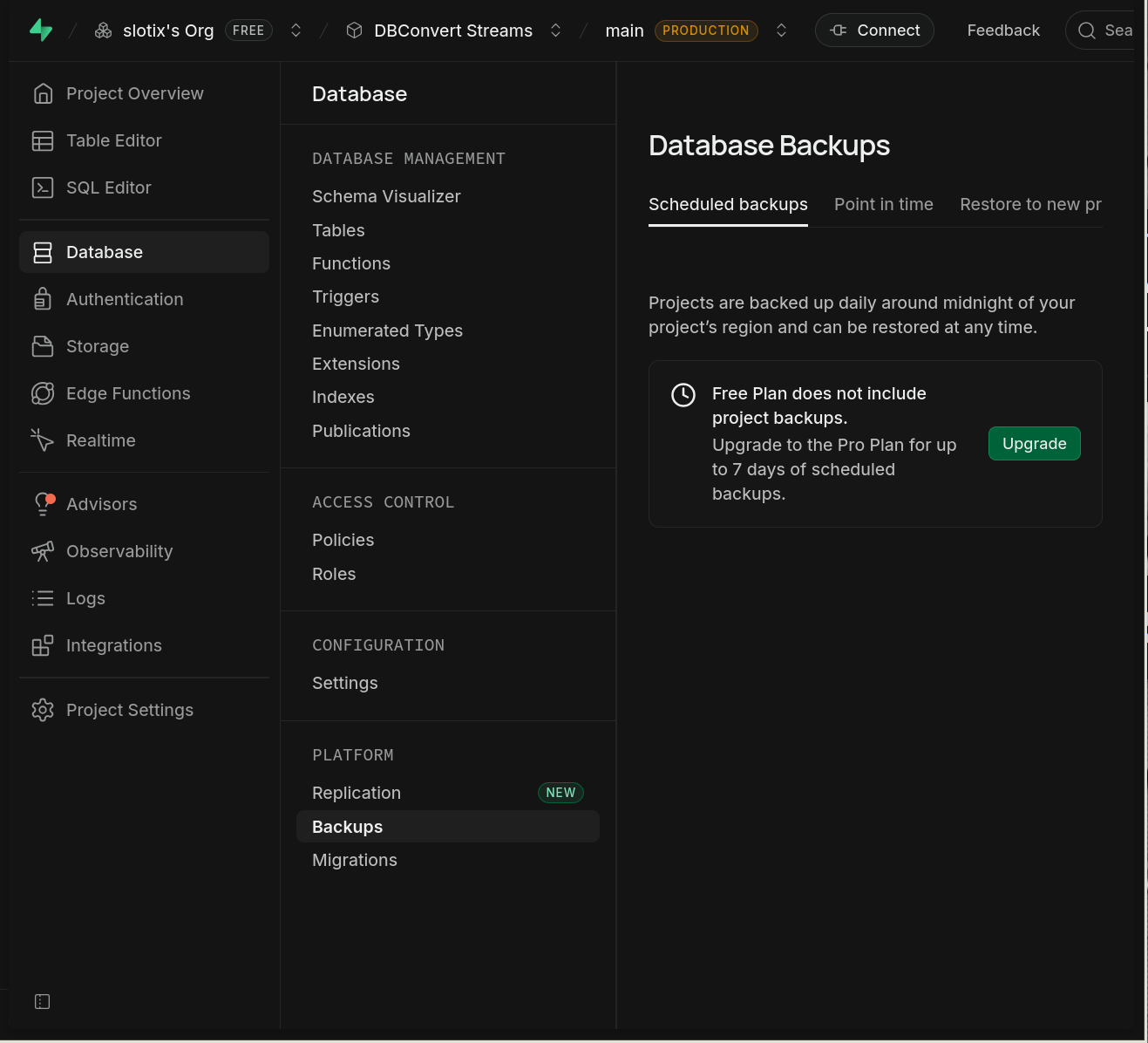
Worth knowing before you rely on the platform to keep a copy for you: under Database → Backups, a Free project says "Free Plan does not include project backups". Paid plans get 7, 14 or 30 days of daily backups depending on tier, and those restore into a project through the dashboard rather than downloading to you.
Copying the data into a database you run yourself is the part DBConvert covers - see Supabase migration and export tools.
Coming from Lovable Cloud
Export your data before you remove Lovable Cloud.
Removing it deletes the instance permanently - Lovable's own documentation says to export first, and there is no undo.
Lovable Cloud is built on Supabase, but it is a managed layer on top: it does not hand external tools a Postgres connection string, so there is nothing for DBConvert to connect to. Move the project onto a Supabase project of your own first, following Lovable's documented path. From that point it is an ordinary Postgres database and everything on this page applies - including the export to MySQL, SQL Server or Oracle that neither Lovable nor Supabase offers.
What was tested
Measured against a live Supabase project in August 2026 - Free plan, region eu-north-1, compute size Nano - using DBConvert for MySQL & PostgreSQL 4.4.2. Host, port and password were identical in all three runs; only the endpoint and username changed:
| Host | Username | Result |
|---|---|---|
db.<ref>.supabase.co:5432 | postgres | Connection timed out (10060), IPv6 address in the message |
aws-1-<region>.pooler.supabase.com:5432 | postgres | FATAL: (ENOIDENTIFIER) no tenant identifier provided |
aws-1-<region>.pooler.supabase.com:5432 | postgres.<ref> | Connection successful |
The transaction pooler on port 6543 was not tested. It is IPv6 by default like the direct host, so the same timeout is expected on an IPv4-only network.