Connect Databricks Lakebase
Connection setup for Databricks Lakebase, and what the platform allows once you are connected.
Last updated September 12, 2026
Lakebase is the managed PostgreSQL that runs inside a Databricks workspace. It speaks the standard PostgreSQL protocol, so DBConvert connects to it as it would to any Postgres server - after one setup step that is specific to Databricks. For the generic workflow, see Source and destination connections.
- Enable a native Postgres role
- Connection fields
- If the connection fails with SQLSTATE 28P01
- What Lakebase allows
- What was tested
Enable a native Postgres role
A new Lakebase project accepts Databricks OAuth identities only. Those tokens expire after one hour, so they cannot drive a stored connection or a scheduled job. DBConvert needs a role with a password.
- Open the Lakebase project in the Databricks workspace and click Settings in the left sidebar, under PROJECT.
- Scroll to Database connections and tick Password (Native postgres roles).
- Click Save, then Allow in the confirmation dialog.
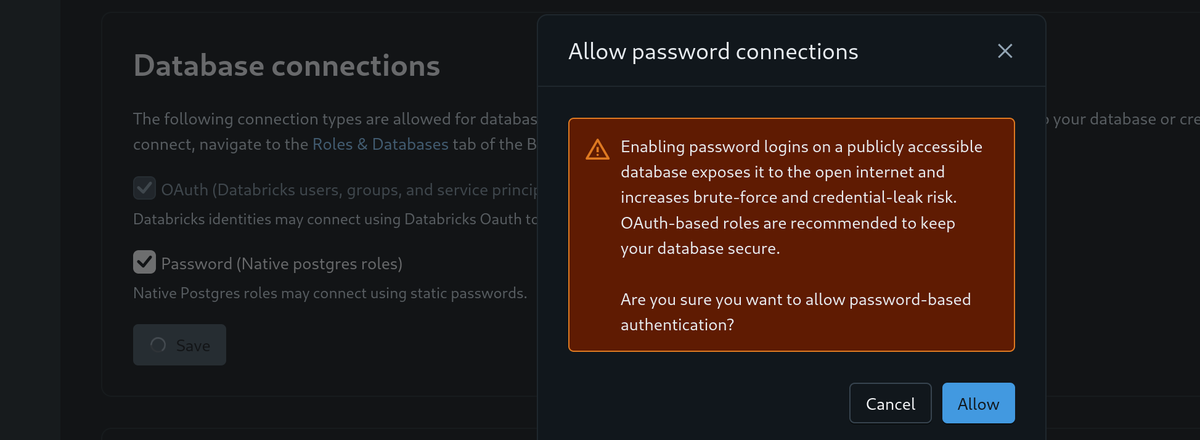
Databricks warns that password logins widen the attack surface on a publicly reachable database and recommends OAuth instead. If your security policy forbids enabling this, no external tool can connect to that project at all.
Then create the role. Open the branch and switch to the Roles & Databases tab.
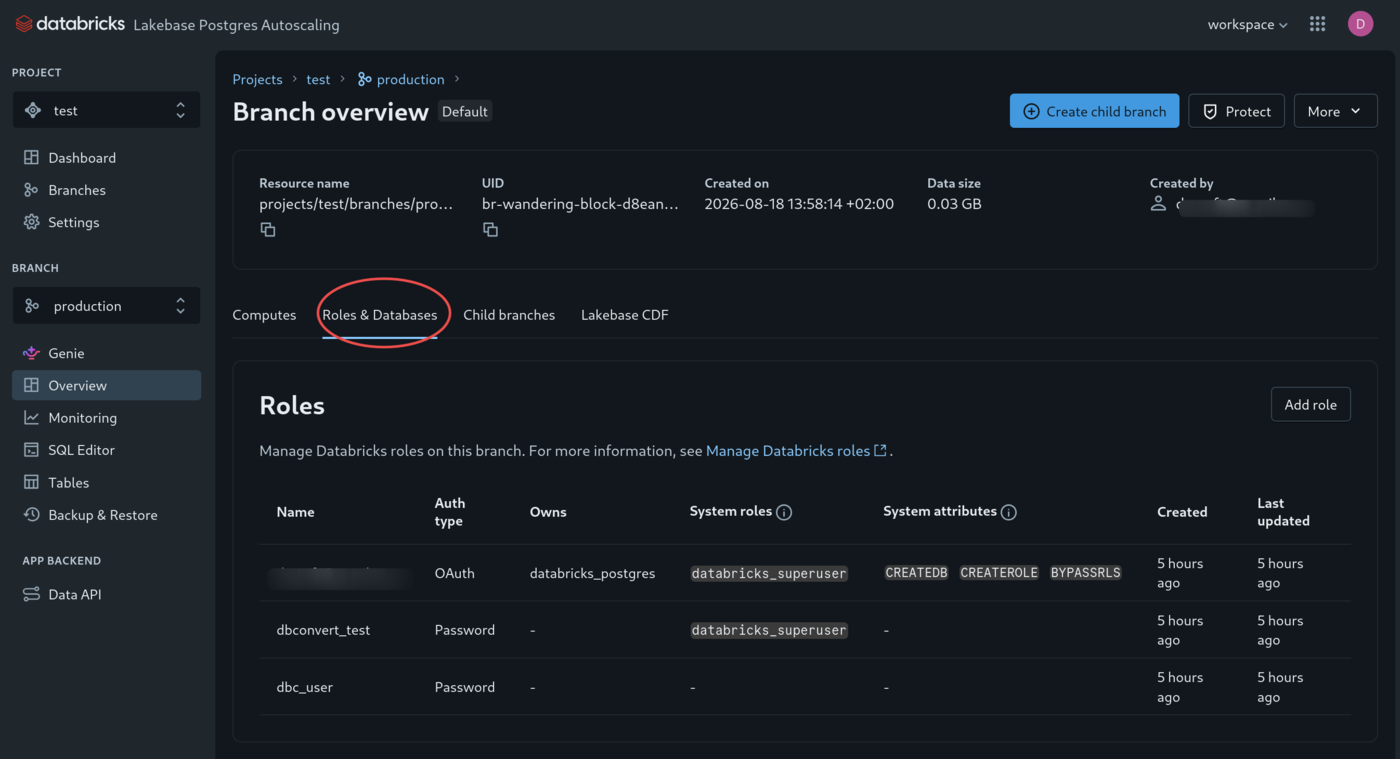
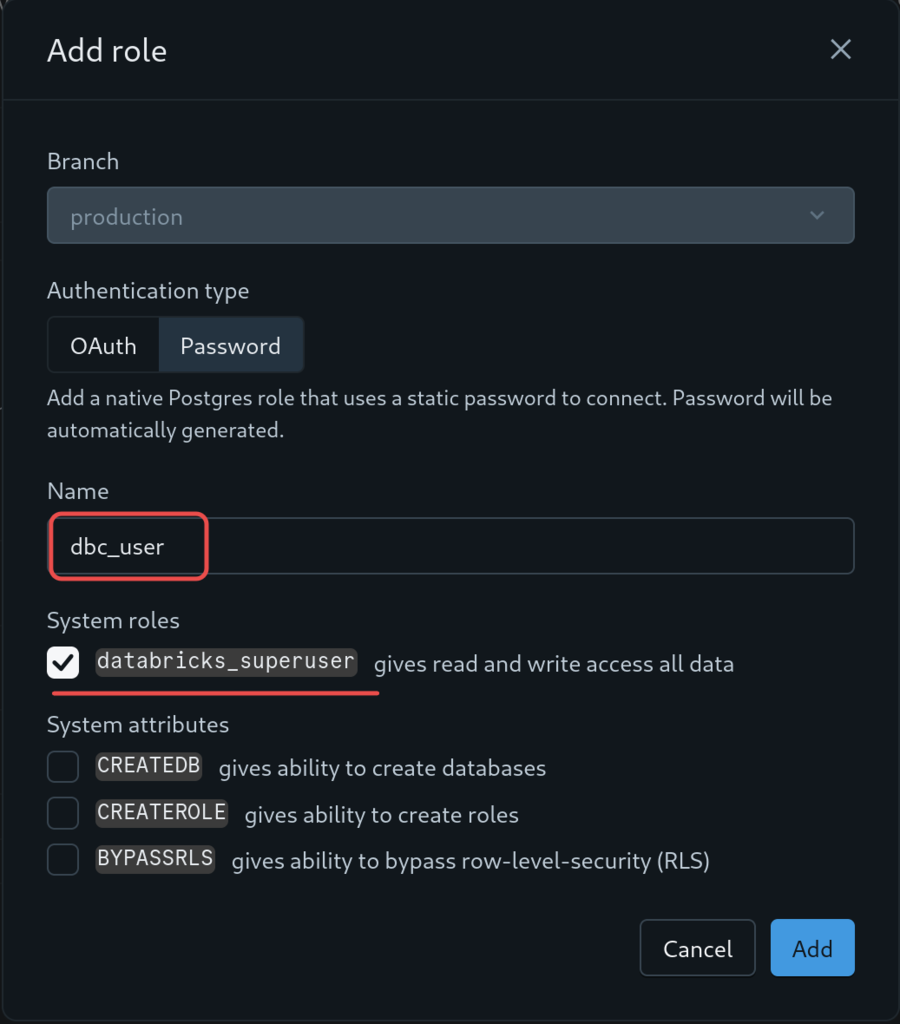
Click Add role:
- Set Authentication type to Password. Databricks generates the password.
- Enter a name. Watch for a leading space - the name is taken exactly as typed.
- Tick databricks_superuser so the role can read, write and create tables.
- Click Add and copy the generated password.
A role created with SQL instead starts with no privileges of its own, and PostgreSQL 15 and later no longer grant CREATE on schema public - see Role and privileges for what that breaks and why. Grant it explicitly:
CREATE ROLE dbc_user LOGIN PASSWORD 'a-long-random-password';
GRANT CREATE, USAGE ON SCHEMA public TO dbc_user;
Connection fields
Open Connect on the project dashboard, set Role to the password role, and leave connection pooling off. The dialog shows the values below.
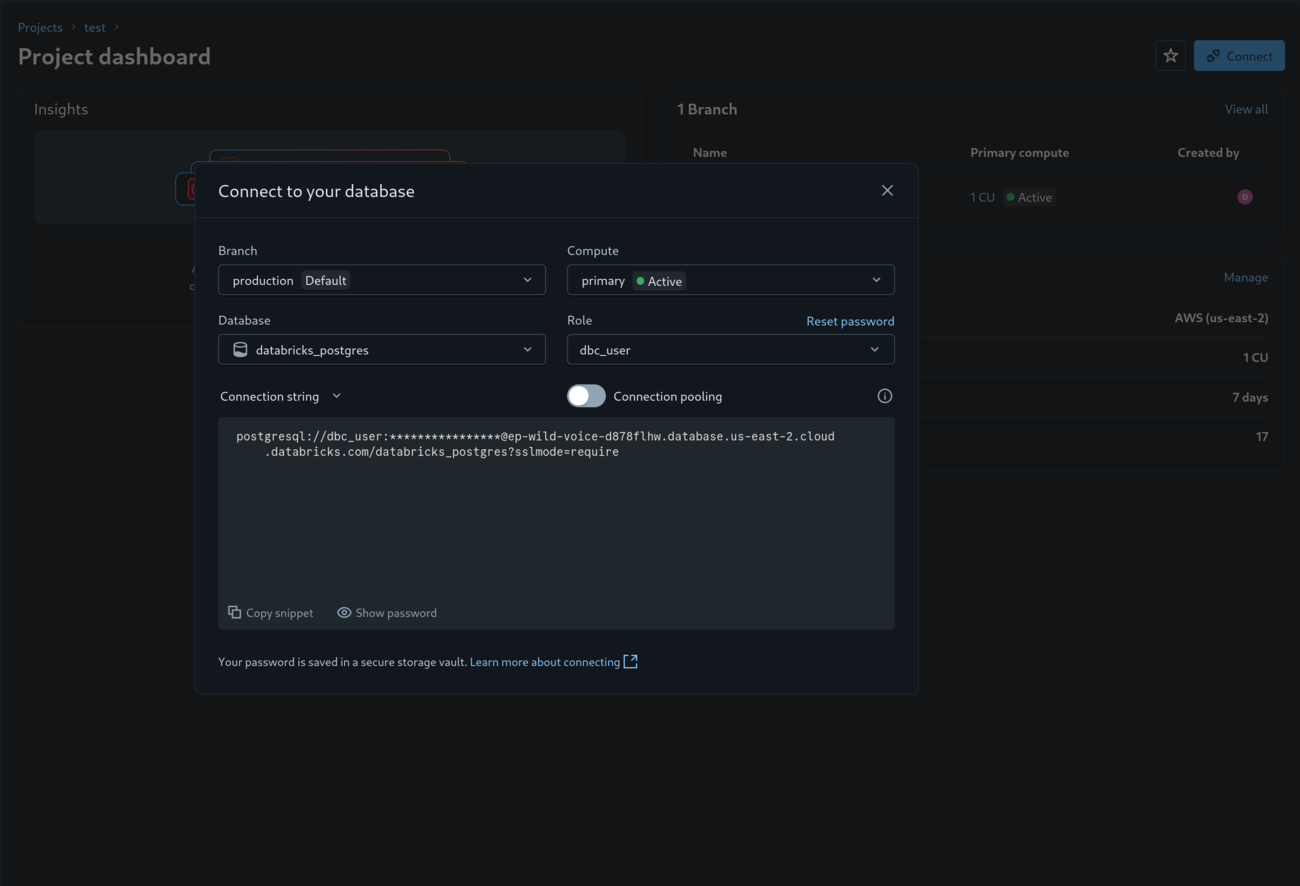
| Field | Value |
|---|---|
| Host | ep-name-id.database.region.cloud.databricks.com |
| Port | 5432 |
| Database | databricks_postgres on a new project |
| User | The native Postgres role, not your Databricks identity |
| Password | The one generated when the role was created |
| SSL | Required - Lakebase refuses unencrypted connections |
If the connection fails with SQLSTATE 28P01
ERROR: Provided authentication token is not a valid JWT encoding (SQLSTATE 28P01)The Connect dialog was left on your Databricks identity, so the connection string it produced expects an OAuth token where the password goes. Reopen the dialog, set Role to the password role, and copy the string again.
What Lakebase allows
| Operation | Supported |
|---|---|
| Copy data into Lakebase | Yes |
| Copy data out of Lakebase | Yes |
| Trigger-based synchronization | Yes - triggers and PL/pgSQL are available |
| Logical replication out of Lakebase | No - blocked by Databricks |
The last row is the one that surprises people. Everything the server reports suggests logical replication should work: wal_level is logical, replication slots are free, and a slot can be created. The publication that logical decoding needs is refused:
CREATE PUBLICATION dbc_pub FOR ALL TABLES;
ERROR: [Databricks Auth] Feature not supported by Databricks. (SQLSTATE 0A000)
0A000 is feature_not_supported, not a privilege error, and the [Databricks Auth] prefix places the refusal in the Databricks proxy rather than in PostgreSQL. No GRANT lifts it, and Databricks has listed logical replication as unavailable since Lakebase shipped.
This is why ongoing synchronization with Lakebase is trigger-based: trigger-based synchronization records changes in a history_store table and never reads the replication log, so the restriction does not apply to it.
What was tested
The behaviour above was measured against a live Lakebase database in August 2026, not taken from documentation:
| Checked | Result |
|---|---|
SELECT current_setting('wal_level') | logical |
pg_create_logical_replication_slot(...) | succeeds |
CREATE PUBLICATION ... | fails, SQLSTATE 0A000 |
CREATE TRIGGER on insert, update and delete | all three fire and record to the history table |
| PL/pgSQL | installed |
PostgreSQL version reported by the tested instance: 17.10.