MySQL errors and timeouts
Errors raised by MySQL during a DBConvert or DBSync run, with the fix for each.
This page collects the MySQL-side errors that most often surface in a DBConvert or DBSync run, together with the fix for each. For trial-only errors, see DBConvert trial limitations.
- Error 1062: Duplicate entry for key
- Error 1005: Can't create table
- Error 2003: Can't connect to server
- Error 2013: Lost connection during query
- Query timeout expired
- Out of memory for query result
Error 1062: Duplicate entry for key
Raised when DBSync tries to insert a row whose primary or unique key already exists on the target side.
Fix:
- In DBSync (or DBConvert Studio in synchronization mode), enable both Insert sync and Update sync for every table that participates in the run.
- Every synchronizing table must declare at least one unique or primary key field. Without a unique key, the synchronizer cannot tell which rows are new and which already exist.
Error 1005: Can't create table
MySQL refuses to create a target table whose definition is inconsistent with an existing referenced table.
Common causes:
- The referenced table is not InnoDB. Foreign keys require InnoDB on both sides.
- The referenced field is not unique.
- The referenced field has a different type from the referring field.
On MySQL versions older than 5.0, the same error also means that no index is declared on the referenced field.
Error 1071: Specified key was too long
MySQL limits how many bytes an index key may use. An index on a long VARCHAR column can exceed that limit, especially with multi-byte character sets (utf8, utf8mb4), producing "max key length is 767 bytes" (or 255/3072 depending on version and row format).
Fix: on the Customization stage, shorten the indexed column length or change the target character set, or drop the oversized index on the target. See Field, index, and foreign-key options.
Error 1406: Data too long for column
A source value is longer than the target column can hold - common when a wide type such as SQL Server varbinary(MAX) or a large text field is mapped to a smaller MySQL type.
Fix: map the target column to a larger type (for example LONGBLOB or LONGTEXT) using data-type mapping before running. See Global data-type mapping.
Error 2003: Can't connect to server
MySQL is unreachable from the machine running DBConvert. The error normally points at one of three things:
- The MySQL user has no privileges to connect from this host. Have the DBA grant access for the source machine's IP, or create a user with
'%'as host. - A firewall on either side is dropping the connection on port 3306. Open the port (or use SSH tunneling).
- The MySQL server itself is not listening on the expected interface. See Connect MySQL / MariaDB.
Error 2013: Lost connection during query
MySQL closed the connection while DBConvert was still reading or writing a large table. This is typically a server-side timeout, not a network issue.
Fix:
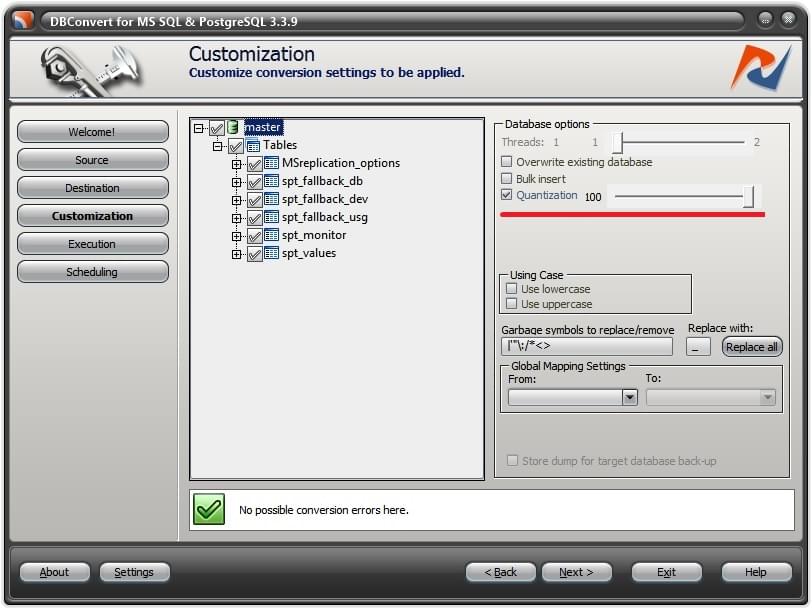
- Enable Quantization at the customization stage so the transfer is split into smaller batches instead of one long-running query.
- Set the Quantization slider to 100 or lower and rerun. Reduce further if the error still occurs.
- If the error persists, ask the DBA to raise
wait_timeoutandnet_read_timeouton the server.
Query timeout expired
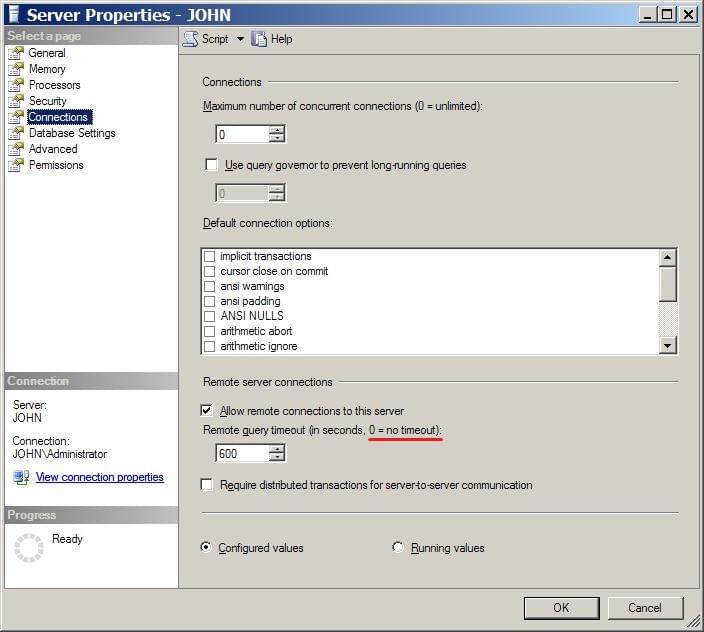
Long-running cross-engine migrations that involve SQL Server can hit "Query timeout expired" when SQL Server cancels a remote query.
Fix: set Remote query timeout on the SQL Server side to 0 (unlimited). The default is 600 seconds, which is often too low for a full table copy.
Out of memory for query result
The source returned more rows than DBConvert can hold in memory in a single pass. Usually visible in the execution-stage log on large source tables.
Fix: enable Quantization at the customization stage and set the slider to 100 or lower. The application then reads the source in portions instead of materializing the full result set.
Rows missing after conversion (Bulk insert)
Bulk insert is enabled by default and transfers data in portions of 100 records. If one record in a portion is rejected by the target (for example a value that violates a constraint or does not fit the column), the whole portion of 100 can fail to insert, so it looks like blocks of rows are missing.
Fix: turn Bulk insert off (database options) and run again. Without it, rows are inserted individually, so only the genuinely bad row fails and the execution log points you at the exact record and reason. Re-enable Bulk insert once the offending data is corrected. See Quantization and Bulk insert.
Characters lost: emoji and 4-byte symbols
Emoji and other 4-byte Unicode characters arrive empty or mangled when the target column uses plain utf8, which in MySQL only stores up to 3 bytes per character.
Fix: on the Customization stage, set the character set to utf8mb4 - per table by clicking the table in the tree, or for every table via the all-tables defaults. See All-tables defaults.