Google Cloud SQL Migration Tools

Move schema and data between Cloud SQL and on-premises or cloud databases. Choose the pair tool that matches the MySQL, PostgreSQL, or SQL Server engine in the Cloud SQL instance.

Choose the migration approach

Keep the current engine for a hosting move, or convert the schema while re-platforming.

Same-engine migration

Use the same connector family on both sides when moving an existing database into or out of Cloud SQL without changing its SQL dialect.

Existing databaseCloud SQL target
MySQLCloud SQL for MySQL
PostgreSQLCloud SQL for PostgreSQL
SQL ServerCloud SQL for SQL Server

Even on a same-engine move, compare server versions, collations, extensions, authentication, and managed-service restrictions.

Prepare the Cloud SQL connection

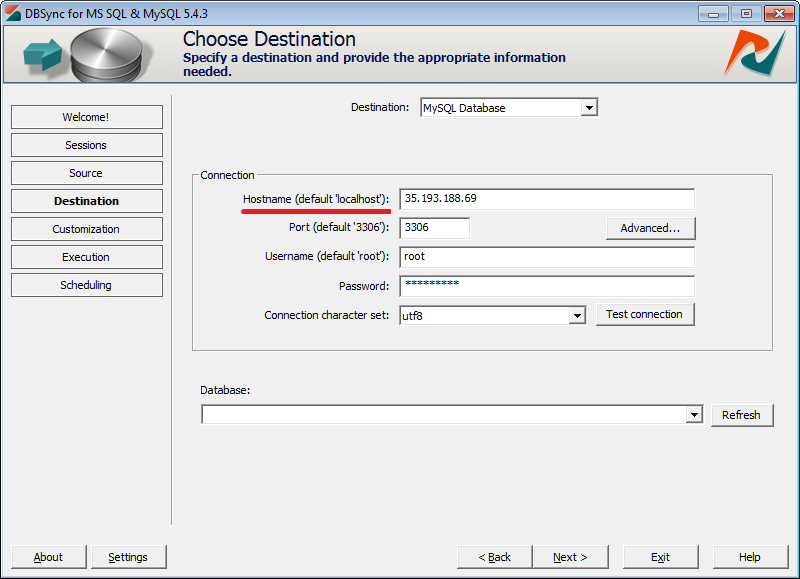
DBConvert uses a database connection; Cloud SQL networking and authorization remain in Google Cloud.

Connection checklist

  1. 1.Choose a direct public or private IP connection, or expose a local TCP endpoint through Cloud SQL Auth Proxy.
  2. 2.For direct public-IP access, add the Windows client's address to Authorized networks.
  3. 3.Copy the instance address, port, database name, database username, and password.
  4. 4.Configure SSL/TLS and CA or client certificates required by the instance SSL mode.
  5. 5.Test representative tables and mappings before the full transfer.
Cloud SQL connection overview

Cloud SQL for MySQL connection example

Google Cloud SQL authorized network settings
Authorize the client network or use another approved Cloud SQL connection path.
Google Cloud SQL MySQL connection in DBConvert
Enter the Cloud SQL endpoint and database credentials in the MySQL connection.

Choose the product after the connection test

DBConvert for the migration

Use it for schema and data transfer, test loads, or an export from Cloud SQL.

DBSync for ongoing comparison

Use it for scheduled row comparison. Trigger-based and bidirectional modes depend on engine features and Cloud SQL privileges, so verify the intended mode with the trial.

$179 one-time license per DBConvert or DBSync database-pair tool. The products are licensed separately; the free Windows trial is time-unlimited with record and feature limits.