
Excel Migration Tools
Load Excel spreadsheets and CSV files into MySQL, SQL Server, PostgreSQL, or other databases - column mapping, type detection, and repeatable jobs.
DBConvert moves data between Excel or CSV files and live MySQL or Microsoft SQL Server databases, in both directions: import a sheet or range into database tables, or export tables and query results back out to a workbook or CSV file.
The work is not opening the file. It is deciding which sheet or range becomes a table, how spreadsheet headers become column names, how mixed cell values map to database types, and how a recurring file refresh avoids duplicate rows. DBConvert handles those steps in a visual wizard you can review per sheet and per column.
Excel & CSV to Database Migration
Automate the migration of Microsoft Excel workbooks and CSV files into Microsoft SQL Server or MySQL databases, and export database tables back to Excel or CSV. The Integrated Data Selector lets you pick the exact data range that takes part in the migration.
Auto-Selection recognizes Excel data ranges as "ready to migrate" tables, so you map sheets to database tables without defining each one by hand.
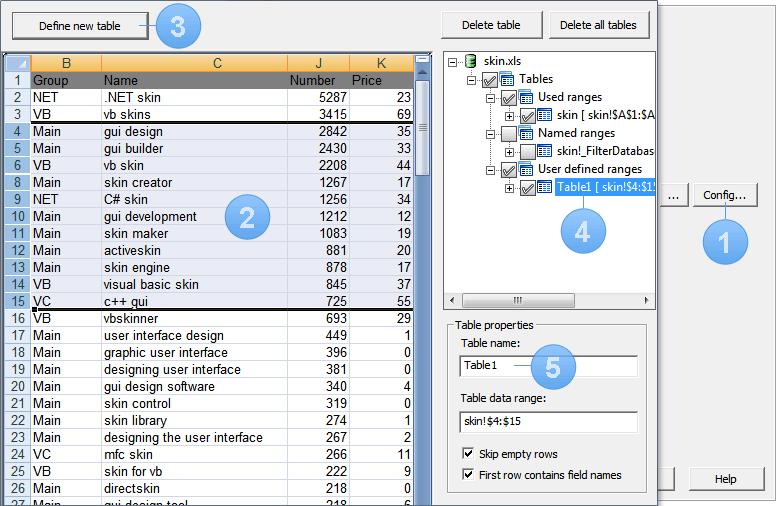
Excel Data Selector Interface
Visual interface for selecting and configuring Excel data for migration
Excel & CSV Converter Features
-
1Database structure configuration
-
2Sheet, CSV file, and column selection
-
3Defining new tables or arranging existing ones
-
4Created tables are displayed at the right top panel
-
5Changing table properties
Learn More
Real Use-Case Tutorial
Here is a real use-case showing how to convert an entire Excel file to MySQL/MS SQL Server
Choose your Excel pair
Open the exact DBConvert tool for your source and target.

