
SQL Server Migration Tools
Move SQL Server data to PostgreSQL, MySQL, SQLite, IBM DB2, or Access — or load Excel and CSV into SQL Server. Schema conversion, type mapping, and optional two-way sync.
Microsoft SQL Server
Migration and synchronization solutions
SQL Server is a relational database management system developed by Microsoft. It combines a familiar interface with low-cost entry-level configurations. To get the benefits of newer SQL Server versions, organizations often migrate to SQL Server hosted in Azure SQL cloud or on-premise.
Three SQL Server Migration Paths
Choose the best migration strategy for your organization
Legacy Database Modernization
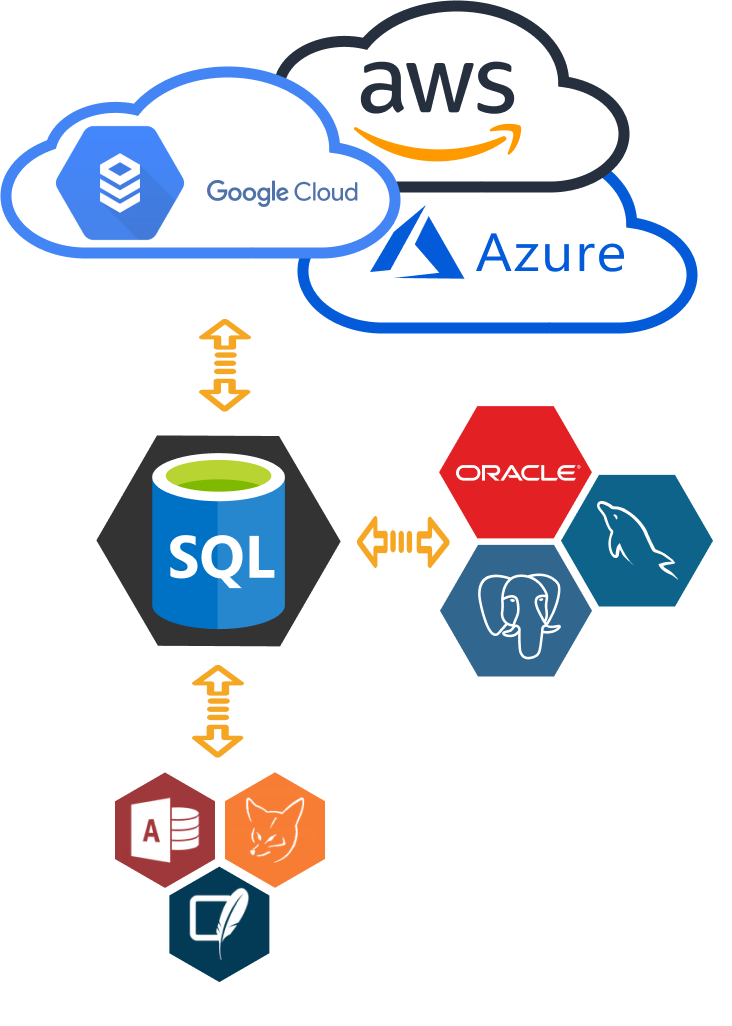
An obvious choice is to migrate overgrown Access databases or obsolete FoxPro data to on-premises SQL Server, as they are all produced by the same vendor.
Cloud Migration Solutions
For large data storage volumes with many clients, consider migrating to cloud-based solutions:
Cost-Effective Open Source Migration
Keeping the same database type when moving to the cloud reduces the maintenance cost of a self-managed database server.
If increasing SQL Server licensing costs becomes an issue, migration to free databases might be another way to go:
Synchronize SQL Server Database
Keep your databases in sync with our synchronization tools
Once you shifted your source database to the target database, you might want to synchronize your databases. This can be achieved by checking one database for updates and then applying them to another database. The source you are migrating continues to change after the initial migration occurs. It drifts from the target database in terms of data and schema.
SQL Server DBSync Features
Insert Sync
Add new records
Update Sync
Modify existing data
Drop Sync
Remove deleted records
Cloud Synchronization
Sync SQL Server databases with Azure cloud or configure one of the DBSync products listed on this page to synchronize SQL Server databases with other clouds or many on-premises database types.
Bidirectional Replication
DBSync software is enhanced by bidirectional replication between SQL Server and other databases. In this scenario, two different databases simultaneously replicate changes from each other.
Homogeneous vs. Heterogeneous Database Migrations
Depending on the need, you can shift your database either to the same type of database or to a new kind of database.
Same Type Database Migration
- Upgrading an on-premises SQL Server to a later version of on-premises SQL Server.
- Move your data from on-premises SQL Server to Azure SQL cloud.
- Convert databases in the opposite direction from Azure SQL to on-premises SQL Server.
- Synchronize on-premises SQL Server databases.
- Sync on-premises SQL Server to Azure Database.
Note: You can choose any software listed below to perform homogeneous database conversion or sync operations. As a bonus, you get one more database which you can select as a source or target.
Different Database Type Migration
For businesses that require switching to another type of database, we offer DBConvert and DBSync heterogeneous cross-database migration software solutions.
To migrate and sync your data between SQL Server and popular directions like MySQL, Oracle, PostgreSQL, choose a required migration or synchronization tool from the list at the bottom of the page.
Note: All DBConvert software listed in the sidebar performs database migration or sync in both directions:
- SQL Server to Any Database
- Any database to SQL Server
Why Use DBConvert for SQL Server Migration?
Although you can use the SQL Server Migration Assistant to automate database migration from multiple DBMSs to SQL Server, they have some drawbacks. DBConvert products address these shortcomings.
Bidirectional Migration
SSMA migration tools can migrate data in one direction only when the target database is SQL Server. In DBConvert, you can easily set SQL Server as a source and another database as a target when migrating or syncing databases.
Extended Database Support
At the moment of writing, the SQL Server Migration Assistant has a limited number of source databases to choose from. Refer to the comparison below to see the list of supported databases.
SQL Server Migration Assistant
- Access
- DB2
- MySQL
- Oracle
- PostgreSQL
- FoxPro
- SQLite
- Firebird / Interbase
- Excel
DBConvert Applications
- Access
- DB2
- MySQL
- Oracle
- PostgreSQL
- FoxPro
- SQLite
- Firebird / Interbase
- Excel
Related Links
Supported SQL Server Versions
On-Premises
- SQL Server (Express) 2000/2005/2008/2008 R2/2012/2014/2016
- SQL Server 2017, 2019 on Windows and Linux


