
Snowflake Data Loading and CDC
MySQL and PostgreSQL into the warehouse, with DBConvert Streams
DBConvert Streams loads MySQL and PostgreSQL into Snowflake, and can keep the warehouse current after that first copy. Snowflake ingests staged files rather than row-by-row inserts, so data reaches it in batches whichever route you take.
The stream's mode selects the route.
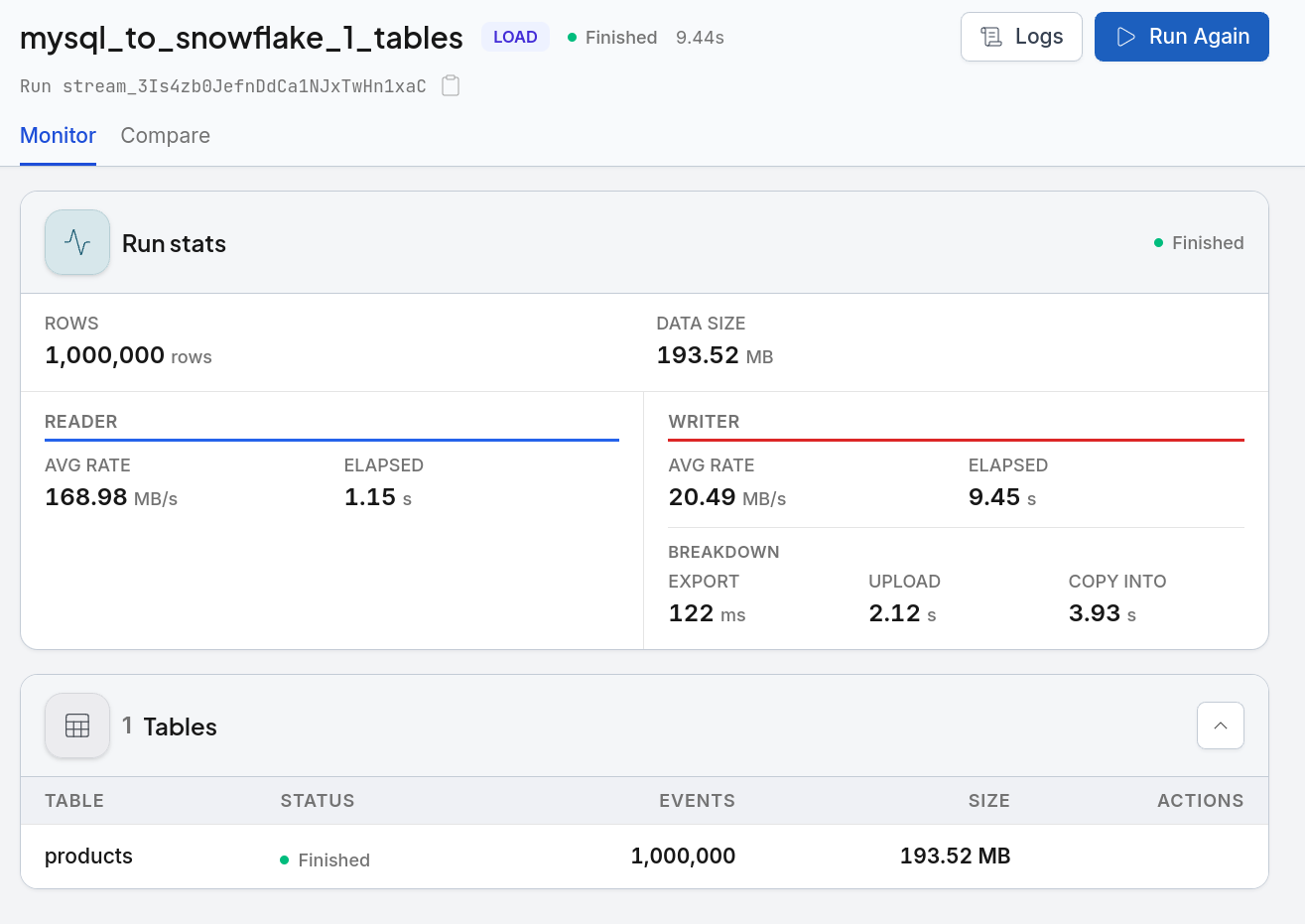
Load stages Parquet at 128-256 MB per file, PUTs it to your user stage and runs one COPY INTO per table. It then compares the rows Snowflake reports loading against the rows it read, and fails the run on a shortfall.
CDC cannot use that path at all, because COPY INTO only appends and so cannot carry an update or a delete. Changes stream over Snowpipe Streaming into an append-only change table instead, and a Snowflake task merges them by primary key into an ordinary table carrying the name your table already has.
Pick the Database You Are Loading From
The type mapping and the CDC prerequisites differ by engine, so each route has its own page.

MySQL to Snowflake
Where TINYINT(1), ENUM, SET and the BLOB family land, and the three binlog settings CDC needs.

PostgreSQL to Snowflake
Where jsonb, arrays, uuid and unconstrained numeric land, and what logical replication has to be told first.
Snowflake is a target, not a source
Streams writes into Snowflake and does not read out of it. A stream configured with Snowflake on the source side is refused at configuration time rather than failing part-way through a run. Snowflake connections remain browsable in the Data Explorer, so a load can be inspected without leaving the tool.
Load and CDC Compared
The two modes share the connection and the table-creation step, and nothing else.
| Load mode | CDC mode | |
|---|---|---|
| How rows travel | Parquet part files, PUT to the user stage, one COPY INTO per table. |
NDJSON appended over HTTPS through Snowpipe Streaming. Nothing is staged on disk. |
| Compute billed | A warehouse runs for the duration of the COPY INTO. |
Ingestion is serverless, billed by volume - Snowpipe Streaming runs no warehouse. Applying the changes does: the task wakes one on your schedule, and not at all when there is nothing to apply. |
| Authentication | Password, key pair or programmatic access token. | Key pair only. A CDC stream on a password connection is refused before it starts. |
| Required of the table | Nothing. | A primary key, on every replicated table. |
| Required of the account | Nothing. | EXECUTE TASK, granted once by an account administrator. Without it the changes arrive and the task that applies them cannot run. |
| Objects created per table | One ordinary table. | Five: the change table, a pipe, a stream, the task that applies changes, and the table your queries use. |
| Run phases reported | export, upload, copy into. |
append, commit. |
| Choose it when | You want a snapshot: a first migration, a validation copy, a rebuild you control the timing of. | The source stays in production and the warehouse has to follow it within seconds. |
A Load Runs in Four Steps
- 1. Structure. Database, schema and tables are created before any data moves. A policy that refuses stops the run here, with nothing staged.
- 2. Export. Rows are buffered locally and written as Parquet part files at 128-256 MB.
- 3. Upload. Files are
PUTto the user stage, up to six in parallel. - 4. Load and count. One
COPY INTOper table, then the loaded row count is compared against the rows read. Snowflake skips records it cannot parse rather than raising, so without that comparison a short load finishes green.
Steps 2 to 4 are timed separately and reported as the run's phases, so a slow run can be attributed to writing Parquet, moving it, or the warehouse itself.
Source and Target, Side by Side
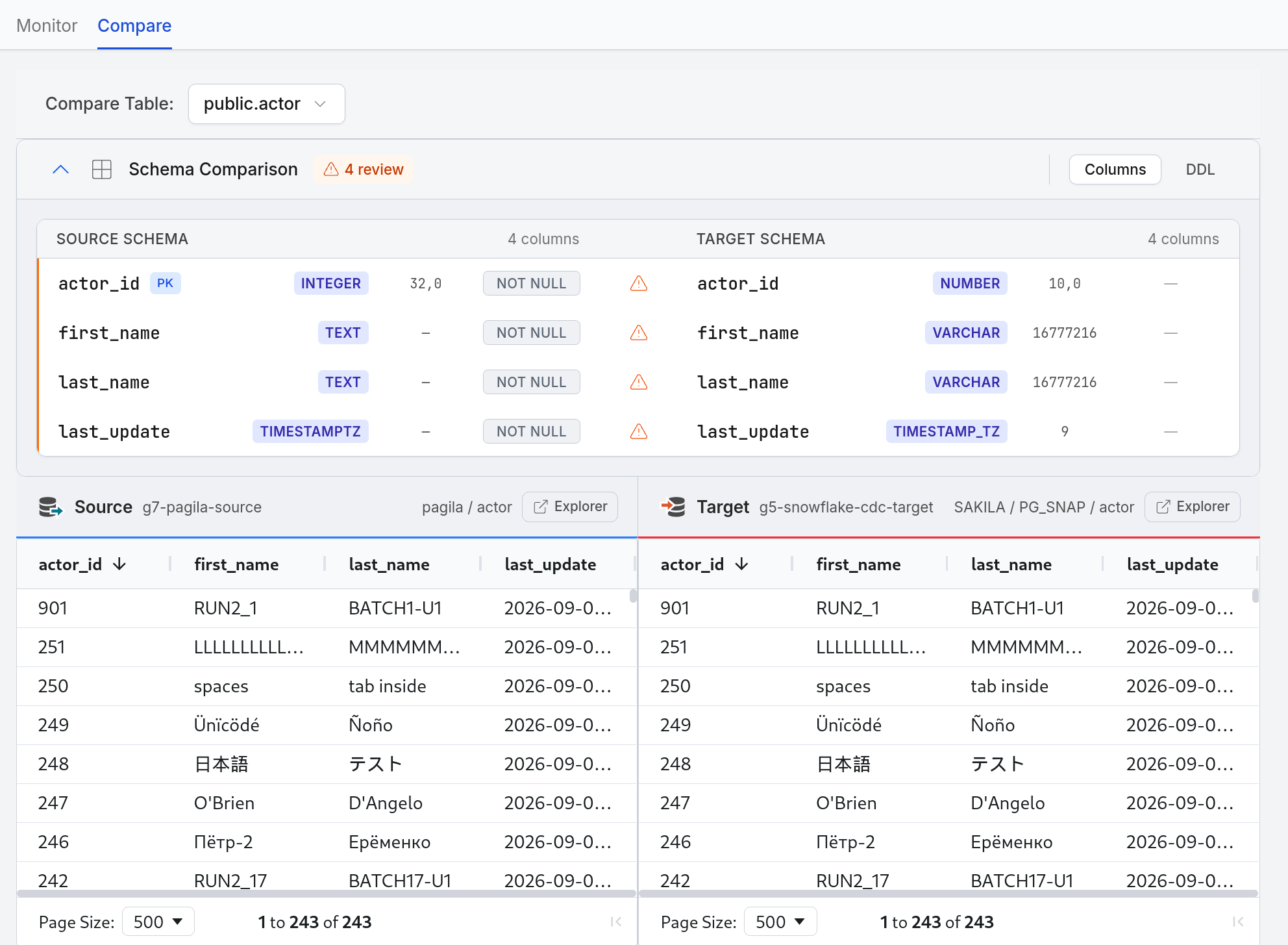
Compare puts the two tables next to each other in one view: the row counts, the rows themselves, and which types changed on the way across.
The awkward values are the ones worth checking
Cyrillic, CJK, diacritics, apostrophes, leading spaces and an embedded tab all arrive byte for byte, because Parquet carries typed values rather than re-parsed text. Those are the rows to sort to the top when you check a load, not the ASCII ones.
Four columns, four narrowings
INTEGER becomes NUMBER(10,0), TEXT becomes VARCHAR, TIMESTAMPTZ becomes TIMESTAMP_TZ. The schema comparison flags each one for review rather than reporting a clean match, which is the honest answer: the values survive, the declarations are not identical.
Existing Tables Are Not Replaced by Default
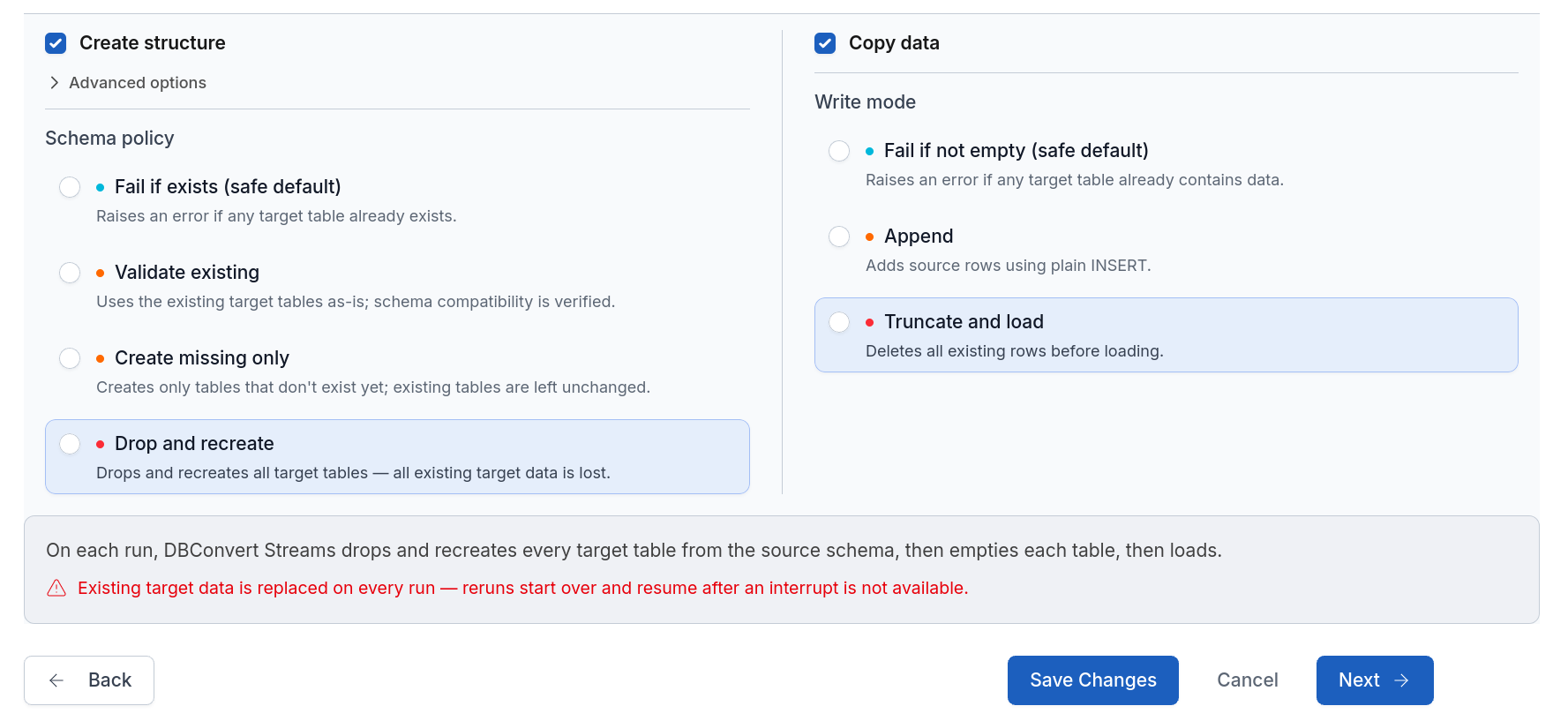
Table creation runs before any data moves, under a policy you set on the stream.
A load defaults to failing if the table exists
Which is the safe default in a warehouse other people query. Create-missing-only and explicit replacement are both available; you choose one deliberately instead of discovering which one you got. A refusing policy stops the run before anything is staged.
CDC defaults to create-missing-only
Its three objects are the stream's own construction and none of them exists before the first run, so refusing on an existing table would refuse every first run.
CDC Authenticates With a Key Pair
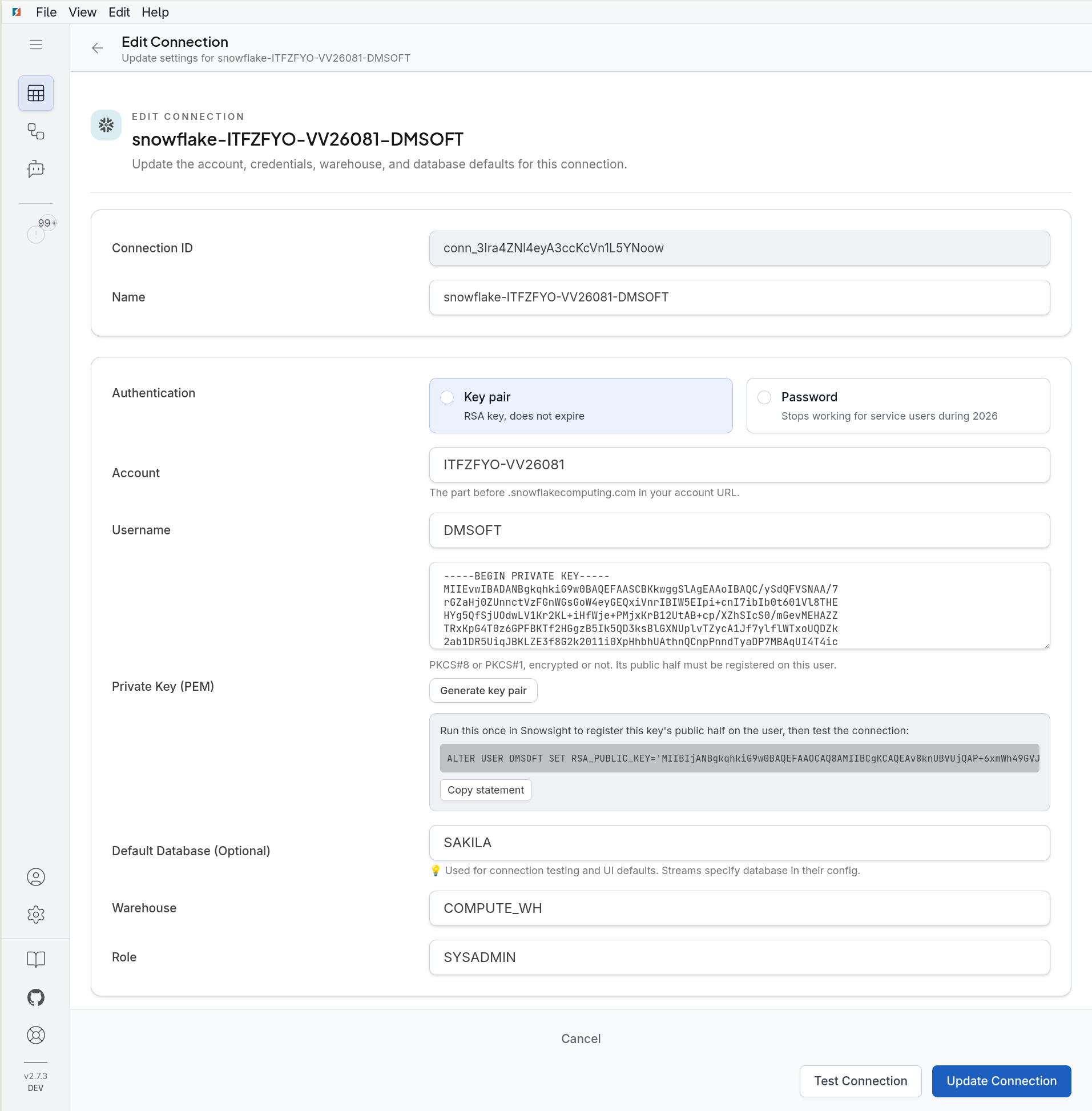
Snowpipe Streaming takes a signed key and neither a password nor an access token, so a CDC stream on a password connection is refused when you configure it rather than on the first change. A load is free to use any of the three.
Streams generates the pair itself, so nobody has to reach for openssl, and hands you the ALTER USER statement to paste into Snowsight. Snowflake keeps only the public half. New connections are created this way for a second reason: Snowflake is phasing out passwords for service users through 2026.
The Three Objects a CDC Stream Creates
For a source table ORDERS, measured on a live account. Five objects, of which only two store anything.
| Object | What it holds | Storage |
|---|---|---|
ORDERS__CHANGES |
Every change ever received, appended: the source columns plus an operation flag, the source log position, an arrival tiebreaker and a timestamp. Nothing is updated in place. | 16,113 rows in 386 KB |
ORDERS__CHANGES_PIPE |
A routing rule saying where rows arriving on a channel are written. Despite the name it is not a container. | None - not a storage object |
ORDERS__CHANGES_STREAM |
What has arrived since the changes were last applied. A position, not a container. | None - not a storage object |
ORDERS__APPLY |
A Snowflake task carrying the MERGE, run by Snowflake on the schedule you choose. It wakes a warehouse only when the stream has something in it. |
None - not a storage object |
ORDERS |
An ordinary table holding its own rows: newest version per primary key, deleted keys removed. It has exactly the source table's columns, so a consumer cannot tell it was built this way. | 16,063 rows in 352 KB |
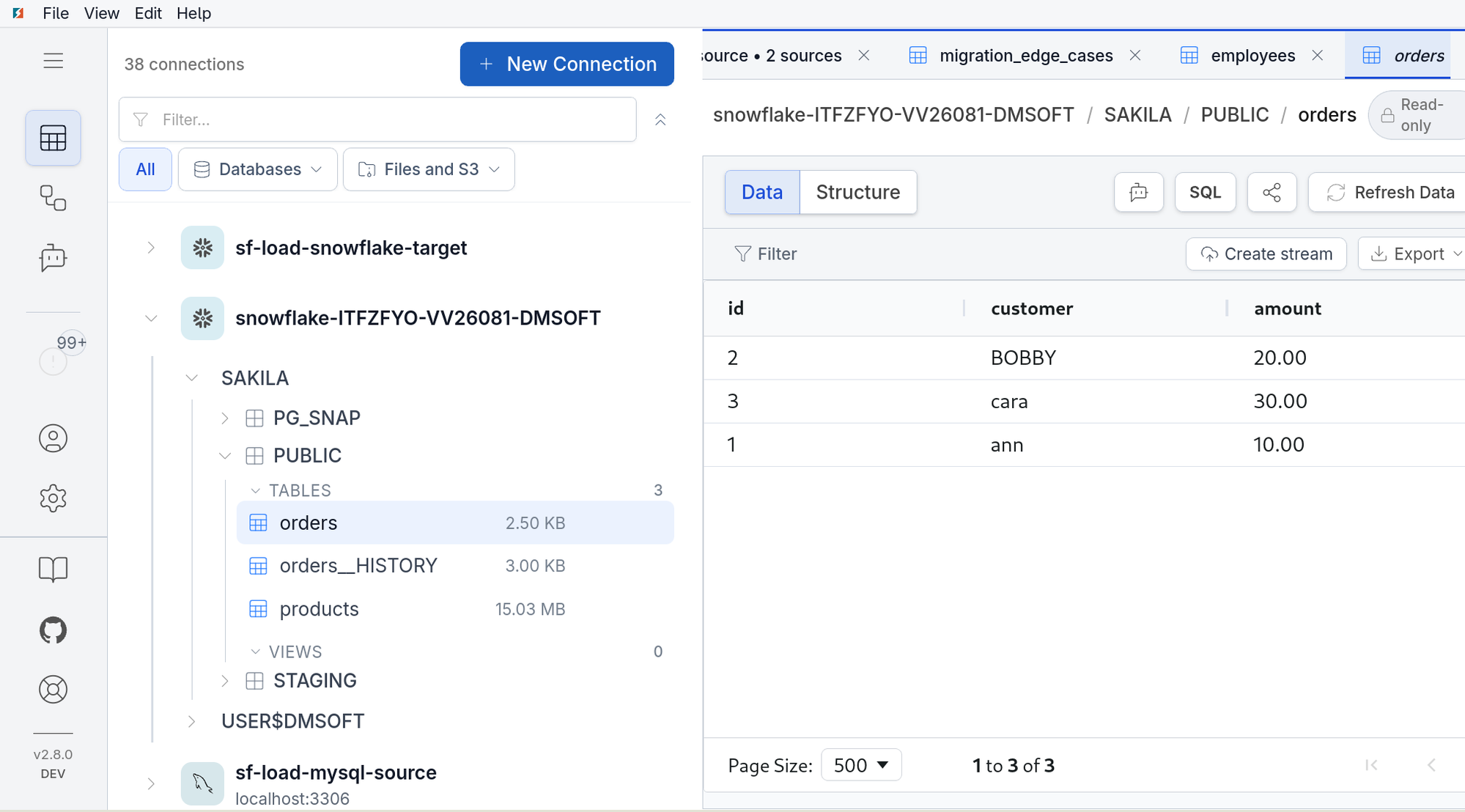
Both tables are visible in the Data Explorer
A Snowflake connection browses like any other, listed beside the MySQL or PostgreSQL it was loaded from. the table you query and its change table sit together in the tree with their sizes, and the first opens as ordinary rows - so checking what a stream produced does not mean leaving for Snowsight, and the name is quoted for you.
Sizing a CDC target
Budget about the size of the source table, plus the changes as they accumulate. The changes are not the expensive half until they have grown past the table itself: 16,113 changes took 386 KB beside 16,063 current rows in 352 KB.
What the schedule actually buys
Changes reach ORDERS__CHANGES within seconds whatever you choose; the schedule decides how often they are merged into ORDERS, from every minute to every eight days. The cost is not the merge but the waking: Snowflake bills a minimum of one minute of warehouse time per resume, and a run that finds an empty stream does not wake one at all.
The history is kept, on purpose
ORDERS__CHANGES grows for the life of the stream and there is no retention setting. Keeping it is the point: it is how you see when a row changed and what it held before, and it is what a stalled stream is repaired from without going back to the source. To bound it, delete from it on your own schedule - ORDERS holds its own rows and keeps every one of them. Delete only changes that have already been applied: anything the task has not merged yet never reaches ORDERS at all.
What Does Not Carry Across
Partly Snowflake having no such feature, partly Snowflake accepting the syntax while enforcing nothing.
Indexes
Snowflake has none at all, partitioning data automatically instead. There is no statement to issue rather than something dropped silently.
Foreign keys and CHECK constraints
Accepted syntactically, enforced neither. Carrying them across would put constraints in the warehouse that guarantee nothing, so they are left out rather than written as decoration.
The upsert write mode
COPY INTO appends and there is no merge behind it, so upsert is rejected at configuration time. CDC has no write mode at all: it appends and collapses.
NOT NULL, on a CDC target only
A load declares it as the source did. A CDC target does not: the change table drops NOT NULL deliberately, because a delete may carry only part of the row it describes - MySQL's binlog_row_image=MINIMAL sends the key columns and nothing else - and a declared column would reject the append.
Unquoted table names
Tables land as quoted lowercase, so SELECT * FROM products folds to PRODUCTS and finds nothing. Quote the name, or use the Data Explorer, which quotes for you.
Start With One Table and Count It
This target is new. Load a single table whose row count you already know, and check it in the warehouse before you point a schema at it. Runs on Linux, Windows, macOS and Docker.
Or start from the route you have: MySQL to Snowflake and PostgreSQL to Snowflake.