
How to Convert SQL Server to PostgreSQL – Complete Migration Guide
A complete guide to migrating from Microsoft SQL Server to PostgreSQL — including schema conversion, data transfer, stored procedure rewriting, validation, and performance tuning. Includes tool comparison (pgloader, AWS SCT, DBConvert), ROI breakdown, and hands-on SQL examples.

Introduction
Migrating from Microsoft SQL Server to PostgreSQL requires careful planning due to differences in data types, T-SQL vs PL/pgSQL, and architectural approaches. These two database systems have distinct characteristics that impact migration strategies. PostgreSQL, as a leading open-source database, offers significant advantages including cost savings, advanced features, extensibility, and freedom from vendor lock-in. PostgreSQL is free and permits modification and distribution.
The fundamental difference: SQL Server, a Microsoft product, requires expensive commercial licensing (typically $3,500-$28,000+ per core annually), while PostgreSQL is completely free with no licensing fees or user limits. This often drives the decision to migrate, with organizations saving 60-90% on database costs immediately. PostgreSQL is highly scalable and supports parallel query execution, suitable for large-scale workloads.
Whether you're reducing licensing costs, embracing open-source flexibility, or leveraging PostgreSQL's advanced capabilities like JSONB and extensibility, this guide will walk you through each phase — from schema conversion and data transfer to validation and performance optimization.
Migration Method Decision Tree
What's your primary migration driver?
├── Budget & Technical Expertise
│   ├── Free + Command Line Experience → pgloader
│   └── GUI + Professional Tools → DBConvert/DBConvert Studio
├── Sync & Testing Requirements
│   ├── One-time Migration → pgloader or DBConvert
│   └── Bidirectional Sync Needed → DBSync/DBConvert Studio
└── Enterprise & Cloud
    └── Large Scale → AWS SCT + DMS (for AWS targets)

Comparing SQL Server and PostgreSQL – Key Differences
Enhanced Data Type Mapping
| SQL Server | PostgreSQL | Migration Notes |
|---|---|---|
| INT IDENTITY | SERIAL/BIGSERIAL | Auto-increment behavior preserved |
| BIT | BOOLEAN | 1/0 → TRUE/FALSE |
| NVARCHAR(MAX) | TEXT | Unicode handling simplified; note differences in character data types |
| NVARCHAR(n) | VARCHAR(n) | UTF-8 native in PostgreSQL; be aware of character data types differences |
| INT | INTEGER | Direct mapping |
| BIGINT | BIGINT | Direct mapping |
| DECIMAL | NUMERIC | Precision maintained |
| DATETIME2 | TIMESTAMP | PostgreSQL has better timezone support |
| VARBINARY(MAX) | BYTEA | Binary storage |
| NVARCHAR(MAX) + JSON | JSONB | PostgreSQL's JSONB offers superior performance |
| No native equivalent | ARRAY | PostgreSQL supports native arrays |
| UNIQUEIDENTIFIER | UUID | PostgreSQL has native UUID support |
| No native equivalent | INTERVAL | PostgreSQL supports time intervals |
| CHECK constraints | ENUM | PostgreSQL has native enum types |
| User-defined types | Custom types | PostgreSQL offers more flexible typing |
Advanced PostgreSQL Features Not in SQL Server
Native Arrays: PostgreSQL supports multi-dimensional arrays with indexing and operators.
-- PostgreSQL array example
CREATE TABLE products (
    id SERIAL,
    tags TEXT[],
    ratings INTEGER[]
);
JSONB Advantages: Binary JSON storage with advanced indexing and operators.
-- PostgreSQL JSONB with GIN indexing
CREATE INDEX idx_product_data ON products USING GIN (data);
SELECT * FROM products WHERE data @> '{"category": "electronics"}';
Extensibility: Custom data types, operators, and functions. Advanced Indexing: GIN, GiST, SP-GiST, BRIN indexes for specialized use cases.
T-SQL to PL/pgSQL Migration Complexity
SQL Server's T-SQL differs significantly from PostgreSQL's PL/pgSQL:
- Variable Declaration:
DECLARE @var INT→DECLARE var INTEGER; - Error Handling:
TRY/CATCH→EXCEPTION WHEN - Cursor Syntax: Different loop structures and cursor handling
- Functions: SQL Server scalar/table functions → PostgreSQL functions with different syntax
Pre-Migration Planning and Assessment Checklist
- [ ] Audit SQL Server licensing costs and identify savings opportunities
- [ ] Review SQL Server version and feature usage
- [ ] Inventory schema objects (tables, views, procedures, functions, triggers)
- [ ] Identify T-SQL specific features and dependencies
- [ ] Map data types to PostgreSQL equivalents
- [ ] Analyze stored procedure complexity for conversion effort
- [ ] Backup SQL Server database
- [ ] Set up target PostgreSQL instance (version 12+ recommended)
- [ ] Create and configure a database user with appropriate privileges in the target database
- [ ] Plan application connection string and driver updates
- [ ] Choose migration strategy based on downtime tolerance
- [ ] Understand data size and complexity to plan the migration strategy effectively

Migration Cost Planning
Comprehensive Cost Analysis by Database Size:
| Size | Manual Labor | AWS SCT+DMS | DBConvert | pgloader | License Savings/Year |
|---|---|---|---|---|---|
| <10GB | 2–3 days | $100–300* | $179 + 4hrs | 4–8 hrs | $3,000–$10,000 |
| 10–100GB | 1–2 weeks | $300–800* | $179 + 8hrs | 8–16 hrs | $15,000–$50,000 |
| 100GB–1TB | 2–4 weeks | $800–3000* | $179 + 16hrs | 1–2 days | $75,000–$250,000 |
| >1TB | 4–8 weeks | $3000+* | $179 + 24hrs | 2–5 days | $250,000+ |
*AWS SCT is free; DMS pricing estimates shown above. Confirm current AWS DMS pricing via official AWS documentation as rates vary by region and usage patterns.
Note1: DBConvert tools include DBConvert ($179), DBSync ($179 for ongoing sync), and DBConvert Studio ($599 for universal database support).
Note2: Azure Database Migration Service is not included as it does not support SQL Server to PostgreSQL migrations.
ROI Calculation: Most organizations see full migration cost recovery within 3–12 months through eliminated SQL Server licensing fees.
Migration Success Example (Illustrative)
E-commerce Platform Migration Example
- Size: 750GB, 300 tables, extensive JSON usage
- Method: AWS SCT + DMS with DBConvert for final sync
- Timeline: 3 weeks prep, 6-hour cutover
- Key Benefits: 70% licensing cost reduction, improved JSON performance
- Result: 99.5% uptime, 40% faster JSON queries post-migration
Note: This is an illustrative example representing typical migration outcomes. Actual results may vary based on specific requirements and implementation.
Migration Tools and Strategies
AWS Schema Conversion Tool (SCT) + DMS
AWS provides enterprise-grade tools for large-scale migrations to AWS targets.
- ✅ Enterprise-grade schema conversion with automation
- ✅ Handles complex T-SQL to PL/pgSQL conversion
- ✅ Integrated with DMS for seamless data transfer
- ✅ Minimal downtime with change data capture
- ✅ Adds linked servers to the object tree when Amazon RDS is the target
- ✅ Converts user-defined table types into temporary table structures
- ❌ AWS-specific - requires AWS cloud infrastructure and targets
- ❌ Limited to AWS ecosystem migrations
Best for: Large enterprise migrations to AWS RDS PostgreSQL or Aurora PostgreSQL.
Note: Azure Database Migration Service does NOT support SQL Server to PostgreSQL migrations. Azure DMS supports PostgreSQL-to-PostgreSQL migrations and SQL Server to Azure SQL targets, but not cross-platform scenarios like SQL Server to PostgreSQL.
pgloader
Open-source command-line tool for SQL Server to PostgreSQL data migration.
- ✅ Fast, reliable, and completely free
- ✅ Handles basic schema creation and data transfer
- ✅ Automatic data type conversion
- ✅ Supports importing data from flat file formats such as CSV files
- ✅ Good for straightforward migrations
- ❌ Command-line only - requires technical expertise
- ❌ No GUI interface for visual mapping
- ❌ No bidirectional sync - one-direction only
- ❌ Limited customization compared to commercial tools
Best for: Budget-conscious migrations where you have command-line expertise and don't need ongoing sync.
DBConvert
Commercial tool specifically designed for SQL Server ↔ PostgreSQL migrations.
- ✅ Visual mapping interface with customizable type mapping
- ✅ Automatic schema conversion - handles complex schemas intelligently
- ✅ Bidirectional sync for testing and validation phases
- ✅ GUI-based - no command-line expertise required
- ✅ Professional support and documentation
- ❌ Commercial license required ($179)
Best for: Professional migrations requiring visual control, bidirectional sync, or GUI interface.
DBSync
Specialized synchronization tool designed specifically for ongoing database replication.
- ✅ Dedicated synchronization - purpose-built for keeping databases in sync
- ✅ Bidirectional replication - changes sync in both directions automatically
- ✅ Continuous operation - runs as ongoing service, not one-time migration
- ✅ Real-time sync - minimal latency between database changes
- ✅ Professional monitoring and error handling
- ❌ Commercial license required ($179)
Best for: Post-migration scenarios where you need to keep SQL Server and PostgreSQL synchronized long-term, testing phases, or hybrid deployments.
DBConvert Studio
Universal migration and synchronization tool supporting 40+ database types.
- ✅ Everything DBConvert offers plus universal database support
- ✅ Future-proof - supports migrations between any database types
- ✅ Same bidirectional sync and visual mapping capabilities
- ✅ Enterprise features and scalability
- ❌ Higher cost ($599) but covers all database migration needs
Consolidated Data Transfer Methods
Method 1: pgloader
pgloader is an open-source tool specifically designed for SQL Server to PostgreSQL data migration:
# Install pgloader
apt-get install pgloader  # Ubuntu/Debian
brew install pgloader     # macOS

# Basic migration command
pgloader mssql://user:pass@sqlserver/database postgresql://user:pass@pgserver/database

# Advanced configuration file
load database
  from mssql://user:pass@sqlserver/database
  into postgresql://user:pass@pgserver/database

WITH include drop, create tables, create indexes, reset sequences

SET work_mem to '256MB',
    maintenance_work_mem to '512MB';
pgloader usage
Method 2: Native Export/Import
SQL Server Export:
-- Export using BCP
bcp "SELECT * FROM tablename" queryout "data.csv" -c -t"," -r"\n" -S server -d database

-- Or use SQLCMD with formatted output
SQLCMD -S server -d database -Q "SELECT * FROM tablename" -o "data.csv" -s","

-- Generate scripts for schema migration via SQL Server Management Studio
Use bcp or sqlcmd for mssql export
PostgreSQL Import:
-- Import using COPY
COPY tablename FROM '/path/to/data.csv' WITH CSV HEADER DELIMITER ',';

-- Or use \copy in psql or pgAdmin for client-side files
\copy tablename FROM 'data.csv' WITH CSV HEADER DELIMITER ','
import data to postgres db
Method 3: AWS DMS with Change Data Capture
For minimal downtime migrations using AWS Database Migration Service:
- Initial Load: Migrate existing data
- CDC (Change Data Capture): Capture ongoing changes
- Cutover: Switch applications to PostgreSQL
Step-by-Step Migration Execution
Phase 1: Schema Conversion
Export table and schema definitions from SQL Server, then convert to PostgreSQL-compatible syntax.
Convert SQL Server DDL to PostgreSQL:
-- SQL Server
CREATE TABLE Products (
    ProductID INT IDENTITY(1,1) PRIMARY KEY,
    ProductName NVARCHAR(100) NOT NULL,
    Price DECIMAL(10,2),
    IsActive BIT DEFAULT 1,
    CreatedDate DATETIME2 DEFAULT GETDATE()
);

-- PostgreSQL equivalent
CREATE TABLE products (
    product_id SERIAL PRIMARY KEY,
    product_name VARCHAR(100) NOT NULL,
    price NUMERIC(10,2),
    is_active BOOLEAN DEFAULT TRUE,
    created_date TIMESTAMP DEFAULT CURRENT_TIMESTAMP
);
Phase 2: Data Transfer
- Export data from SQL Server using appropriate methods (manual export, SSIS, SQLCMD, bcp)
- Import into PostgreSQL with proper encoding (UTF-8)
- Validate row counts and data integrity
- Update sequence values for SERIAL columns
Phase 3: Stored Procedure Conversion
Convert T-SQL stored procedures to PL/pgSQL functions, adjusting parameter handling and result sets.
T-SQL to PL/pgSQL Example:
-- SQL Server T-SQL
CREATE PROCEDURE GetProductsByCategory
    @CategoryID INT
AS
BEGIN
    SELECT * FROM Products
    WHERE CategoryID = @CategoryID
    ORDER BY ProductName;
END

-- PostgreSQL PL/pgSQL
CREATE OR REPLACE FUNCTION get_products_by_category(category_id INTEGER)
RETURNS TABLE (
    product_id INTEGER,
    product_name VARCHAR,
    price NUMERIC
) AS $$
BEGIN
    RETURN QUERY
    SELECT p.product_id, p.product_name, p.price
    FROM products p
    WHERE p.category_id = category_id
    ORDER BY p.product_name;
END;
$$ LANGUAGE plpgsql;
Phase 4: Application Updates
- Update connection strings to PostgreSQL
- Replace SQL Server database drivers with PostgreSQL drivers for your programming language
- Modify queries for PostgreSQL syntax differences
- Update any SQL Server-specific function calls
Performance Considerations
Indexing Strategy Migration
| SQL Server Index | PostgreSQL Equivalent | Migration Notes |
|---|---|---|
| Clustered Index | ❌ No direct equivalent | Use PRIMARY KEY with CLUSTER command occasionally |
| Non-clustered Index | ✅ B-tree Index | Standard PostgreSQL indexes (default) |
| Filtered Index | ✅ Partial Index | WHERE clause conditions supported |
| Full-text Index | ✅ GIN Index + tsvector | More powerful text search capabilities |
| Spatial Index | ✅ GiST Index + PostGIS | Enhanced spatial features via extension |
| Columnstore Index | ✅ BRIN Index | For large tables with natural ordering |
| XML Index | ❌ Limited equivalent | Use GIN indexes on extracted data |
PostgreSQL Performance Advantages
Better JSONB Performance:
-- PostgreSQL JSONB with native operators
SELECT * FROM products
WHERE data @> '{"category": "electronics"}'
AND data ? 'discount';

-- Create GIN index for fast JSON queries
CREATE INDEX idx_products_data ON products USING GIN (data);
Advanced Query Planning:
- PostgreSQL's query planner often outperforms SQL Server on complex queries
- Better handling of large result sets
- More sophisticated join algorithms
Enhanced Validation and Testing
Data Integrity Verification
Row Count Comparison:
-- SQL Server
SELECT COUNT(*) FROM tablename;

-- PostgreSQL
SELECT COUNT(*) FROM tablename;
Checksum Verification:
-- PostgreSQL data validation
SELECT
    schemaname,
    tablename,
    n_tup_ins - n_tup_del as row_count
FROM pg_stat_user_tables
ORDER BY schemaname, tablename;
Performance Testing
Query Performance Comparison:
- Migrate top 20 most critical queries
- Compare execution plans using
EXPLAIN ANALYZE - Test with production-like data volumes
- Validate that PostgreSQL performance meets or exceeds SQL Server
Common Migration Pitfalls and Solutions
Character Encoding Differences
SQL Server: Uses UTF-16 encoding by default
PostgreSQL: Uses UTF-8 encoding natively
Migration considerations:
-- Ensure UTF-8 encoding during database creation
CREATE DATABASE mydb
    WITH ENCODING = 'UTF8'
    LC_COLLATE = 'en_US.UTF-8'
    LC_CTYPE = 'en_US.UTF-8';
Identity Column Migration
Problem: SQL Server IDENTITY doesn't transfer sequence values
Solution:
-- After data import, reset sequences
SELECT setval('tablename_id_seq', (SELECT MAX(id) FROM tablename));
Case Sensitivity Differences
Problem: PostgreSQL is case-sensitive by default
Solution: Use consistent naming conventions or quoted identifiers
NULL Handling in Unique Constraints
SQL Server: Multiple NULLs allowed in unique indexes
PostgreSQL: Also allows multiple NULLs (similar behavior)
JSON Migration Advantages
SQL Server JSON → PostgreSQL JSONB provides significant benefits:
- Better performance with binary storage
- Native operators (
, ->>, #>, @>, ?) - Advanced indexing with GIN
- JSONPath support in newer versions
Post-Migration Optimization

PostgreSQL-Specific Optimizations
1. Vacuum and Analyze:
-- Set up automatic vacuum and analyze
ALTER SYSTEM SET autovacuum = on;
SELECT pg_reload_conf();

-- Manual vacuum for immediate optimization
VACUUM ANALYZE;
2. Connection Pooling:
-- Configure connection pooling (pgbouncer recommended)
-- PostgreSQL handles connections differently than SQL Server
3. Memory Configuration:
-- Optimize PostgreSQL memory settings
ALTER SYSTEM SET shared_buffers = '25% of RAM';
ALTER SYSTEM SET effective_cache_size = '75% of RAM';
ALTER SYSTEM SET work_mem = '256MB';
SELECT pg_reload_conf();
Walkthrough: Migrating SQL Server to PostgreSQL Using DBConvert Studio
DBConvert Studio provides a comprehensive solution for SQL Server to PostgreSQL migration with universal database support.
Step 1 – Connect Databases
- Launch DBConvert Studio
- Configure SQL Server source connection (Windows or SQL Authentication)

- Set up PostgreSQL target connection

- Test both connections.
Step 2 – Customize options for conversion/ sync.
- Configure database objects.


Step 3 – Data Type Mapping Customization
- Customize NVARCHAR → VARCHAR mappings
- Configure IDENTITY → SERIAL conversions
- Set up JSON → JSONB transformations
- Preview conversion results

Step 4 – Configure Data Filters (optional)

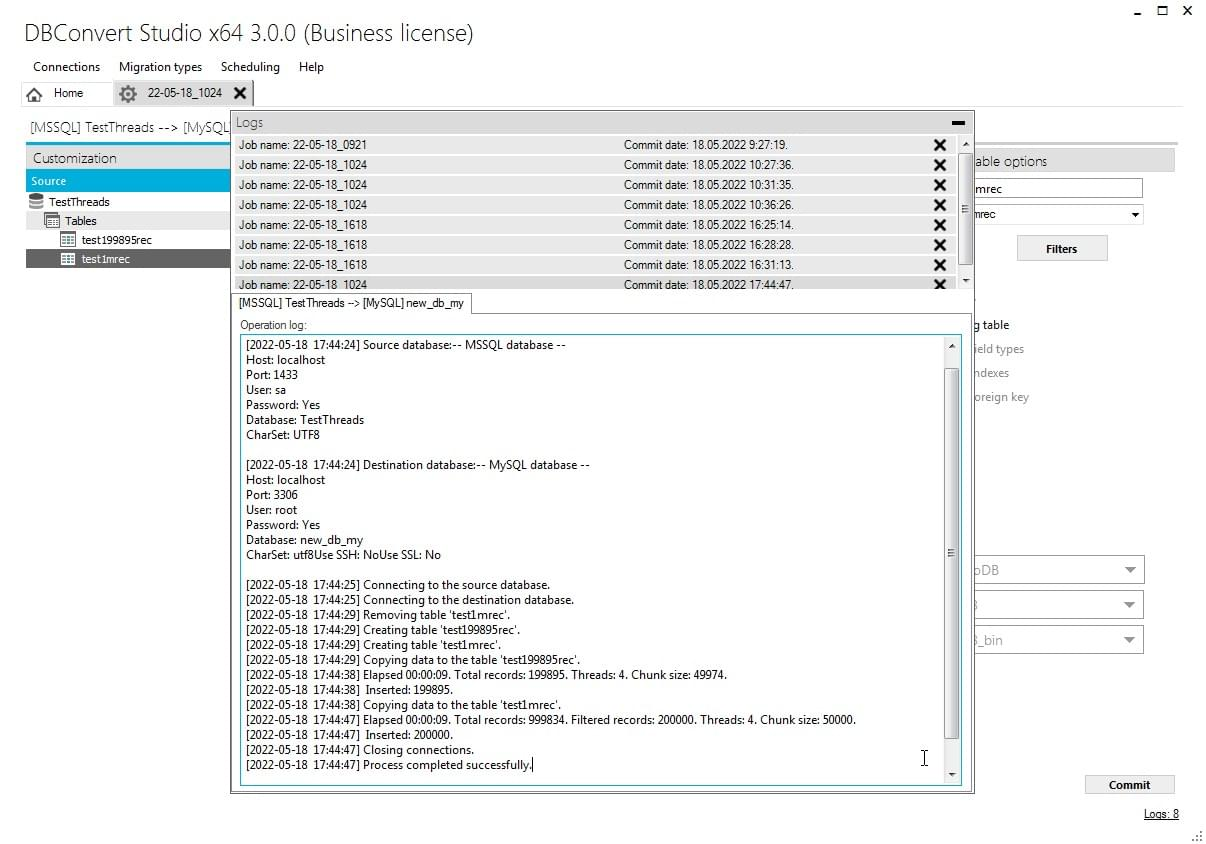
Step 5 – Execute Migration
- Choose full migration or sync mode
- Monitor real-time progress and logs
- Handle any conversion errors or warnings
- Verify data integrity during transfer
Frequently Asked Questions (FAQ)
Q: Can I migrate T-SQL stored procedures automatically?
A: Tools like AWS SCT can convert many procedures, but complex T-SQL often requires manual rewriting. PostgreSQL's PL/pgSQL is powerful but syntactically different.
Q: How does PostgreSQL licensing compare to SQL Server?
A: PostgreSQL is completely free and open-source with no licensing fees, no core limits, or CAL requirements. When factoring in total database operational costs (including optional support, training, and migration), most organizations still save 60-90% overall.
Q: Will my applications need major changes?
A: It depends on your application architecture. Simple applications using basic SQL may need only minor changes (connection strings, drivers). However, applications heavily relying on T-SQL stored procedures, SQL Server-specific functions, or proprietary features may require significant modifications.
Q: How does PostgreSQL JSON compare to SQL Server JSON?
A: PostgreSQL JSONB significantly outperforms SQL Server JSON with binary storage, native operators, and advanced indexing capabilities.
Q: Can I maintain both systems during migration?
A: Yes. Tools like DBSync support bidirectional sync, allowing parallel operation during testing and gradual transition.
Q: What about performance compared to SQL Server?
A: PostgreSQL often performs better, especially for complex queries, JSON operations, and analytical workloads. Proper tuning is essential for both systems.
Q: Is PostgreSQL enterprise-ready?
A: Absolutely. PostgreSQL powers major enterprises worldwide including Apple, Instagram, Netflix, and many Fortune 500 companies.
Q: How do I handle SQL Server-specific features?
A: Most SQL Server features have PostgreSQL equivalents or better alternatives. Some proprietary features may require application logic changes.
Ready to Migrate from SQL Server to PostgreSQL?
Breaking free from SQL Server licensing costs while gaining PostgreSQL's advanced features and flexibility is a strategic decision that pays dividends immediately. Whether you're driven by cost savings, feature requirements, or open-source principles, the migration path is well-established and supported by excellent tooling.
For SQL Server to PostgreSQL migrations with visual mapping and professional features, try DBConvert for MSSQL & PostgreSQL starting at $179 — providing cost-effective migration with trusted technology used by thousands of organizations worldwide.
For ongoing synchronization after migration, DBSync at $179 specializes in bidirectional real-time replication between SQL Server and PostgreSQL, perfect for:
- Maintaining hybrid environments during extended transition periods
- Real-time data synchronization for testing and validation
- Long-term dual-database deployments
- Disaster recovery and backup strategies
For universal database migrations supporting 40+ database types beyond just SQL Server and PostgreSQL, explore DBConvert Studio — the comprehensive platform for enterprise migrations. Studio provides the same intuitive interface and sync capabilities across the entire database ecosystem.
Start your journey to database freedom and immediate cost savings today.