
What is Database Synchronization?
Database synchronization, or database sync, keeps two or more databases consistent by copying inserts, updates, and deletes between them. Learn insert, update, drop, mixed, bidirectional sync, and CDC replication.
Database synchronization, often shortened to database sync, is the process of keeping
two or more databases consistent by copying changes between them. When a row is
inserted, updated, or deleted in the source database, the same change is applied to the
target database so both systems contain the same current data.
DBConvert syncs data between different database engines, matching rows by primary key and running on a schedule.
Database sync is used when teams need reporting copies, staging databases, cloud
replicas, cross-database transfers, or recurring updates between different database
engines. It is different from a one-time database migration: migration moves data once,
while synchronization keeps data aligned over time.
A reliable sync process depends on primary keys. Each synchronized table should have a
primary key or another stable unique identifier, because the sync tool needs a way to
match one source row to exactly one target row. Without primary keys, update and delete
synchronization becomes slower and more error-prone.
In this guide we explain the main database synchronization types:
- Insert synchronization
- Update synchronization
- Drop/delete synchronization
- Mixed synchronization
- Bidirectional database synchronization
- CDC replication for real-time sync
Main Types of Database Sync
Insert Synchronization
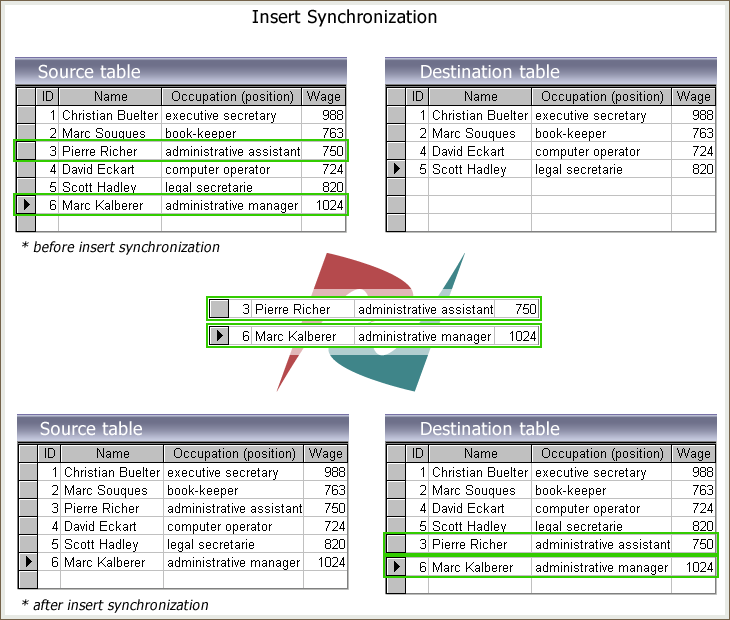
New records from the source table will be copied to the target table if there are no matching records with identical primary key values. As a result of the database synchronization process, the missing rows will be inserted into the target tables.
The following diagram illustrates the "Insert Sync"
Update Synchronization
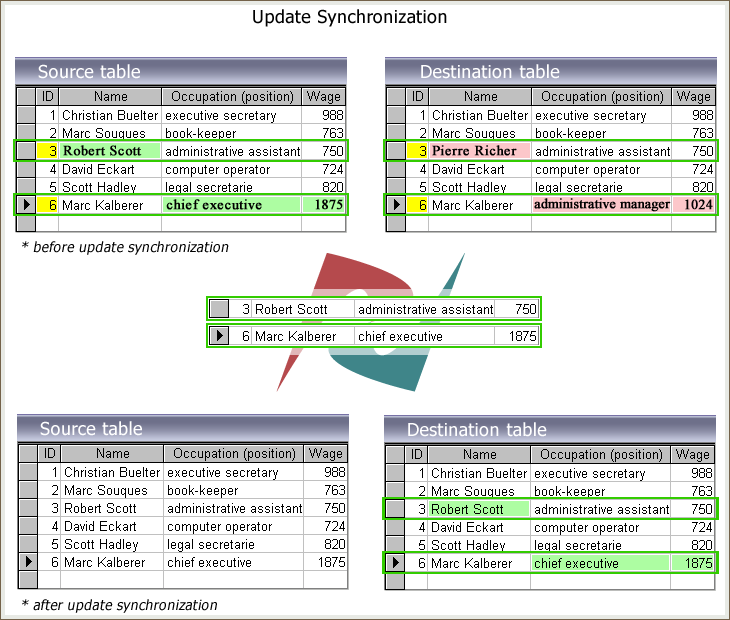
When making changes to the source database, the corresponding changes must be made to the target database. The synchronizer keeps track of the values of the table rows. The changed records will then be replaced in the target tables to confirm the identity between the two tables. As a result of update synchronization, all of your data in the source and destination is constantly updated.
The figure below shows the update synchronization.
Drop Synchronization
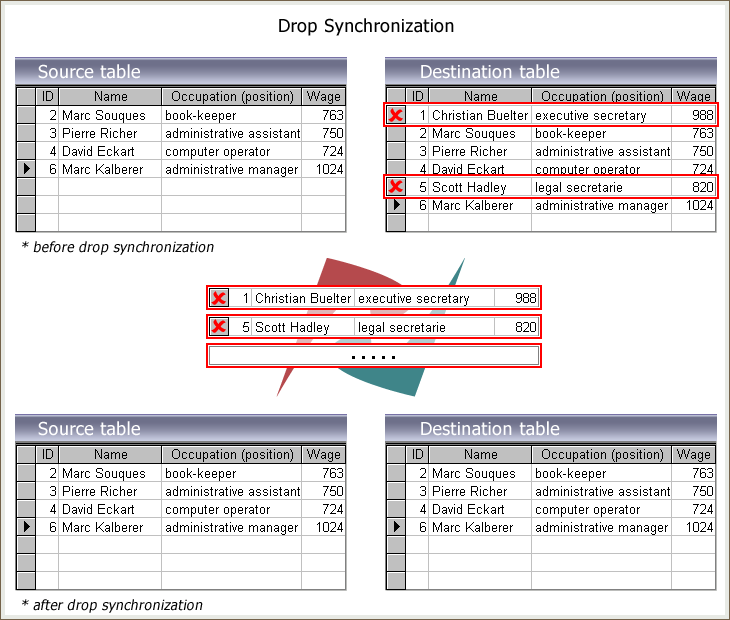
If some records have been removed from the source, the corresponding records must be removed from the destination. These obsolete records will be dropped from the target if they do not exist at the source.
The Drop sync process is shown schematically below.
Mixed Synchronization
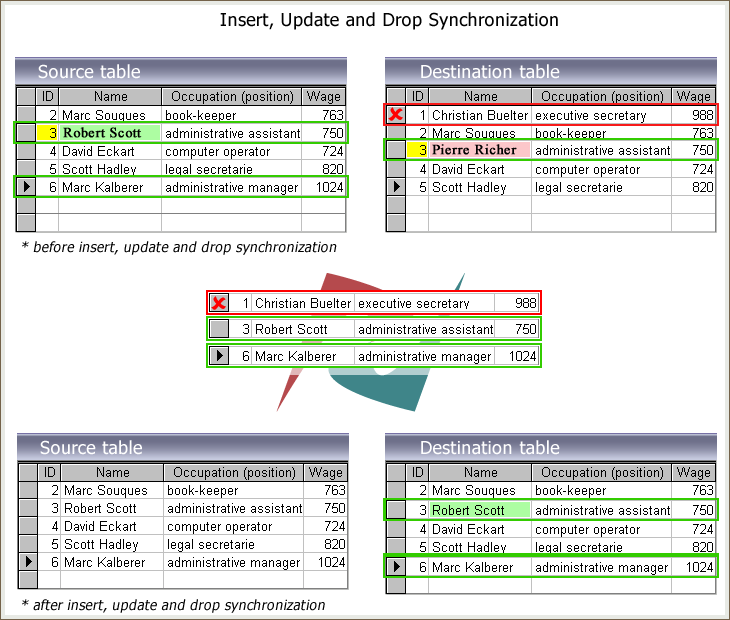
For example, you made changes to your original tables, added completely new records, and removed obsolete rows. To keep your databases up to date, you must add, delete, and update these relevant records in the target database.
Check all the "Insert Sync," "Update Sync," and "Drop Sync" options to get the identical source and target databases.
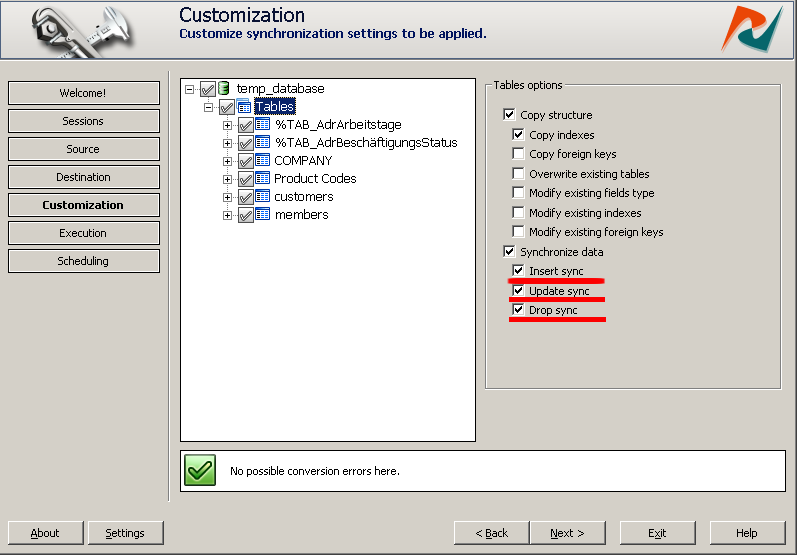
The figure below shows how the insert, update and delete synchronization options in DBSync Tools work together.
Bidirectional Database Synchronization
Bidirectional database synchronization keeps two databases updated in both directions.
Changes made in database A are applied to database B, and changes made in database B
are applied back to database A.
This is useful when two systems must stay active at the same time, for example a
production database and a branch-office database, or two applications that both write
data.
Bidirectional sync needs conflict handling, because the same row can be changed in both
databases before the next sync run. DBSync supports bidirectional synchronization for
many DBConvert database pairs.
Ways to keep two databases in sync, compared
Four approaches solve this problem, and they differ on what they can move and what access they need.
| Approach | Engine pairs | Direction | Mechanism | Runs unattended |
|---|---|---|---|---|
| Native engine replication | same engine only | one-way | engine's own log | yes, via the DBMS |
| Manual export and import | any | one-off | none | no |
| Trigger-based sync tool | any supported pair | one-way or bidirectional | triggers | yes, scheduled |
| Log-based CDC | engines that expose a log | one-way | binlog or WAL | continuous |
Trigger-based sync is worth understanding, because it is the foundation for both one-way and bidirectional sync, not only for two-way. The tool installs INSERT, UPDATE and DELETE triggers on the synchronized tables and records every change to a history table. Each run then reads only the recorded changes instead of comparing the whole dataset row by row, which makes repeated runs on a large database several times faster than a full comparison.
Same engine on both sides? A tool still earns its place
Native replication is built to mirror a whole server to a read-only replica, continuously, and it is configured at server level. That is the right shape for a hot standby. It is the wrong shape for most other jobs, and those jobs are common:
- You need part of the database, not all of it. DBConvert syncs the tables, fields and indexes you select, and a WHERE condition limits which rows move, for example only this year's orders or only one branch's records.
- Both sides accept writes. A replica is read-only, so anything written to it is overwritten on the next run. Bidirectional sync, described above, is the alternative.
- The two schemas are not identical. Native replication assumes they match. DBConvert maps source columns to target columns when names or structures differ.
- You want it on a schedule, not always on. Replication needs a live link between servers. DBConvert saves the job and runs it hourly, nightly, or from the command line, which suits intermittent or VPN links.
So the question is not which engine you run, it is how much control you need over what moves and in which direction. Sync is also not a MySQL and PostgreSQL feature: DBConvert synchronizes across SQL Server, MySQL, PostgreSQL, Oracle, SQLite, Firebird, MariaDB, IBM DB2, Access, FoxPro and DBF, in both same-engine and cross-engine combinations. When FoxPro or DBF is one side of the pair, only one-way sync is available.
What access do you actually need?
This is the question that decides whether a sync is possible at all, and it is worth checking before anything else. Native replication needs server-level work: binary logging enabled in the server configuration, a unique server id on each side, a dedicated replication user, and elevated privileges to point the replica at its source. If you cannot edit the server configuration or restart the instance, that route is closed to you.
A sync tool asks for much less, and it comes in two tiers.
Standard sync needs only an ordinary database login. Host, port, username, password, with permission to read the source and write the target. It compares source and target row by row and applies Insert, Update and Drop. This works on locked-down and hosted databases where you have a user account and nothing more.
Trigger-based sync needs permission to create triggers and tables on both sides, because that is how the change history is recorded. In exchange you get the speed described above and the option of bidirectional sync. If the connecting user is not allowed to create triggers, which is a common restriction on locked-down or hosted databases of any engine, trigger-based sync cannot be set up, and standard sync is the fallback.
So the practical order is: try trigger-based sync, and if the account cannot create triggers, fall back to standard sync rather than abandoning the job.
Database Sync vs CDC Replication
Classic database synchronization usually runs as a controlled job. It compares source
and target tables, detects inserted, updated, and deleted rows, then applies the
selected changes.
CDC replication, or change data capture, works differently. It reads database change
events continuously and applies them downstream with lower delay.
Next Steps
If you need scheduled database synchronization, use DBSync to compare source and target
tables and apply insert, update, delete, mixed, or bidirectional changes across
supported database pairs.
If you need continuous MySQL and PostgreSQL change data capture, use DBConvert Streams for real-time CDC replication.
- DBSync database synchronization tools: https://dbconvert.com/dbconvert-dbsync/
- DBConvert Studio: https://dbconvert.com/dbconvert-studio/
- DBConvert Streams CDC Replication : https://streams.dbconvert.com/cdc-replication/