
MySQL to SQL Server Converter: Complete Migration Guide for 2025
Discover how to migrate from MySQL to SQL Server with zero downtime using advanced no-code tools. This comprehensive guide compares DBConvert, SSMA, and manual approaches, featuring real-world case studies and step-by-step implementation guidance for enterprise-grade database migrations.

Migrating from MySQL to SQL Server represents one of the most critical database operations that IT professionals face today. Whether driven by enterprise integration requirements, performance optimization needs, or business continuity demands, the conversion process requires careful planning, robust database migration tools, and a deep understanding of potential challenges.
A MySQL to SQL Server converter is specialized no-code software designed to automate the complex process of transferring database schema, data, and objects from MySQL databases to Microsoft SQL Server environments. The right MySQL MSSQL converter can mean the difference between hours of downtime and seamless transitions that preserve data integrity while minimizing business disruption - all without requiring any programming expertise or manual scripting.
This comprehensive guide examines the leading MySQL to SQL Server conversion methods, with particular focus on DBConvert as the premier no-code commercial solution for enterprise migrations. We'll explore why organizations migrate, compare available tools, and provide step-by-step implementation guidance to ensure your database migration tool selection and MySQL to SQL Server sync processes succeed without requiring programming skills.
🚀 Ready to start your migration? Try DBConvert for MySQL to SQL Server - Get your free trial and experience seamless database migration with zero downtime through advanced bidirectional synchronization.
Why Migrate From MySQL to SQL Server?
Understanding the motivations behind MySQL to SQL Server migrations helps inform the conversion process and tool selection. Organizations typically pursue this migration for several compelling reasons that directly impact their operational efficiency and strategic goals.
Enterprise Integration Benefits
Microsoft SQL Server offers deep integration with the broader Microsoft technology ecosystem, creating significant advantages for organizations already invested in Windows-based infrastructure. This integration extends to
- Active Directory authentication,
- seamless connectivity with .NET applications, and
- native support for Microsoft's business intelligence tools like Power BI.
SQL Server instances integrate naturally with Azure cloud services, enabling hybrid cloud strategies that many enterprises require. The ability to migrate MySQL databases to environments that support both on-premises and cloud deployments provides flexibility that pure MySQL environments often lack.
Performance and Scalability Advantages
MS SQL Server delivers enhanced performance capabilities through advanced indexing strategies, compression technologies, and parallel execution engines. For organizations processing large volumes of transactional data, these performance improvements can dramatically impact application responsiveness and user experience.
The platform's high availability features, including Always On Availability Groups and transparent data encryption, provide enterprise reliability that many MySQL configurations struggle to match. These capabilities become particularly important as databases grow beyond the multi-terabyte range.
Security and Compliance Features
Regulatory compliance often drives migration decisions, particularly in industries subject to GDPR, HIPAA, or similar data protection regulations. SQL Server's built-in security features include:
- Row-level security for granular access control
- Always Encrypted for protecting sensitive data
- Dynamic data masking to hide sensitive information
- Comprehensive audit trails for compliance reporting
- Advanced threat protection with monitoring capabilities
Additionally, vendor consolidation strategies frequently motivate migrations. Organizations seeking to standardize on Microsoft technologies find significant operational benefits in migrating MySQL databases to SQL Server environments, reducing training requirements and support complexity.
Best MySQL to SQL Server Converter Tools and Methods
Several approaches exist for converting MySQL databases to SQL Server, each offering distinct advantages and trade-offs. Understanding these database migration tools helps determine the best fit for specific migration requirements and organizational constraints.
Manual Export/Import Approach
The manual approach involves using MySQL utilities like mysqldump to export database schema and data, then manually converting SQL scripts for SQL Server compatibility. This method provides maximum control over the conversion process but requires extensive technical expertise and time investment.
Database administrators must manually address data type differences, convert MySQL-specific syntax, and handle stored procedures and triggers individually. While cost-effective for small databases, this approach becomes prohibitively complex for large or mission-critical systems.
Microsoft SQL Server Migration Assistant (SSMA)
SSMA represents Microsoft's free solution for automating MySQL to SQL Server conversions. The tool analyzes MySQL database objects, automatically converts schema definitions, and migrates data while providing detailed conversion reports.
Key SSMA capabilities include:
- MySQL metadata explorer for reviewing source database structure
- Automated schema conversion with limited customization options
- One-way data migration from MySQL to SQL Server
- Support for both on-premises and Azure SQL databases
- HTML reports summarizing conversion statistics and issues
However, SSMA limitations become apparent with complex database designs or non-standard configurations. The tool excels at straightforward migrations but may require significant manual intervention for sophisticated database implementations.
DBConvert: Premier No-Code MySQL MSSQL Converter
DBConvert stands out as the leading no-code MySQL to SQL Server converter for enterprise environments requiring minimal downtime and maximum reliability. Unlike complex migration tools that require programming expertise or manual scripting, DBConvert provides a completely visual, point-and-click interface.
💡 Experience the difference: Download DBConvert free trial and see why enterprises choose DBConvert's no-code approach for their critical MySQL to SQL Server migrations.
Key DBConvert advantages include:
- Live bidirectional synchronization for zero-downtime migrations
- Complete no-code interface requiring zero programming knowledge
- Parallel migration engine reducing transfer times by 60-80%
- Comprehensive object support for tables, indexes, foreign keys, and views
- Professional support included with licensing
- Multi-cloud compatibility supporting Azure, AWS, and Google Cloud
The software's parallel migration engine can reduce downtime for multi-gigabyte databases from several hours to less than one hour. Combined with continuous synchronization features, DBConvert can achieve near-zero downtime for production migrations.
Alternative Database Migration Tools
Several other tools serve specific migration niches:
- FullConvert: High-speed conversion with command-line automation
- Navicat Premium: Cloud-oriented features for hybrid environments
- Skyvia: Cloud-to-cloud migrations with no-code approach
Each alternative tool offers unique capabilities, but most lack the comprehensive feature set and enterprise support that complex migrations demand.
🏆 Tool Comparison: DBConvert vs SSMA vs Manual Migration
| Feature | DBConvert ⭐ | SSMA | Manual |
|---|---|---|---|
| 🔄 Live Sync | ✅ Advanced bidirectional sync | ❌ No | ❌ No |
| ⚡ Speed | 🚀 High (parallel engine) | 🐌 Moderate | 🐢 Slow |
| 💻 Learning Curve | 🟢 No-code interface | 🟡 Moderate | 🔴 High skill required |
| 🛠️ Support | ✅ Professional included | 🟡 Community forums | ❌ None |
| ☁️ Cloud | ✅ Azure, AWS, Google | 🟡 Azure only | ❌ Manual setup |
| 💰 Cost | 💳 Commercial license | 🆓 Free | 💸 Labor costs |
🎯 Winner: DBConvert - Only tool with zero-downtime migrations through live synchronization
Key Differentiators
Live Synchronization: DBConvert's bidirectional sync enables zero-downtime migrations where both databases stay synchronized during the entire migration period. SSMA and manual approaches offer no synchronization capabilities.
Speed & Performance: DBConvert's parallel engine dramatically reduces transfer times for large datasets. SSMA provides moderate single-threaded performance, while manual processes are typically slow and variable.
Ease of Use: DBConvert offers a complete no-code interface requiring zero programming knowledge. SSMA requires moderate technical knowledge, while manual approaches demand high technical skills for SQL scripting and database administration.
Zero-Downtime Migration with Live Synchronization
One of the most critical challenges in database migration is maintaining business continuity during the transition process. Traditional migration approaches require extended downtime, potentially lasting hours or days for large databases, which can be catastrophic for mission-critical systems that operate 24/7.
DBConvert's bidirectional synchronization technology revolutionizes the migration process by enabling zero-downtime migrations for production environments. This advanced capability allows organizations to maintain their MySQL databases fully operational while simultaneously building and testing their new SQL Server environment.
How Live Synchronization Works
The sync process operates in three phases:
Phase 1: Initial Migration - DBConvert performs the complete schema conversion and data transfer while your MySQL database continues serving production traffic.
Phase 2: Continuous Synchronization - Any changes made to the MySQL database (inserts, updates, deletes) are automatically replicated to SQL Server, keeping both databases synchronized.
Phase 3: Seamless Cutover - When ready, simply redirect your applications to SQL Server with minimal downtime (typically under 5 minutes), as both databases are already in sync.

Business-Critical Sync Scenarios
🛒 E-commerce Platforms: Maintain online sales during peak shopping seasons while migrating backend databases. No lost transactions, no downtime during Black Friday or holiday rushes.
🏦 Financial Systems: Ensure compliance and continuous operation for banking, trading, or payment processing systems that require 24/7 availability.
🏥 Healthcare Applications: Migrate patient management systems without interrupting critical care operations or violating HIPAA requirements.
🏭 Manufacturing Operations: Keep production lines running while transitioning to new database infrastructure, preventing costly operational disruptions.
Multi-Location Enterprises: Perform staged migrations across different geographical locations, testing each site before full cutover.
🎯 Experience zero-downtime migration: Start your DBConvert trial and see how bidirectional synchronization transforms risky migrations into smooth transitions.
DBSync: Ongoing Database Synchronization
Beyond migration, DBConvert includes DBSync capabilities for maintaining long-term synchronization between MySQL and SQL Server databases. This feature supports:
- Hybrid environments running both database types
- Disaster recovery scenarios with live backup systems
- Development/testing environments requiring production data sync
- Data warehouse integration keeping analytics systems current
- Compliance requirements maintaining audit-ready replicas
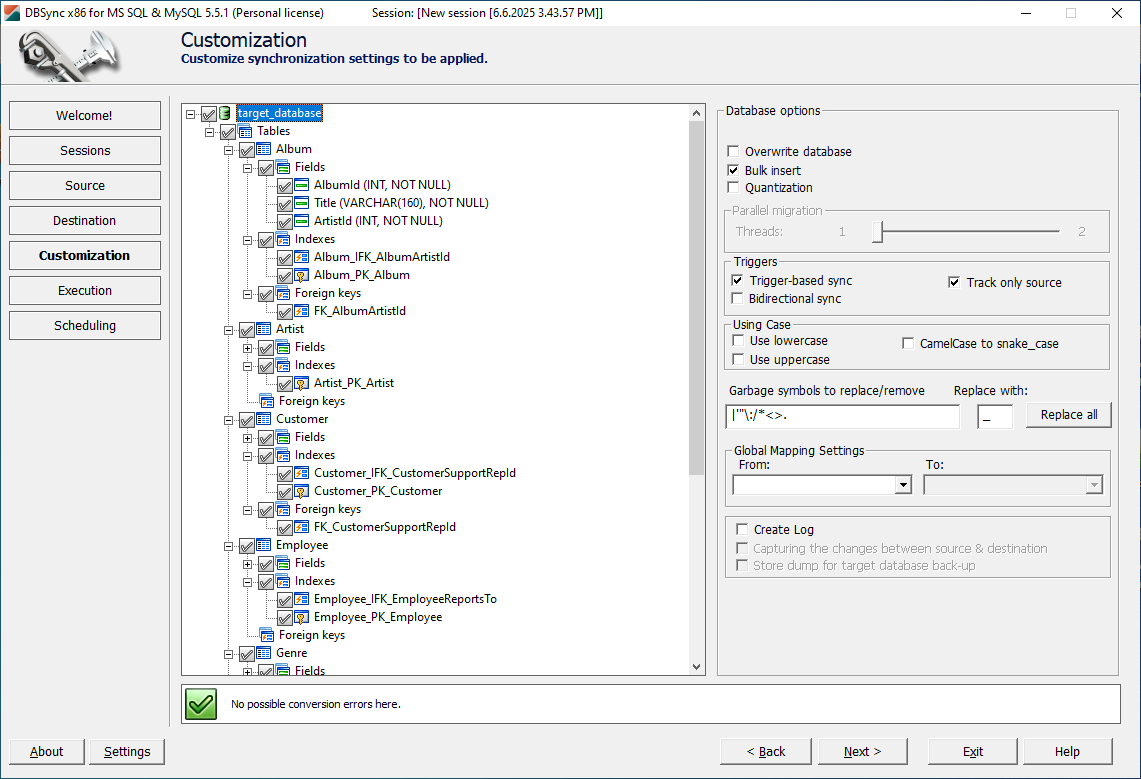
DBSync operates continuously in the background, monitoring changes and applying them automatically using sophisticated Update, Insert, and Drop algorithms that preserve data integrity across platforms.
Step-by-Step: Using DBConvert to Migrate MySQL to SQL Server
This detailed walkthrough demonstrates the complete DBConvert migration process, from initial setup through post-migration validation.
Installation and Configuration
- Download DBConvert from the official website and select the appropriate edition
- Install the standalone tool (no additional database drivers required)
- Configure your migration environment with adequate disk space and network connectivity
- Verify connectivity between source MySQL server and target SQL Server instance
Connecting Source and Target Databases
- Launch DBConvert and create a new migration job
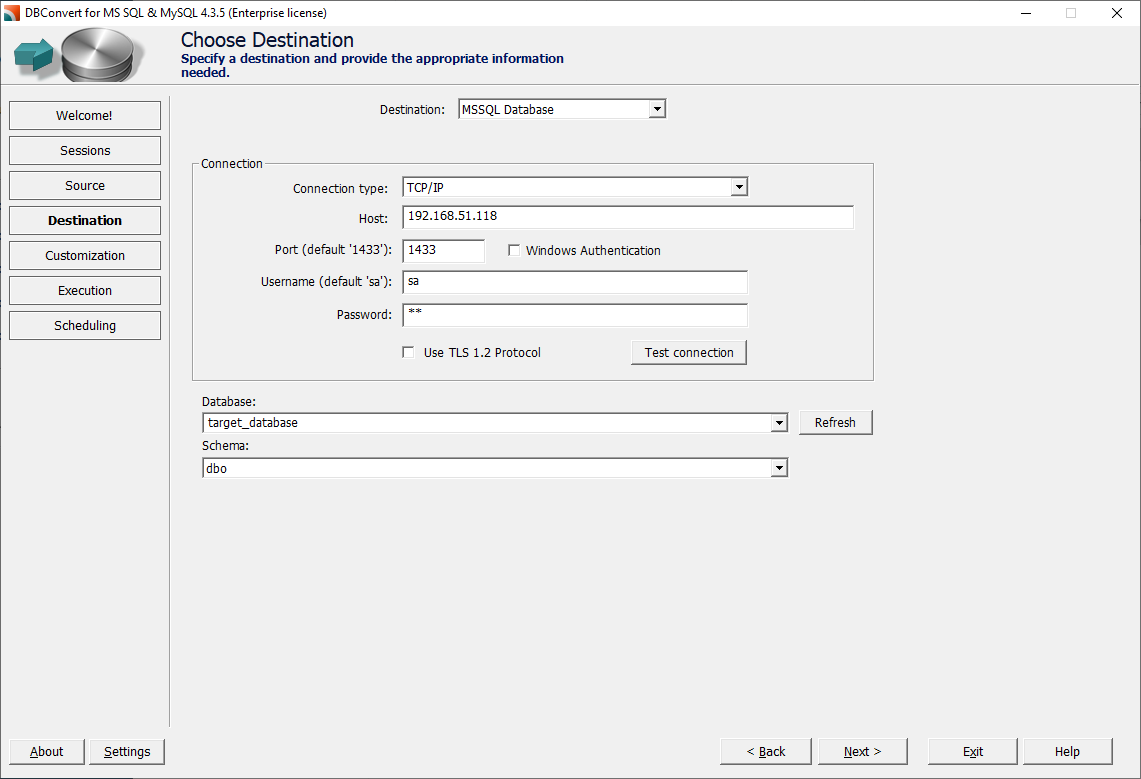
- Configure MySQL connection (hostname, port 3306, database name, credentials)
- Configure SQL Server connection (server instance, target database, authentication)
- Test both connections to ensure proper connectivity

Schema Conversion and Mapping
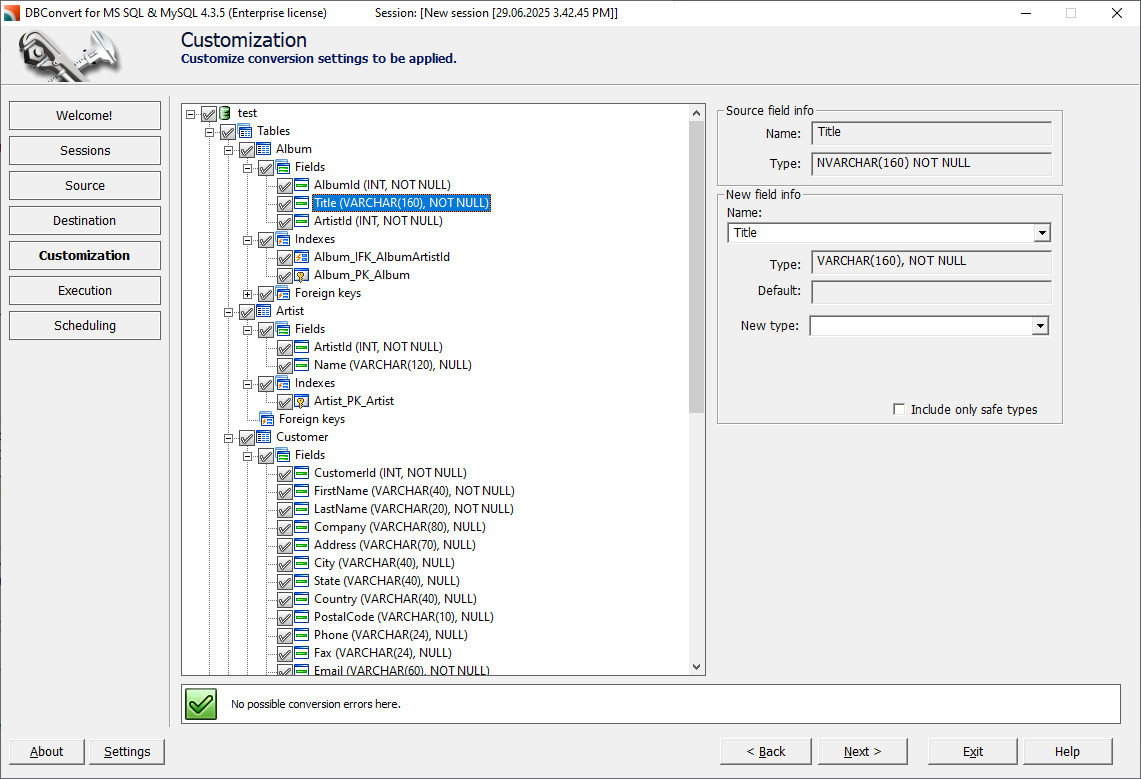
DBConvert's automated schema analysis examines all MySQL database objects and generates corresponding SQL Server definitions automatically.
Example: No-Code Schema Conversion
MySQL Source Table:
CREATE TABLE users (
    id INT AUTO_INCREMENT PRIMARY KEY,
    username VARCHAR(50) NOT NULL,
    email TEXT,
    created_at TIMESTAMP DEFAULT CURRENT_TIMESTAMP,
    status ENUM('active', 'inactive', 'pending')
);
SQL Server Result (automatically generated):
CREATE TABLE users (
    id INT IDENTITY(1,1) PRIMARY KEY,
    username NVARCHAR(50) NOT NULL,
    email NVARCHAR(MAX),
    created_at DATETIME2 DEFAULT GETDATE(),
    status NVARCHAR(20) CHECK (status IN ('active', 'inactive', 'pending'))
);
No coding required - DBConvert handles all data type mappings, constraint conversions, and syntax translations automatically through its visual interface.
Data Transfer and Validation
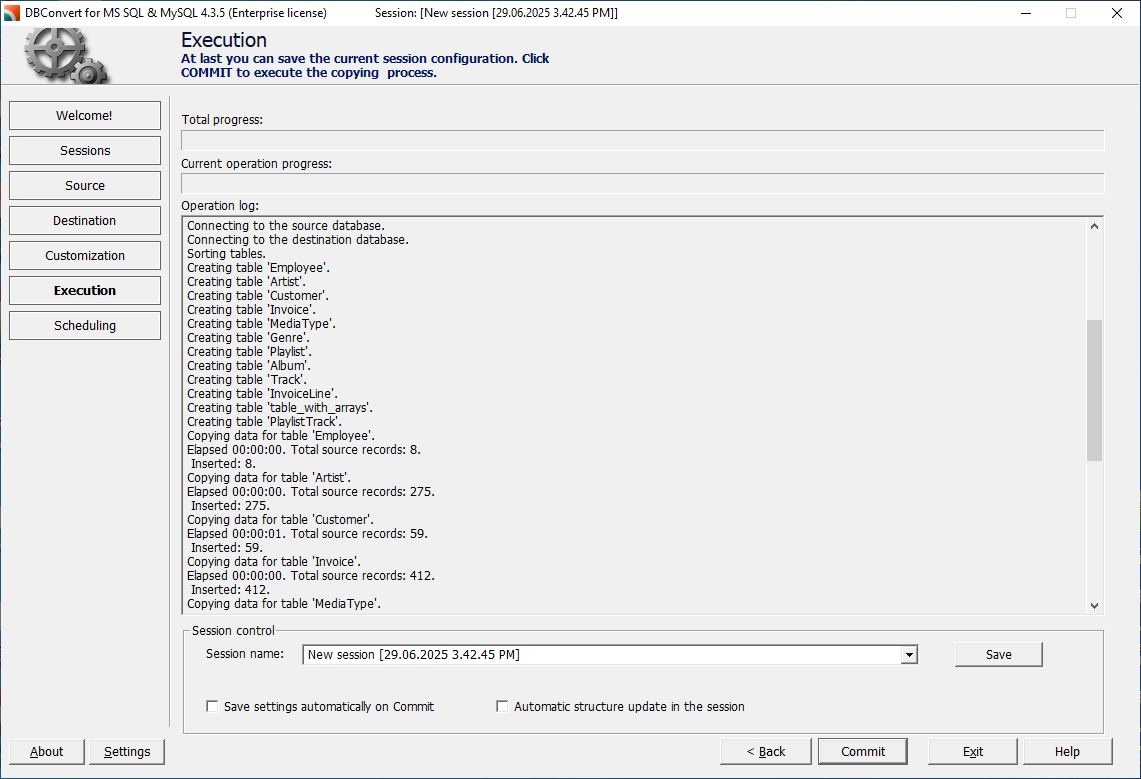
- Initiate migration using DBConvert's parallel migration engine
- Monitor progress through dashboard
- Review built-in validation reports for data integrity verification
- Generate comprehensive migration reports documenting all conversions
Post-Migration Testing
Execute comprehensive testing procedures including:
- Application connectivity testing
- Performance benchmarking
- Functional validation of database objects
- Data integrity verification
Real-World Case Studies: Successful MySQL to SQL Server Migrations
🛒 Case Study 1: E-commerce Platform Migration
Challenge: A growing e-commerce company with 15 million customer records needed to migrate from MySQL to SQL Server to integrate with their Microsoft-based ERP system while maintaining 24/7 availability during 500GB data migration.
Solution: DBConvert's live bidirectional synchronization enabled a completely staged migration with zero business disruption, maintaining database synchronization during a 3-week transition period.
Results:
- Migration completed with zero business downtime (3 minutes traffic redirection)
- Continuous synchronization enabled 3 weeks of parallel testing
- Zero data loss across 50+ tables
- 40% performance improvement in report generation
- Integration with Microsoft Power BI for analytics
🏥 Case Study 2: Healthcare System Database Consolidation
Challenge: Multi-location healthcare provider needed to consolidate three separate MySQL databases into a single SQL Server instance for HIPAA compliance and improved data governance.
Solution: Used DBConvert's advanced filtering and mapping capabilities to merge schemas while maintaining data relationships and comprehensive audit trail features.
Results:
- Successfully consolidated 1.2TB of patient data
- Reduced database maintenance overhead by 60%
- Achieved HIPAA compliance with SQL Server's built-in security features
- Improved query performance by 3x for clinical reporting
🏭 Case Study 3: Manufacturing Company Cloud Migration
Challenge: Manufacturing company migrating from on-premises MySQL to Azure SQL Database for cloud-first strategy, handling production data requiring minimal downtime.
Solution: Phased approach using DBConvert's parallel processing engine and continuous synchronization features to minimize production impact.
Results:
- Migrated 800GB production database with 30 minutes actual downtime
- Live synchronization enabled 2 months of parallel cloud testing
- Reduced infrastructure costs by 35% through cloud optimization
- Enabled analytics integration with Azure services
- Achieved 99.9% uptime improvement through Azure's high availability
Common Challenges and Solutions
Data Type Compatibility Issues
MySQL and SQL Server implement different data type systems that don't always map directly. Common challenges include:
- TEXT vs VARCHAR(MAX): MySQL TEXT converts to SQL Server VARCHAR(MAX)
- ENUM types: Require conversion to CHECK constraints in SQL Server
- Temporal data types: MySQL DATETIME(3) maps to SQL Server DATETIME2 for precision
- TIMESTAMP behavior: Differs significantly between platforms
Solution: DBConvert handles most standard conversions automatically while providing override capabilities for complex mappings.
Character Set and Collation Differences
Character encoding mismatches can cause data corruption during migration. MySQL typically uses UTF-8 encoding, while SQL Server defaults to SQL_Latin1_General_CP1_CI_AS collation.
Solution: DBConvert provides collation mapping tools and converts character data during transfer to ensure compatibility.
Performance Optimization Strategies
Large database migrations stress both network and system resources. Optimization strategies include:
- Parallel processing: Multiple data transfer streams
- Bulk loading techniques: Optimized for large datasets
- Staged migration approaches: Minimize system impact
- Off-peak scheduling: Reduce operational disruption
Solution: DBConvert's parallel migration engine automatically optimizes transfer performance with additional tuning options for very large databases.
Migration Deployment Options
When planning your MySQL to SQL Server migration, selecting the right deployment model is crucial for success:
🏢 On-Premises Deployment
- Benefits: Complete control, data residency compliance, existing infrastructure utilization
- Considerations: Significant upfront investment, ongoing maintenance requirements
- Best for: Organizations with strict compliance requirements or substantial existing infrastructure
☁️ Cloud-Based Deployment
- Benefits: Scalability, reduced maintenance, pay-as-you-go pricing
- Platforms: Azure SQL Database, Amazon RDS for SQL Server, Google Cloud SQL
- Best for: Organizations seeking modernization, rapid scaling, or reduced operational overhead
🔄 Hybrid Deployment
- Benefits: Combines on-premises control with cloud flexibility
- Use cases: Phased cloud migration, disaster recovery, data distribution
- Best for: Large enterprises with complex requirements or gradual cloud adoption strategies
Frequently Asked Questions About MySQL to SQL Server Migration
Q: How long does it typically take to migrate from MySQL to SQL Server?
A: Migration time varies significantly based on database size and complexity. Small databases (under 1GB) can migrate in minutes, while larger databases (100GB+) may take several hours. DBConvert's parallel processing engine can reduce migration time by 60-80% compared to traditional methods. For enterprise databases over 1TB, expect 4-12 hours depending on hardware and network capacity.
Q: Do I need programming skills to use DBConvert?
A: Absolutely not! DBConvert is designed as a complete no-code solution. You simply connect to your MySQL and SQL Server databases through the visual interface, select what you want to migrate, and click start. All schema conversions, data type mappings, and complex transformations happen automatically behind the scenes.
Q: Is it possible to keep MySQL and SQL Server synchronized during migration?
A: Yes! This is one of DBConvert's most powerful features. Live bidirectional synchronization allows you to keep both databases synchronized during the entire migration period - not just during the initial transfer, but continuously as your applications make changes to the MySQL database. This enables zero-downtime migrations where you can test thoroughly, train users, and validate everything works correctly before switching over with minimal disruption (typically under 5 minutes).
Q: How can DBConvert achieve zero-downtime migrations?
A: DBConvert's live synchronization technology enables zero-downtime migrations through a three-phase process:
(1) Initial migration while MySQL continues operating,
(2) Continuous synchronization of all changes, and
(3) Seamless application cutover when ready.
This means your business operations continue uninterrupted while the new SQL Server environment is built and tested in parallel.
Q: What's the difference between DBConvert and free tools like SSMA?
A: While SSMA is free and suitable for basic migrations, DBConvert offers enterprise features including parallel processing, live bidirectional synchronization for zero-downtime migrations, comprehensive object support, and professional support. Most importantly, DBConvert provides a complete no-code experience - no scripting or manual SQL conversion required. The continuous sync capability alone can save organizations thousands in lost revenue by eliminating extended downtime.
Q: Can I migrate to cloud-based SQL Server instances?
A: Yes, DBConvert supports migration to various SQL Server environments including on-premises installations, Azure SQL Database, Azure SQL Managed Instance, and Amazon RDS for SQL Server. The tool handles the different authentication and connectivity requirements for each platform.
Q: Will my applications continue to work after migrating to SQL Server?
A: Application compatibility depends on how your applications connect to the database. Applications using standard SQL queries typically require minimal changes, mainly updating connection strings. However, applications using MySQL-specific functions or syntax may need modifications. DBConvert provides detailed conversion reports highlighting areas that may require application updates.
Q: Can I migrate only specific tables or do I need to migrate the entire database?
A: You can migrate selectively using DBConvert's advanced filtering options. You can choose specific tables, schemas, or even filtered data based on custom criteria. This flexibility is particularly useful for staged migrations or when moving only relevant data subsets.
Conclusion: Successful MySQL to SQL Server Migration
Converting MySQL databases to SQL Server requires careful planning, appropriate database migration tools, and thorough testing to ensure successful outcomes. While multiple approaches exist, DBConvert consistently emerges as the premier MySQL to SQL Server converter for enterprise environments demanding minimal downtime, comprehensive object support, and professional reliability.
The investment in robust MySQL MSSQL converter tools pays dividends through reduced risk, faster implementation, and improved data integrity compared to manual or basic automated approaches. For organizations prioritizing business continuity and operational excellence, DBConvert's advanced synchronization capabilities provide the zero-downtime migrations necessary for successful database transitions without business disruption.
Next Steps for Your Migration Project
- Assess Your Current Environment - Document your MySQL database schema, size, and complexity requirements
- Choose the Right Tool - Evaluate your specific needs against available options, considering factors like downtime tolerance, synchronization requirements, and budget
- Plan Your Migration Strategy - Develop a comprehensive timeline including testing phases, sync periods, and rollback procedures
- Start with a Trial - Test your chosen migration tool with a subset of your data before committing to full migration
Evaluate your specific migration requirements, including database size, complexity, and downtime constraints, then choose the solution that best aligns with your technical requirements and business objectives. The right MySQL to SQL Server converter transforms a potentially disruptive migration into a smooth transition that enables your organization to leverage SQL Server's enterprise capabilities effectively.
🎯 Take the first step toward successful migration: Download DBConvert's free trial and experience the difference that professional-grade, no-code database migration tools with zero-downtime synchronization can make for your organization. With comprehensive support, advanced features, proven reliability, live bidirectional sync capabilities, and zero programming requirements, DBConvert is the trusted choice for enterprise MySQL to SQL Server migrations.

DBConvert Studio's no-code platform migrates between 40+ database types with live synchronization technology that keeps your business running.
Try DBConvert Studio free and experience professional-grade migrations without the complexity.