
How to Migrate MySQL to PostgreSQL: Steps, Data Types, and SQL Rewrites
A practical guide to moving MySQL to PostgreSQL: data-type mapping, copy-paste SQL rewrites (AUTO_INCREMENT, ENUM, unsigned, backticks), and low-downtime CDC cutover.

Both MySQL and PostgreSQL are free and open source, so this move isn't about licensing - it's about capability. Teams move to PostgreSQL for:
- Stricter transactional behavior, transactional DDL, and a stronger integrity model
- A richer type system and constraints, with indexable
JSONB - A deep extension ecosystem (PostGIS for spatial,
pg_trgmfor typo-tolerant text search)
The good news: MySQL and PostgreSQL both speak similar ANSI SQL, so most tables and data move cleanly with the right tool.
What's left is the MySQL-isms - backtick identifiers, AUTO_INCREMENT, ENUM, unsigned integers, zero dates - plus the application SQL and stored routines on top. Here's the whole path at a glance, then the detail, with copy-paste before/after blocks for the common MySQL-isms.
Migrating from Oracle instead? See How to Migrate Oracle to PostgreSQL.
MySQL to PostgreSQL migration checklist
The safe path, top to bottom:
- Assess schema, data size, and how much stored-routine and app SQL you have.
- Convert table structures and data types (
AUTO_INCREMENT,ENUM,TINYINT, unsigned). - Bulk-load data into PostgreSQL (clean up zero dates and charset first).
- Recreate indexes, constraints, and sequences.
- Rewrite and test MySQL SQL and stored routines (AI/tools draft it; you verify the logic).
- Validate counts, reports, and application behavior.
- Go live, with CDC streaming if downtime must be short.
Steps 2-4 (schema, data, indexes) are what a converter automates end to end.
Step 5 - rewriting SQL and stored routines - is human work no matter which tool you use.
Knowing that split up front keeps the project on schedule.
MySQL vs PostgreSQL: the differences that affect migration
These behavioral differences - not the data types - cause most migration surprises. Get them on your radar before you start.
| Behavior | MySQL | PostgreSQL | Migration impact |
|---|---|---|---|
| Identifier case | Depends on
OS / lower_case_table_names | Unquoted names fold to lowercase | Standardize identifiers on lowercase |
| Text comparison | Often case-insensitive collation | Usually case-sensitive | Use citext,
ILIKE, or lower() indexes |
| Booleans | TINYINT(1) | Native
boolean | Map TINYINT(1)
→ boolean deliberately |
| Auto-increment | AUTO_INCREMENT | IDENTITY / serial | Reset the sequence after the load |
| Unsigned integers | INT
UNSIGNED, etc. | None | Widen to a larger signed type |
| Invalid dates | Legacy/non-strict data may hold 0000-00-00 | Rejected | Clean to
NULL before the load |
GROUP BY | Permissive (non-aggregated columns allowed) | Strict ANSI | Every non-aggregated column must
be in GROUP BY |
| JSON | JSON | jsonb (binary,
indexable) | Target jsonb for indexing
and speed |
| Identifier length | Up to 64 chars | 63 chars | Long auto-generated names truncate and can collide |
Step 1 - Assess the MySQL database first
Before moving anything, take inventory. A solid assessment tells you two things: what actually needs to move, and how big the real effort is - which is driven by the SQL your application and routines rely on, not by data volume.
Get the whole picture from one query against the information schema - object counts plus the MySQL-isms you'll have to handle, in a single row:
SELECT
(SELECT COUNT(*) FROM information_schema.tables
WHERE table_schema = DATABASE() AND table_type = 'BASE TABLE') AS tables,
(SELECT COUNT(*) FROM information_schema.views
WHERE table_schema = DATABASE()) AS views,
(SELECT COUNT(*) FROM information_schema.routines
WHERE routine_schema = DATABASE() AND routine_type = 'PROCEDURE') AS procedures,
(SELECT COUNT(*) FROM information_schema.routines
WHERE routine_schema = DATABASE() AND routine_type = 'FUNCTION') AS functions,
(SELECT COUNT(*) FROM information_schema.triggers
WHERE trigger_schema = DATABASE()) AS triggers,
(SELECT COUNT(*) FROM information_schema.columns
WHERE table_schema = DATABASE()
AND (column_type LIKE 'enum%' OR column_type LIKE 'set%')) AS enum_set_cols,
(SELECT COUNT(*) FROM information_schema.columns
WHERE table_schema = DATABASE() AND column_type LIKE '%unsigned%') AS unsigned_cols;

That one row tells you the scope (tables, views), the manual-rewrite load (procedures, functions, triggers), and the MySQL-isms to plan for (enum/set/unsigned columns). Then drill into the exact columns that need a type decision:
SELECT table_name, column_name, column_type
FROM information_schema.columns
WHERE table_schema = DATABASE()
AND (column_type LIKE 'enum%' OR column_type LIKE 'set%' OR column_type LIKE '%unsigned%');
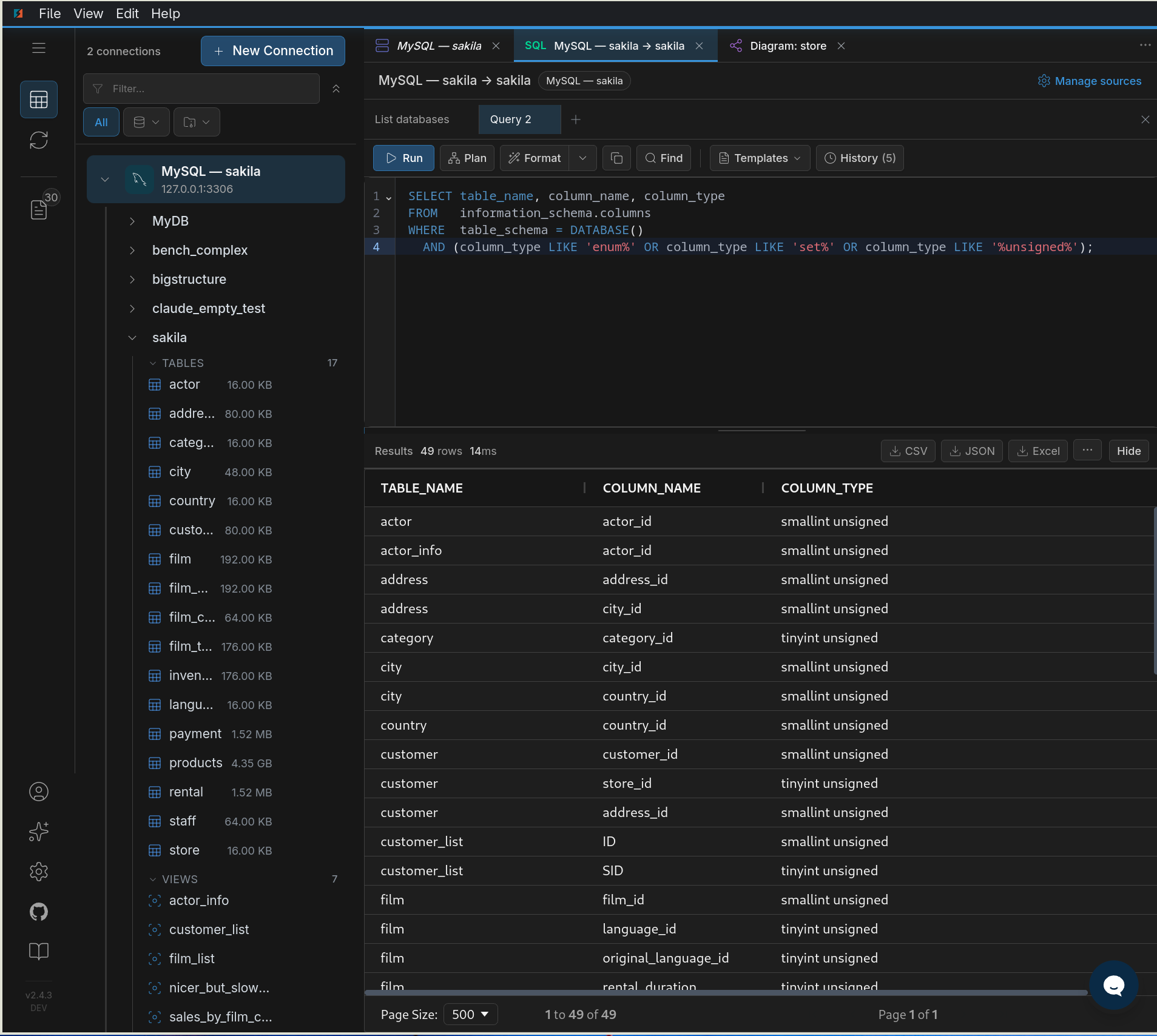
unsigned columns that each need a deliberate type decision.Start by deciding what not to migrate. History and audit tables, staging and temp tables, and old logging tables often don't need to move - archive them on MySQL or export to cold storage instead of carrying dead weight into PostgreSQL. Trimming scope shrinks the data load, the validation surface, and the go-live window.
Then size the SQL. Schema and data move fast; your real effort is the procedural and application SQL: stored procedures, triggers, functions, and the queries in your app that use MySQL-only syntax. Count those - that's your timeline, not the row count.
Decide the migration shape
The counts above point you to one of these. Know which before you start:
- Schema + data only - no stored logic, and the app's SQL is already portable.
- Schema + data + app-SQL rewrite - queries use MySQL-only syntax (backticks,
LIMIT a,b,IFNULL,GROUP_CONCAT). - Schema + data + stored-routine rewrite - procedures, triggers, and functions to port by hand (Step 5).
- Low-downtime with CDC - you can't take a maintenance window, so changes stream during cutover (Step 6).
Step 2 - Move the schema and map the data types
Most MySQL types map cleanly to PostgreSQL. The friction is in a handful of MySQL-specific ones - get these right before any rows move.
| MySQL | PostgreSQL | Notes |
|---|---|---|
INT AUTO_INCREMENT | integer GENERATED ... AS IDENTITY | Or serial/bigserial. See the dialect
section. |
TINYINT(1) | boolean | MySQL uses it as a boolean flag; map deliberately. |
TINYINT / SMALLINT / MEDIUMINT | smallint / integer | No MEDIUMINT; widen to
integer. |
INT
  UNSIGNED
, BIGINT UNSIGNED | bigint / numeric | PostgreSQL has no unsigned — widen the type to fit the range. |
DECIMAL(p,s) / NUMERIC | numeric(p,s) | Exact, unchanged. |
FLOAT / DOUBLE | real / double precision | Inexact, as in MySQL. |
DATETIME | timestamp | No time zone — wall-clock value. |
TIMESTAMP | timestamptz (if it's an instant) | MySQL converts TIMESTAMP via the session time
zone. Map to timestamptz only if the column is a true instant; if the app
used it as local wall-clock, test or use timestamp. |
0000-00-00 dates | NULL (or a real date) | Invalid in PostgreSQL — must be cleaned. See below. |
VARCHAR(n) / TEXT / LONGTEXT | varchar(n) / text | PostgreSQL text is unbounded. |
ENUM('a','b') | text
+ CHECK, or a native enum | Trade-off below. |
SET(...) | text[] or
a junction table | No direct equivalent. |
BLOB / LONGBLOB | bytea | Up to 1 GB per value. |
JSON | jsonb | PostgreSQL jsonb is indexable and
richer. |
Three mappings cause most of the surprises:
No unsigned integers in PostgreSQL. INT UNSIGNED holds values MySQL INT can't. Map it to a wider signed type (INT UNSIGNED → bigint) so the full range fits, or add a CHECK (col >= 0) if you want to keep the non-negative rule.
0000-00-00 is not a valid date. Legacy or non-strict MySQL data can contain the zero date; PostgreSQL rejects it. Decide per column whether it becomes NULL or a sentinel, and clean it during the load (shown in Step 3).
ENUM - pick one of two targets:
text+ aCHECKconstraint - flexible, easy to add values later, plays well with ORMs. The common default.- A native PostgreSQL
enumtype - compact and strict, but adding values requiresALTER TYPE.
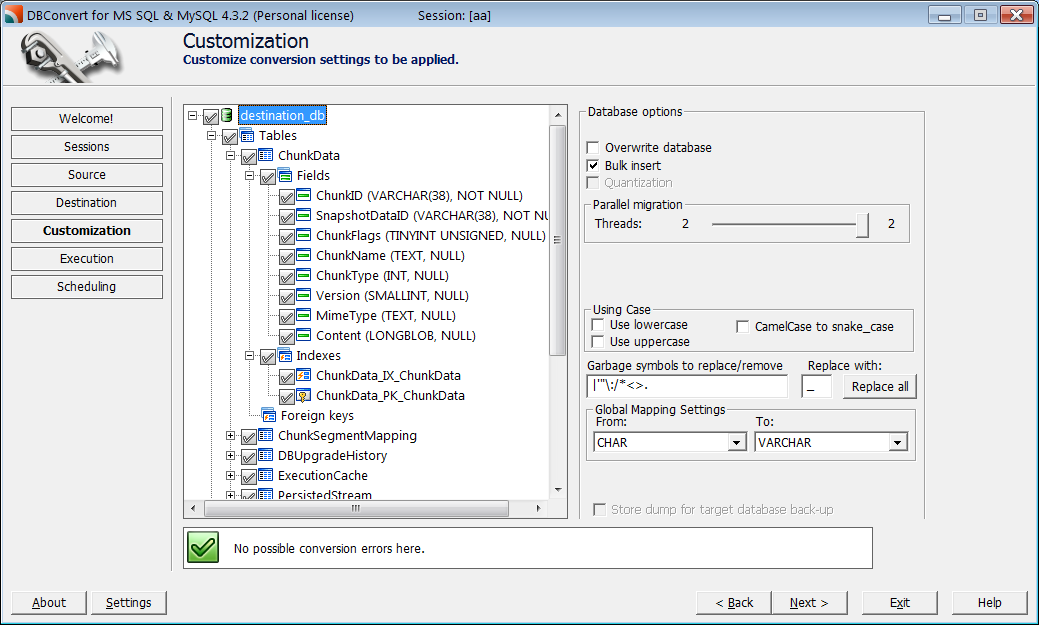
DBConvert handles this step in full. Every MySQL type is mapped to its PostgreSQL equivalent automatically, and the mapping is shown for review before any rows move. Where you want a custom choice - TINYINT(1) → boolean, widening an unsigned column, ENUM → text vs a native type - you set it per column or globally for the whole database, and the load follows your mapping. Tables, columns, data, indexes, primary keys, and relationships transfer in the same job.
What a real edge-case conversion produces
The table above is the plan. To see it in practice we built one MySQL table holding every awkward type at once — unsigned integers at their maximum, ENUM/SET, BIT(8), YEAR, zero dates, a generated column, TIMESTAMP ... ON UPDATE, and utf8mb4 emoji — and ran it through DBConvert. Here are the cases the mapping table above glosses over: the constraints and types DBConvert adds on its own.
| MySQL column | What DBConvert emitted |
|---|---|
INT UNSIGNED AUTO_INCREMENT | bigserial + CHECK (id >= 0 AND id <= 4294967295) |
BIGINT UNSIGNED | numeric(20,0) + CHECK (0 … 18446744073709551615) |
TINYINT UNSIGNED | smallint + CHECK (0 … 255) |
ENUM('active', …) | text + CHECK (col IN ('active', …)) + default kept |
YEAR | smallint |
BIT(8) | bit(8) |
TIMESTAMP … ON UPDATE CURRENT_TIMESTAMP | timestamp DEFAULT CURRENT_TIMESTAMP (auto-update on row change not carried over) |
generated STORED column | plain numeric (computed value copied, not re-generated) |
The data inside survived the awkward cases too: the BIGINT UNSIGNED maximum 18446744073709551615 landed intact in numeric, zero dates became NULL, BIT(8) bytes came across as 10101010, and the utf8mb4 emoji and nested JSON were preserved.
Two things don’t carry over 1:1 — by design, and worth planning for. ON UPDATE CURRENT_TIMESTAMP has no PostgreSQL equivalent (recreate it as a trigger if the app relied on the auto-refresh), and a STORED generated column arrives as a plain column with its computed value copied — re-add it as a PostgreSQL GENERATED ... STORED column if you need it kept in sync.
Step 3 - Move the data
With the schema in place, load the rows. A few things make this faster and safer:
- Add foreign keys, constraints, and most indexes after the load, not before - constraints slow a bulk insert and can fail on out-of-order rows.
- Use bulk copy, not row-by-row INSERT. PostgreSQL's
COPYis dramatically faster for large tables. - Fix the charset up front. Migrate MySQL
utf8mb4to PostgreSQLUTF8; the old MySQLutf8(3-byte) silently truncated 4-byte characters, so verify emoji and CJK text survived.
One cleanup to plan for - the zero date:
-- Legacy/non-strict MySQL data can hold 0000-00-00; PostgreSQL rejects it. Normalize before/at load:
UPDATE orders SET shipped_at = NULL WHERE shipped_at = '0000-00-00';
Prefer not to hand-roll the load? DBConvert moves the data in the same job that built the schema - no COPY scripts to write and maintain:
- The type mapping you confirmed in Step 2 is applied as the rows transfer.
- The job is saved and repeatable - one dry run to validate, then a final production run against the same source.
- The free trial has no speed limit, so measure real throughput on a partial run before you commit.
Always do a dry run first - on a sample, not the whole database. Migrate a
representative slice and check:
- A mix of representative tables plus a capped slice of one large table (LIMIT) -
enough to expose type and memory issues without waiting on a 50M-row load. - Zero dates (0000-00-00) converted as intended.
- ENUM/SET landed the way you chose.
- Unicode/emoji (utf8mb4) survived intact.
- Row counts match on the sample.
- Throughput on the slice - extrapolate it to size the real maintenance window for the
big tables.
Skip the manual schema and type mapping.
DBConvert moves the MySQL schema and data to PostgreSQL automatically:
- Tables, columns, data, indexes, keys, and relationships
- Data-type mapping you review before any rows move (TINYINT(1), unsigned, ENUM)
Stored procedures, triggers, views, and app SQL stay a manual rewrite.
Download the free trial →See the MySQL → PostgreSQL toolStep 4 - Translate the MySQL SQL dialect
This is the part the data tools leave to you - and the part most reference pages list without real examples. Here are the MySQL-isms you'll hit in queries, views, and app code, each with its PostgreSQL rewrite.
Backtick identifiers → double quotes (or none)
MySQL quotes identifiers with backticks; PostgreSQL uses double quotes - and unquoted names fold to lowercase.
-- MySQL
SELECT `id`, `userName` FROM `Orders`;

-- PostgreSQL (prefer unquoted, lowercase)
SELECT id, username FROM orders;
Watch the double quote: in PostgreSQL "x" is an identifier, while 'x' is a string. MySQL code that used "..." for strings must switch to single quotes.
AUTO_INCREMENT → IDENTITY / serial
-- MySQL
CREATE TABLE orders (id INT AUTO_INCREMENT PRIMARY KEY, total DECIMAL(12,2));

-- PostgreSQL
CREATE TABLE orders (
  id    integer GENERATED BY DEFAULT AS IDENTITY PRIMARY KEY,
  total numeric(12,2)
);
After a bulk load, reset the identity/sequence to one past the current max, or the next insert collides:
SELECT setval(
  pg_get_serial_sequence('orders', 'id'),
  COALESCE((SELECT MAX(id) FROM orders), 1),
  (SELECT MAX(id) IS NOT NULL FROM orders)
);
LIMIT offset, count → LIMIT count OFFSET offset
-- MySQL: rows 11-20
SELECT * FROM orders ORDER BY created_at LIMIT 10, 10;

-- PostgreSQL
SELECT * FROM orders ORDER BY created_at LIMIT 10 OFFSET 10;
IFNULL → COALESCE, IF() → CASE
-- MySQL
SELECT IFNULL(phone, 'n/a'), IF(active, 'yes', 'no') FROM customers;

-- PostgreSQL
SELECT COALESCE(phone, 'n/a'), CASE WHEN active THEN 'yes' ELSE 'no' END FROM customers;
ON DUPLICATE KEY UPDATE → INSERT ... ON CONFLICT
-- MySQL
INSERT INTO inventory (sku, qty) VALUES ('A1', 5)
ON DUPLICATE KEY UPDATE qty = VALUES(qty);

-- PostgreSQL
INSERT INTO inventory (sku, qty) VALUES ('A1', 5)
ON CONFLICT (sku) DO UPDATE SET qty = EXCLUDED.qty;
MySQL's REPLACE INTO (delete-then-insert) maps to the same ON CONFLICT upsert in most cases - but watch delete-side effects such as cascades, triggers, and auto-generated values, since ON CONFLICT DO UPDATE updates the row instead of deleting it.
GROUP_CONCAT → string_agg
-- MySQL
SELECT user_id, GROUP_CONCAT(tag SEPARATOR ',') FROM tags GROUP BY user_id;

-- PostgreSQL
SELECT user_id, string_agg(tag, ',') FROM tags GROUP BY user_id;
Other quick swaps
NOW()works in both;CURDATE()→CURRENT_DATE;DATE_FORMAT(d, fmt)→to_char(d, fmt)(different format codes).CONCAT(a, b)works in both, but in PostgreSQL||returnsNULLif any operand isNULL.UPDATE t JOIN t2 ...→UPDATE t SET ... FROM t2 WHERE ....# comment→-- comment.
GROUP BY is stricter in PostgreSQL
MySQL lets you SELECT non-aggregated columns that aren't in the GROUP BY. PostgreSQL enforces the ANSI rule: every selected column must be aggregated or listed in GROUP BY.
-- MySQL (allowed): name isn't grouped or aggregated
SELECT user_id, name, COUNT(*) FROM orders GROUP BY user_id;

-- PostgreSQL: add name to GROUP BY (or aggregate it)
SELECT user_id, name, COUNT(*) FROM orders GROUP BY user_id, name;
Case sensitivity and collation
Many MySQL installations use a case-insensitive collation by default, so WHERE name = 'bob' matches Bob. PostgreSQL text comparisons are case-sensitive unless you opt in - so the same query can return nothing after the move.
Where your app relied on case-insensitive matching, use ILIKE, a lower(col) expression index, the citext extension, or a nondeterministic collation.
Step 5 - Port stored procedures, triggers, and functions
This is the hard stage, and it's worth being blunt: no automated tool should be treated as producing production-ready PL/pgSQL for non-trivial stored routines. Converters scaffold a translation you then fix by hand; AI assistants help with boilerplate; everything non-trivial gets human review and testing.
The bottleneck has shifted: AI-assisted translation can speed up the first draft, but the real work is verifying that the business logic survived and behaves correctly on PostgreSQL - transaction boundaries, error handling, and edge cases. Estimate this stage by review and test time, not typing time.
What changes moving MySQL SQL/PSM to PL/pgSQL:
- Routine syntax. MySQL
CREATE PROCEDURE ... BEGIN ... ENDbecomes a PostgreSQLFUNCTION/PROCEDUREwith a$$ ... $$ LANGUAGE plpgsqlbody and aDECLAREsection. - Triggers are two pieces in PostgreSQL: a trigger function plus a
CREATE TRIGGERthat calls it (MySQL inlines the body). - Error handling. MySQL
DECLARE ... HANDLER→ PostgreSQLEXCEPTION WHEN .... - Flow and variables (
IF/LOOP/WHILE,DECLARE v ...) carry over with PostgreSQL syntax.
DBConvert keeps this boundary clear: schema, data, indexes, keys, and relationships are migrated by the tool; stored logic and app SQL stay a separate rewrite-and-test track.
Step 6 - Validate and go live
Before you switch the application:
- Compare row counts table by table, and spot-check aggregates (
SUM/MIN/MAX) on key columns. - Re-run representative queries and reports against PostgreSQL and diff the results.
- Reset every sequence/identity to
MAX(id)(see Step 4) so the first insert doesn't collide. - Verify migrated objects - tables, indexes, constraints, keys, and relationships; rewritten views and routines checked separately.
Run the same cheap checksum on both sides and compare - row count plus a few aggregates catches most silent data loss:
SELECT COUNT(*), MIN(id), MAX(id), SUM(total) FROM orders;
For the switch itself, two shapes:
- Big-bang: freeze writes on MySQL, run the final load, switch the app. Needs a maintenance window sized to your data volume (time a dry run first).
- Near-zero downtime: keep MySQL live, do the bulk load, then keep PostgreSQL current with change data capture (CDC) until you flip the app over.

DBConvert Streams does log-based CDC from MySQL to PostgreSQL for exactly this window - the target stays in sync while you test, and the switch is just a connection-string change. (For the one-time bulk conversion, see the MySQL → PostgreSQL tool.)
After go-live: tune PostgreSQL
A freshly loaded database has no statistics, so the first reports can feel slow until you settle it in:
- Run
ANALYZE(orVACUUM ANALYZE) so the planner has current statistics. - Check the indexes are in place. If you deferred them during a manual load, create them now; DBConvert brings them over with the job.
- Recheck case-insensitive lookups - add
citextor expression indexes where MySQL's collation used to handle it. - Install the extensions your schema needs -
PostGISfor spatial,pg_trgmfor typo-tolerant / partial-match text search (also speeds upLIKE '%...%'),jsonbfeatures for what was MySQLJSON.
The DBConvert fast path (schema + data)
For the schema-and-data part, DBConvert is the direct path - review the mapping, run a repeatable job, validate, then rerun against production:
- Connect to the MySQL source and the PostgreSQL target.
- Review the type mapping - the proposed MySQL → PostgreSQL types are shown before anything runs; override per column (e.g.
TINYINT(1)→boolean, unsigned widening). - Run the job - tables, columns, data, indexes, keys, and relationships transfer in one pass. Save it as a repeatable job for a dry-run-then-production workflow.
- Add sync (optional) for a near-zero-downtime switch.
That is the point of using DBConvert here: take the mechanical migration work off the table - schema, data, indexes, keys, relationships, type mapping, repeatable runs, and optional CDC - so the team spends its time on the part no tool can safely fake: application SQL and stored-routine logic. The PostgreSQL migration tool page lists the other sources DBConvert moves into Postgres the same way.
Ready to move the schema and data now?
DBConvert migrates the MySQL schema and data to PostgreSQL - no scripting. You get:
- Tables, data, indexes, keys, and relationships, moved automatically
- Reviewed type mapping and repeatable jobs
- Optional CDC sync (DBConvert Streams) for a low-downtime cutover
Stored routines and app SQL still need review.
Download the free trial →See the MySQL → PostgreSQL toolMySQL to PostgreSQL migration tools compared
There's no single right tool - it depends on where your migration is hardest and where PostgreSQL is hosted.
| Route | Best for | Watch out |
|---|---|---|
| DBConvert + Streams | Reviewable MySQL → PostgreSQL schema and data conversion, repeatable jobs, bidirectional support, plus log-based CDC for low-downtime cutover | Stored routines and app SQL still need review — that is business logic, not table movement |
| pgloader | Free one-time bulk schema + data load (handles casts, indexes, zero dates) | Mapping set in a load file, not a GUI; one-shot; one-way |
| AWS DMS | When the whole migration already lives inside AWS and you accept the AWS workflow | Heavy setup for a MySQL → PostgreSQL move, AWS-specific, data-movement first; schema objects, indexes, routines, privileges, and many MySQL edge cases stay separate |
All three leave stored procedures, triggers, and app SQL as manual work - that part is the migration itself, not the tooling.
FAQ
Can I migrate MySQL to PostgreSQL for free? pgloader is the free CLI route for a one-time load. DBConvert is the commercial path when you want reviewed type mapping, a repeatable migration job, GUI control, and optional CDC instead of maintaining load scripts yourself. Either way, stored routines and app SQL are a manual rewrite - that's business logic, not table movement.
How long does a MySQL → PostgreSQL migration take? Schema and data are quick - hours to a day or two depending on volume. The timeline is driven by SQL: stored routines and the MySQL-specific syntax in your application. Size that first (see Step 1) before you commit to a date.
Does DBConvert convert stored procedures and triggers? No. DBConvert handles schema, data, indexes, keys, relationships, and sync. Stored procedures, triggers, functions, views, and app SQL are rewritten and tested separately - see Step 5.
What is the best way to handle MySQL ENUM in PostgreSQL? Two good options. Map it to text with a CHECK constraint when you want flexibility - it's easy to add values later and plays well with ORMs (the common default). Use a native PostgreSQL enum type when you want it compact and strictly constrained, accepting that adding values needs ALTER TYPE. Avoid leaving it as plain text with no constraint - you lose the validation ENUM gave you.
Can PostgreSQL read MySQL data during the migration? Yes - a foreign data wrapper (mysql_fdw) lets PostgreSQL query MySQL tables as foreign tables, which is handy for staged, table-by-table moves. To keep the two in sync while you test and cut over, change data capture is the cleaner path - DBConvert Streams streams MySQL changes to PostgreSQL continuously until you flip the app.
What's the trickiest part of MySQL → PostgreSQL? The MySQL-isms with no direct equivalent: unsigned integers, ENUM/SET, 0000-00-00 dates, and MySQL's case-insensitive comparisons. Each needs a deliberate decision, not an automatic cast.
Can I migrate PostgreSQL back to MySQL? Yes - the schema-and-data path works both directions, and the same dialect differences apply in reverse. DBConvert supports PostgreSQL → MySQL as well.
Conclusion
The MySQL → PostgreSQL move splits cleanly in two. The schema-and-data transfer is mechanical and well-automated. The real work is the MySQL-isms - AUTO_INCREMENT, unsigned, ENUM, zero dates, backticks, case sensitivity - plus the stored routines and app SQL built on top.
The playbook: move the structure and data with a tool, translate the dialect with the patterns above, port and test the routines by hand, validate, then go live - optionally with DBConvert Streams keeping MySQL and PostgreSQL in sync until the cutover.