
How to Convert PostgreSQL to SQL Server – Complete Migration Guide
Learn how to convert PostgreSQL to SQL Server with minimal downtime. Covers schema conversion, sync options, tools like DBConvert, SSMA, AWS DMS, and more.”

Introduction
Migrating a PostgreSQL database to Microsoft SQL Server requires careful planning due to differences in data types, procedural logic, and SQL dialects. PostgreSQL, as an open source RDBMS, is known for its extensibility and support for structured and semi-structured data. If you're preparing to convert PostgreSQL to SQL Server, this guide will walk you through each phase — from schema conversion and data transfer to validation and performance tuning.
Whether you're aligning with a Microsoft tech stack, integrating with Azure, or centralizing analytics, SQL Server offers strategic advantages like tighter enterprise integration, BI tooling, and broader compatibility with Microsoft services.
Migration Method Decision Tree
How much downtime can you tolerate?
├── Zero/Minimal Downtime
│   ├── Large Database (>100GB) → AWS DMS + Delta Sync
│   └── Medium Database (<100GB) → DBConvert with Live Replication
├── Planned Downtime (4–8 hours)
│   ├── Complex Schema → SSMA + Manual Verification
│   └── Simple Schema → DBConvert One-time Migration
└── Extended Downtime Acceptable
    └── Any Size → Manual Export/Import (Most Control)

Comparing PostgreSQL and SQL Server – Key Differences
Enhanced Data Type Mapping
| PostgreSQL | SQL Server | Notes |
|---|---|---|
| SERIAL | INT IDENTITY | Auto-increment preserved |
| BOOLEAN | BIT | TRUE/FALSE → 1/0 |
| TEXT | NVARCHAR(MAX) | Unicode-safe |
| VARCHAR(n) | NVARCHAR(n) | Encoding may differ |
| INTEGER | INT | Direct mapping |
| BIGINT | BIGINT | Direct mapping |
| NUMERIC | DECIMAL | Precision maintained |
| TIMESTAMP | DATETIME2 | Higher precision in SQL Server |
| BYTEA | VARBINARY(MAX) | Binary support |
| JSONB | NVARCHAR(MAX)/JSON | SQL Server 2016+ supports native JSON |
| ARRAY | NVARCHAR(MAX) | Convert to JSON or normalize |
| UUID | UNIQUEIDENTIFIER | Direct with formatting |
| INTERVAL | No direct equivalent | Emulate with DATEDIFF/DATEADD |
| ENUM | CHECK constraints | Use lookup tables |
| Custom Types | User-defined types | Manual recreation required |
Complex Data Structures
Arrays: Normalize, store as JSON, or as delimited strings (discouraged).
Custom Types/Domains: Rebuild as user-defined types or base + constraints.
JSON Support:
PostgreSQL: Offers robust support for semi-structured data with native JSONB data type, including JSON data and XML documents. You can store and query JSON files alongside traditional relational data, with functions to extract and manipulate JSON data efficiently. Supports JSON operators like ->, ->>, #> for easy querying.
SQL Server: Since SQL Server 2016, provides JSON functions but stores JSON as NVARCHAR(MAX) (no native JSON data type). Key functions include:
JSON_VALUE()- extract scalar valuesJSON_QUERY()- extract objects/arraysJSON_MODIFY()- update JSON dataOPENJSON()- parse JSON into rowsFOR JSON- format query results as JSON
Index Type Mapping:
| PostgreSQL Index | SQL Server Equivalent | Fact-Checked Notes |
|---|---|---|
| GIN (JSONB) | ❌ No direct equivalent | Use computed columns to extract JSON values + indexes on them. SQL Server lacks native JSON indexing. |
| GIN (arrays) | ❌ No array support | Normalize arrays into related tables or serialize to JSON. SQL Server has no native array types. |
| Partial indexes | ✅ Filtered indexes | Both allow indexing a subset of rows using a WHERE clause. SQL Server supports this via CREATE INDEX ... WHERE. |
| GIN (full-text) | ✅ Full-text indexes | SQL Server full-text search supports stemming, thesaurus, proximity, etc. PostgreSQL uses tsvector and tsquery. |
| GiST (spatial) | ✅ Spatial indexes | SQL Server has spatial indexes on geometry and geography. PostgreSQL uses GiST with PostGIS. |
| GIN (XML) | ✅ XML indexes | SQL Server has primary and secondary XML indexes for XPath/XQuery. PostgreSQL handles XML with functions, but lacks native XML indexing. |
| — | ✅ Columnstore indexes | SQL Server feature for analytics/OLAP, offering compression and batch processing. PostgreSQL has BRIN and FDW-based solutions, but not a direct match. |
Stored Procedure Migration Complexity
PostgreSQL's PL/pgSQL differs from T-SQL in exception handling, cursor logic, and overloading. Security models (e.g., row-level security) also differ. Most complex logic requires manual rewrites.
Access Control and Security Mapping
PostgreSQL and SQL Server use different authentication and permission systems. During migration, user access and security policies must be carefully translated.
PostgreSQL Roles ➜ SQL Server Logins and Users
-- In SQL Server:
CREATE LOGIN app_user WITH PASSWORD = 'StrongPassword123';
CREATE USER app_user FOR LOGIN app_user;
EXEC sp_addrolemember 'db_datareader', 'app_user';
- PostgreSQL roles can own schemas and objects. In SQL Server, this is typically separated between logins (server) and users (database).
- Translate grants and privileges accordingly using
GRANT,DENY, and role membership.
Row-level Security:
- PostgreSQL supports RLS via
CREATE POLICY. SQL Server uses security predicates (FILTERorBLOCK) viaCREATE SECURITY POLICYin Enterprise edition only.
Pre-Migration Planning and Assessment Checklist
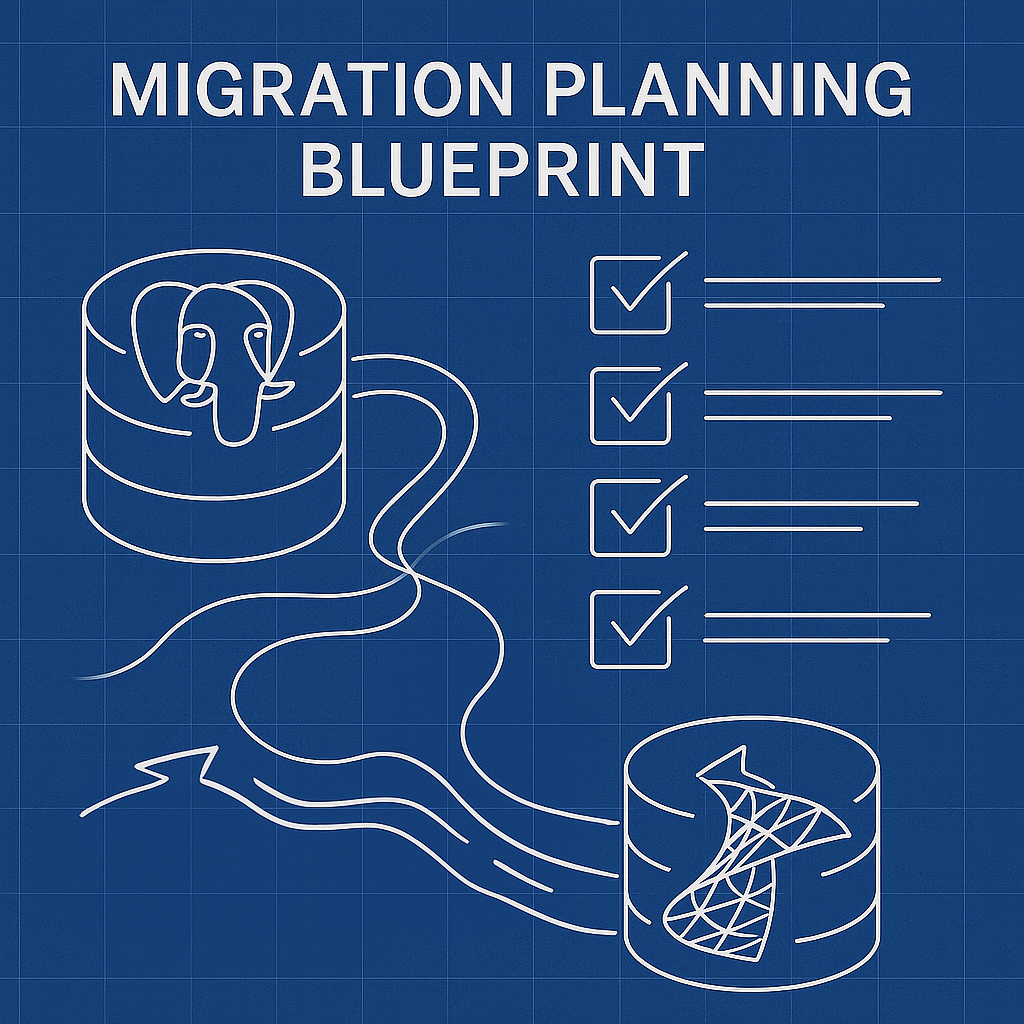
- [ ] Review PostgreSQL version and extensions
- [ ] Inventory schema objects (tables, triggers, views, etc.)
- [ ] Review and document the entire database schema
- [ ] Identify custom types, arrays, and advanced features
- [ ] Map types to SQL Server equivalents
- [ ] Backup PostgreSQL source database
- [ ] Verify data integrity
- [ ] Prepare target SQL Server instance
- [ ] Ensure network access
- [ ] Choose cutover or sync strategy
- [ ] Confirm user roles and privileges
Migration Cost Planning
Comprehensive Cost Analysis by Database Size:
| Size | Manual Labor | SSMA Time | DBConvert | AWS DMS Cost |
|---|---|---|---|---|
| <10GB | 1–2 days | 4–8 hrs | $179 + 2hrs | $50–100 |
| 10–100GB | 3–5 days | 1 day | $179 + 4hrs | $200–500 |
| >1TB | 2–4 weeks | 4–7 days | $179 + custom | $2000+ |
Project Planning Questions:
- What's your acceptable downtime window?
- Do you have PostgreSQL and SQL Server expertise in-house?
- What's your budget for tools vs. labor?
- How complex are your stored procedures and custom functions?
Rollback and Contingency Planning
Even with proper planning, it's essential to prepare for rollback:
- Backup Both Systems:
- Use
pg_basebackuporpg_dumpfor PostgreSQL. - Use
BACKUP DATABASEin SQL Server.
- Use
- Read-Only Mode:
- Keep PostgreSQL in read-only after cutover for fallback use.
- Reverse Sync Plan:
- Use DBSync or scripts to sync back changes from SQL Server if the new system fails.
- Testing Environment:
- Clone both databases and simulate rollback before production migration.
Migration Success Example
E-commerce Platform Migration
- Size: 500GB, 200 tables, heavy JSON use
- Method: DBConvert with bidirectional sync
- Timeline: 2 weeks prep, 4-hour cutover
- Key Challenge: Converting JSONB product data
- Result: 99.7% uptime
Migration Tools and Strategies
SQL Server Migration Assistant (SSMA)
Free Microsoft tool supporting schema and data conversion.
- ✅ Great for complex schemas
- ❌ Windows-only, limited automation
AWS Database Migration Service (DMS)
Supports minimal-downtime, large-scale migrations.
- ✅ Cloud-native, handles replication
- ✅ Supports migration to Amazon RDS
- ❌ AWS-only, setup complexity
DBConvert Solutions
GUI-driven migration and bidirectional sync
- ✅ Supports one-time or continuous migration
- ✅ Allows hybrid operation between PostgreSQL and SQL Server
- ✅ Easy UI, auto mapping, visual sync
- ❌ Commercial license, Windows desktop client
Consolidated Data Transfer Methods
Method 1: Manual Bulk Export/Import
PostgreSQL Export:
# Using COPY command
COPY tablename TO 'C:\data.csv' DELIMITER ',' CSV HEADER;

# Alternative using pg_dump
pg_dump -U user -s -d mydb -f schema.sql
pg_dump -U user -d mydb -t tablename --column-inserts > data.sql
SQL Server Import:
BULK INSERT dbo.tablename
FROM 'C:\data.csv'
WITH (
  FIRSTROW = 2,
  FIELDTERMINATOR = ',',
  ROWTERMINATOR = '\n',
  CODEPAGE = '65001'
);
Method 2: Trigger-Based Synchronization
Capture data changes via triggers; replicate to SQL Server using intermediary tables or tools like DBConvert DBSync.
Method 3: Incremental Sync
PostgreSQL logical decoding → Change capture → SQL Server apply. Useful for live cutovers or A/B testing.
Step-by-Step Migration Execution
Phase 1: Schema Preparation
- Translate DDL scripts
- Apply data type mapping
- Rebuild foreign keys and indexes
Phase 2: Data Transfer
- Disable constraints temporarily
- Perform bulk or synced transfer
- Re-enable integrity rules
Phase 3: Post-Migration
- Rebuild indexes
- Update statistics
- Test performance and app behavior
Performance Considerations
Indexing Strategies
| PostgreSQL | SQL Server |
|---|---|
| Partial Index | Filtered Index |
| Expression Index | Computed Column + Index |
| GIN/GiST (text) | Full-Text Index |
Optimization Nuances
- PostgreSQL ANALYZE ≠ SQL Server auto stats
- Memory: shared_buffers (PG) → buffer pool (SQL)
- Isolation: Repeatable Read (PG) ≈ Snapshot (SQL)
Performance Expectations During Migration
General Performance Considerations:
- Simple queries (SELECT, INSERT, UPDATE): Usually perform similarly or better in SQL Server
- Complex joins: SQL Server's query optimizer may provide different execution plans
- JSON operations: PostgreSQL JSONB typically outperforms SQL Server JSON due to binary storage and native indexing
- Full-text search: SQL Server's full-text capabilities may offer advantages in specific scenarios
- Bulk operations: ⚠️ Depends - SQL Server BULK INSERT is efficient, but PostgreSQL's COPY is also very fast. SQL Server may outperform for parallel bulk load if configured properly (e.g.,
TABLOCK, batching). Performance depends on disk, memory, and indexes.
Migration Performance Tips:
- Always benchmark your specific workload after migration
- SQL Server's Query Store helps identify performance regressions
- Consider SQL Server's specialized indexes for your PostgreSQL advanced indexing needs:
Enhanced Validation and Testing
Row Count Check
-- PostgreSQL
SELECT relname, n_live_tup FROM pg_stat_user_tables;

-- SQL Server
SELECT t.name, SUM(p.rows)
FROM sys.tables t
JOIN sys.partitions p ON t.object_id = p.object_id
WHERE p.index_id < 2 GROUP BY t.name;
Random Sampling
-- PostgreSQL
SELECT * FROM tablename TABLESAMPLE SYSTEM(1);
-- SQL Server
SELECT TOP 100 * FROM tablename TABLESAMPLE(1 PERCENT);
Query Plan Comparison
- Use
EXPLAIN (ANALYZE)in PostgreSQL - Use Execution Plan Viewer in SQL Server Management Studio
Common Pitfalls and Fixes
Character Encoding
- Use
NVARCHARin SQL Server - Specify
CODEPAGE = '65001'for UTF-8 CSVs
Case Sensitivity
- PostgreSQL is case-sensitive by default
- SQL Server is case-insensitive unless collation changed (e.g.,
SQL_Latin1_General_CP1_CS_AS)
NULLs in Constraints
- PostgreSQL allows multiple NULLs in unique indexes
- SQL Server treats NULLs as equal → use filtered indexes
CREATE UNIQUE INDEX idx_name ON tablename(column) WHERE column IS NOT NULL;
Post-Migration Monitoring & Observability

After cutover, use SQL Server's built-in tools to ensure system health:
- Query Store – track query performance regressions over time.
- SQL Profiler / Extended Events – capture slow queries, timeouts, and failed logins.
- Dynamic Management Views (DMVs) – inspect memory usage, locking, blocking.
- Azure Monitor / AWS CloudWatch – for cloud-hosted environments.
Consider setting up alerts for:
- Query timeouts > 5s
- Replication lag (if still syncing)
- CPU/IO spikes
Walkthrough: Migrating PostgreSQL to SQL Server Using DBConvert
DBConvert / DBSync for PostgreSQL and SQL Server simplifies schema and data migration with bidirectional sync support.
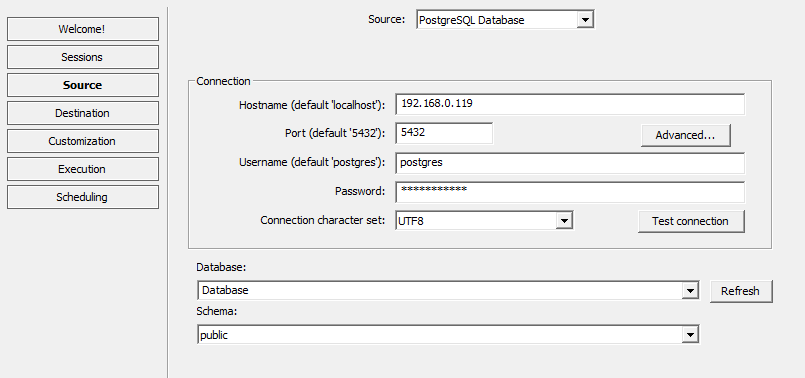
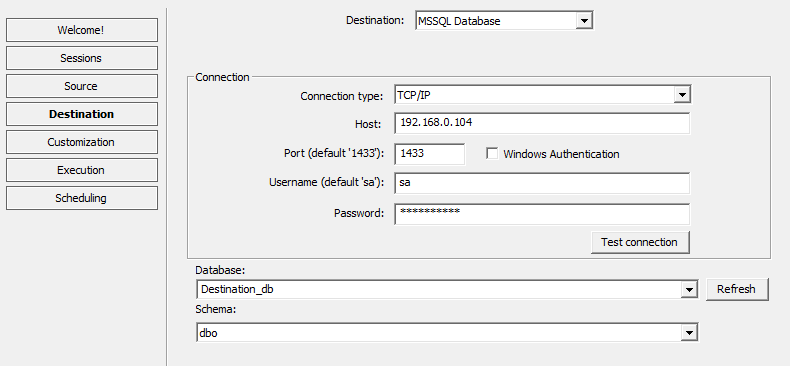
Step 1 – Connect Databases
- Launch app, enter credentials
- Test PostgreSQL and SQL Server connections
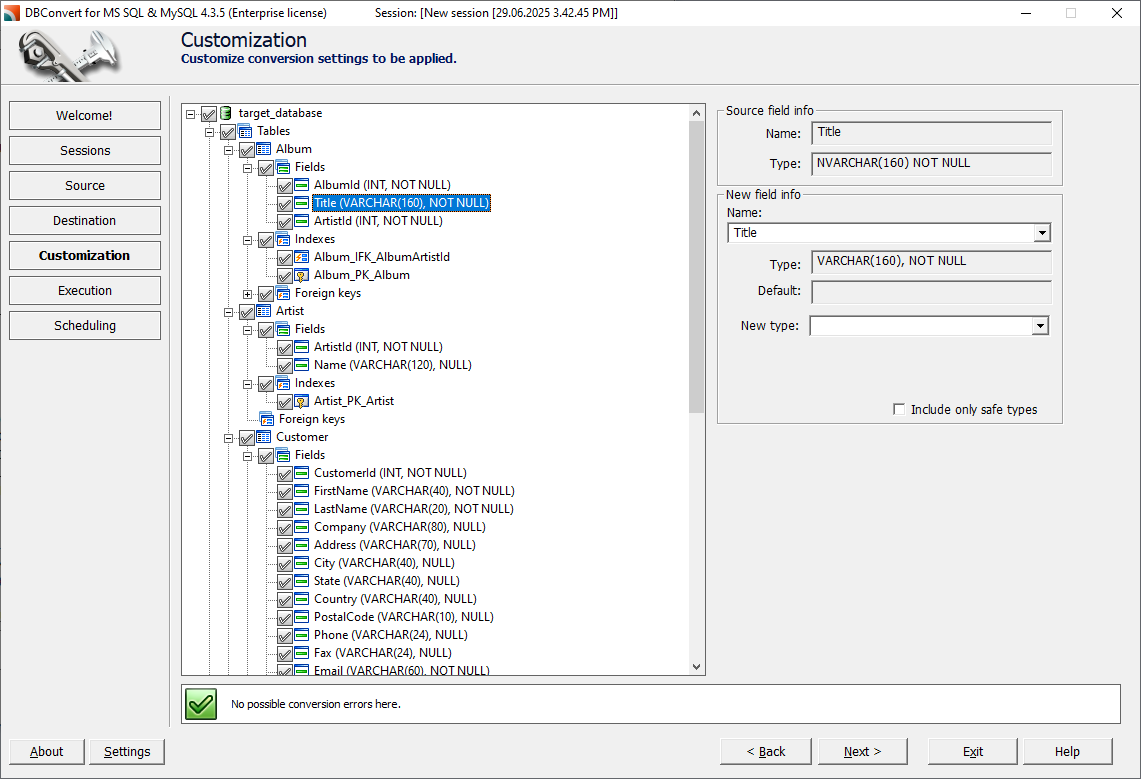
Step 2 – Customize Table and Database options
- Select objects to migrate


Step 3 – Adjust Type Mappings
- Customize mappings (e.g., ARRAY → JSON)
- Preview field-level transformations
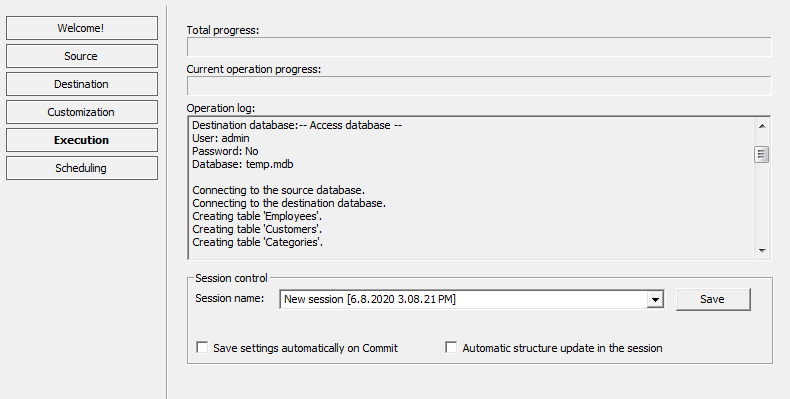
Step 4 – Execute Migration
- Track real-time progress, monitor logs
- Verify data integrity during transfer
Step 5 – Enable Sync
- Use DBSync for synchronization.

Frequently Asked Questions (FAQ)
Q: Can I migrate stored procedures automatically?
A: Tools like SSMA can convert simple procedures, but complex PL/pgSQL logic often requires manual rewriting due to differences in exception handling, cursor usage, and function overloading.
Q: What's the best tool for large databases (>100GB)?
A: AWS DMS or DBConvert with live replication are ideal for handling high volumes with minimal downtime.
Q: How can I handle PostgreSQL arrays in SQL Server?
A: Convert arrays to JSON strings, normalize into separate tables, or store as delimited values (least recommended).
Q: Is PostgreSQL's JSONB fully compatible with SQL Server JSON?
A: Not directly. SQL Server JSON lacks some PostgreSQL JSONB operators. Rewrite queries using JSON_VALUE() and OPENJSON().
Q: Can I maintain bidirectional sync during migration?
A: Yes. DBConvert supports bidirectional synchronization so both systems stay in sync during testing or phased cutover.
Q: What about licensing costs?
A: SSMA is free. DBConvert is commercial (~$179+). AWS DMS incurs hourly compute charges.
Q: Do SQL Server and PostgreSQL treat NULLs the same?
A: No. PostgreSQL allows multiple NULLs in unique constraints. SQL Server treats NULLs as equal, so filtered indexes are needed.
Q: Do I need to rewrite all queries?
A: Most SELECTs transfer with little change, but complex procedures and syntax differences (e.g., LIMIT vs TOP) require adjustments.
Ready to Migrate from PostgreSQL to SQL Server?
Whether you're planning a quick migration or a zero-downtime switchover, the tools and strategies in this guide provide a solid foundation.
For PostgreSQL to SQL Server migrations with bidirectional sync, visual mapping, and no scripting required, try DBConvert tools — trusted by thousands of teams worldwide. The bidirectional sync capability allows you to:
- Keep both databases synchronized during testing and transition phases
- Run parallel systems while validating application compatibility
- Maintain data consistency across hybrid environments
- Enable safe rollback scenarios if issues arise during cutover
For universal database migrations beyond PostgreSQL and SQL Server, explore DBConvert Studio — supporting 40+ database types including Oracle, MySQL, SQLite, MongoDB, and cloud platforms. Studio provides the same intuitive interface and sync capabilities across the entire database ecosystem.