
Best Ways to Convert MSSQL to MySQL: A Step-by-Step Guide
Learn how to convert Microsoft SQL Server (MSSQL) to MySQL efficiently with this comprehensive step-by-step guide. Explore migration tools, compare options like AWS DMS, and avoid common pitfalls while reducing costs and gaining cloud-native flexibility.

Migrating from Microsoft SQL Server (MSSQL) to MySQL is a strategic move many organizations consider to optimize costs, leverage open-source advantages, or transition to cloud-native environments. Whether you are dealing with a single SQL Server database or multiple SQL Server instances, understanding how to efficiently convert SQL Server to MySQL is crucial for a smooth transition.
In this guide, we will explore why migrating from SQL Server to MySQL makes sense, common challenges you might face during the migration process, and practical solutions using tools like DBConvert and DBSync. We will also compare these tools with alternatives such as AWS Database Migration Service and MySQL Workbench, helping you choose the best approach for your needs.
Introduction to Database Migration
Database migration is the process of moving data, schema, and database objects from one database management system to another. This is often necessary when organizations want to switch from a proprietary database like Microsoft SQL Server to an open-source solution such as MySQL.
Migrating a SQL Server database to a MySQL database can help reduce costs, improve flexibility, and take advantage of the robust community support that MySQL offers. However, database migration is not just about copying data—it involves careful planning, understanding the differences between the two systems, and ensuring that all aspects of the source SQL Server database are accurately represented in the new MySQL environment.
Why Migrate from SQL Server to MySQL?
Choosing to convert MSSQL to MySQL is often driven by several compelling factors:
Cost Optimization
Microsoft SQL Server is a powerful, proprietary database system widely used in enterprise environments, but it comes with significant licensing costs. The Enterprise version of SQL Server can cost $13,748 for a 2-core license, making it a substantial expense for businesses. SQL Server Express, while free, has limitations such as a maximum database size of 10 GB per database and 1.4 GB memory limit.
Platform Flexibility and Performance
MySQL is an open-source relational database management system known for its portability, scalability, and support across many operating systems, including Windows, macOS, and various Linux distributions. MySQL installs faster and offers fewer tuning configuration knobs, making it ideal for startups, SaaS platforms, and companies optimizing cloud infrastructure.
Strategic Advantages
- Reduced licensing expenses enable organizations to allocate resources to other priorities
- Broader ecosystem of tools and integrations available
- Cloud-native compatibility where MySQL is often the preferred database system
- Community support providing valuable resources for troubleshooting and optimization
- No vendor lock-in allowing greater flexibility in technology choices
However, the migration process requires careful handling of database schemas, stored procedures, and data types to ensure application continuity and data integrity.
Pre-Migration Considerations
Before beginning the migration process, thoroughly assess your current SQL Server database and plan for a smooth transition to MySQL:
Database Assessment
- Evaluate database complexity including tables, relationships, and custom logic
- Identify data type incompatibilities - SQL Server data types such as
uniqueidentifierdo not have direct equivalents in MySQL and may require special handling - Review performance requirements to ensure MySQL can meet your application's needs
- Document stored procedures and triggers that will need manual conversion
Critical Preparation Steps
- Create comprehensive backups of both source SQL Server and target MySQL databases before starting migration
- Set up proper migration environment with necessary tools and connectivity
- Plan testing phases to validate migration results
- Establish rollback procedures in case issues arise
Common Migration Challenges
Converting SQL Server to MySQL presents several challenges that must be addressed to achieve a successful migration:
Data Type Mismatches
SQL Server data types such as uniqueidentifier do not have direct equivalents in MySQL, while binary types map to MySQL's BINARY, VARBINARY, or BLOB types depending on size. Mapping SQL Server data types to corresponding MySQL equivalents requires careful adjustment to avoid data loss or corruption.
| SQL Server Type | MySQL Equivalent | Notes |
|---|---|---|
| UNIQUEIDENTIFIER | VARCHAR(64) or CHAR(36) | No native UUID type in older MySQL |
| NVARCHAR(MAX) | LONGTEXT | Character set considerations |
| DATETIME2 | DATETIME | Precision differences |
| BIT | TINYINT(1) | Boolean representation |
| MONEY | DECIMAL(19,4) | Fixed-point arithmetic |
| BINARY(n) | BINARY(n) or MEDIUMBLOB | Depending on length |
| VARBINARY(n) | VARBINARY(n) or LONGBLOB | Depending on length |
SQL Syntax Differences
SQL Server uses T-SQL, a proprietary extension of SQL, which differs significantly from MySQL's SQL dialect. This affects stored procedures, triggers, and complex queries that may not translate directly.
Database Objects Conversion
Views, stored procedures, and triggers are often proprietary and require manual rewriting when moving to MySQL, as automated tools typically do not convert them fully.
Constraint Compatibility
Constraints and foreign key implementations may behave differently between the two systems, necessitating validation and possible schema redesign.
Production Environment Requirements
For production environments, maintaining data consistency during migration or enabling ongoing synchronization between SQL Server and MySQL can be complex.
⚡ DBConvert & DBSync: Simplify MSSQL → MySQL Migration
To address the complexities of migrating from SQL Server to MySQL, specialized tools like DBConvert and DBSync offer user-friendly, Windows-based solutions designed to streamline the database migration and synchronization process. These tools simplify the entire migration project, reducing manual effort and minimizing errors during data type mapping and conversion.
| Feature | DBConvert (One-Time Migration) | DBSync (Ongoing Sync) |
|---|---|---|
| 🔁 Mode | Full schema + data transfer | Trigger-based sync between MSSQL & MySQL |
| 🎯 Use Case | One-time migration | Keep databases updated automatically |
| 🖥 Interface | Windows Desktop GUI + CLI | Windows Desktop GUI + CLI |
| 🧠 Object Support | Tables, views, indexes | Tables, views, indexes |
| ⚠️ Stored Procedures / Triggers | ❌ Not migrated (manual conversion required) | ❌ Not supported |
| 🧩 Conflict Handling | Manual review / merge options | Configurable conflict resolution |
| 💾 Storage | Local or networked environments; dump files supported | On-premise or remote servers; dump files supported |
Key Advantages of DBConvert & DBSync:
- No vendor lock-in - works with both on-premises and cloud-hosted databases (AWS RDS, Azure SQL Database, Google Cloud SQL, DigitalOcean Managed Databases, etc.)
- Comprehensive data type mapping with intelligent conversion suggestions
- User-friendly interface that doesn't require deep database expertise
- Flexible deployment options supporting on-premises, cloud, and hybrid environments
- Proven reliability with extensive testing across different SQL Server and MySQL versions
DBConvert is ideal for one-time migrations where you need to convert your SQL Server database schema and table data into a MySQL schema.
DBSync, on the other hand, is designed for ongoing data integration, keeping your SQL Server and MySQL databases synchronized using trigger-based replication.
For users who need both migration and synchronization capabilities, DBConvert Studio provides an all-in-one solution that combines the power of DBConvert and DBSync in a single comprehensive platform. This unified tool streamlines your entire database workflow, from initial migration to ongoing synchronization, making it the perfect choice for complex database management scenarios.

🧰 How to Migrate SQL Server to MySQL with DBConvert
Migrating your database from SQL Server to MySQL using DBConvert is a straightforward process. Follow these steps to convert your MS SQL Server database into a MySQL database:
Step 1: Installation and Setup
Install DBConvert/ DBSync on your Windows machine that has access to both the source SQL Server instance and the target MySQL server instance. The tool requires minimal system resources and can be installed quickly.
Step 2: Configure Source Connection
- Select SQL Server as the source and choose the ODBC connection method
- Specify connection parameters including driver, server, credentials, and database
- Click the Test Connection button to verify successful connection to your SQL Server instance

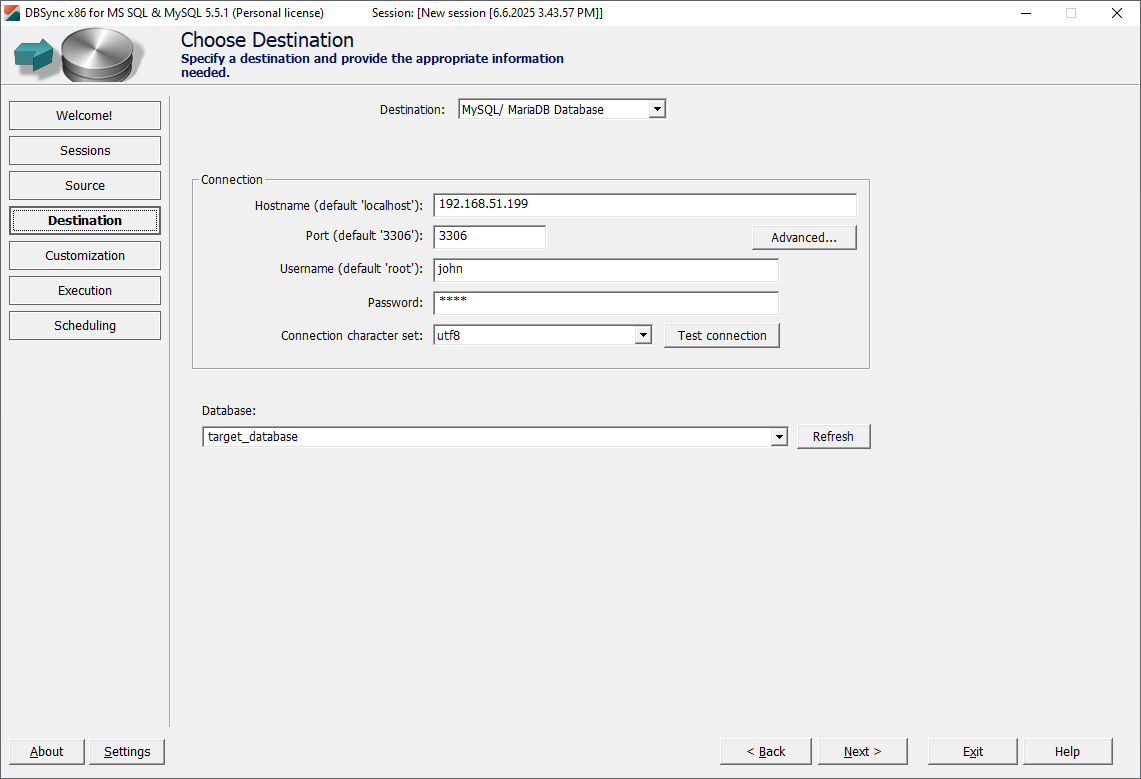
Step 3: Configure Target Connection
- Select MySQL as the target database system
- Configure connection parameters for your MySQL server
- Test the connection to ensure DBConvert can access your target MySQL environment
- Select the create schema option to establish the new database structure
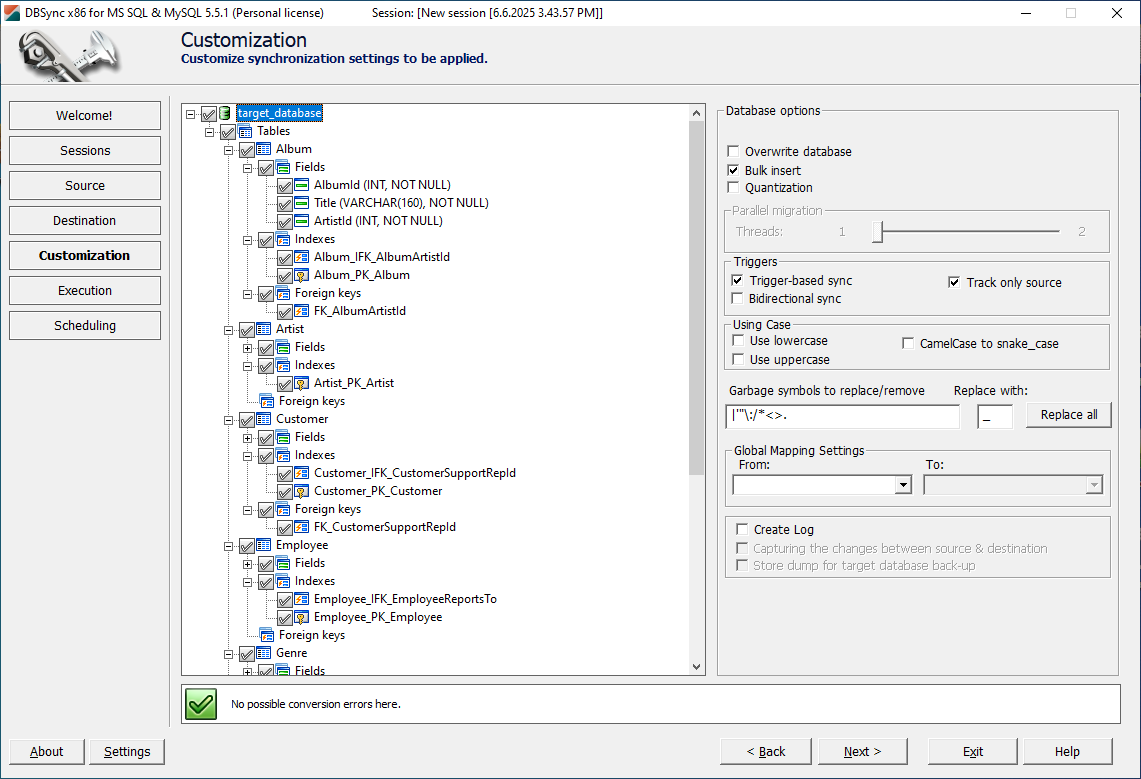
Step 4: Object Selection
- Choose tables and views you want to migrate from the source database
- Review database objects including indexes and constraints
- Select additional options such as data-only or structure-only migration if needed
Step 5: Data Type Mapping Review
- Review automatic data type mappings suggested by DBConvert
- Adjust mappings as needed - for example, mapping SQL Server
NVARCHARto MySQLVARCHAR - Handle special cases like
uniqueidentifierfields by converting them to suitable MySQL data types - Verify column mappings to ensure accurate data type conversions and attribute settings

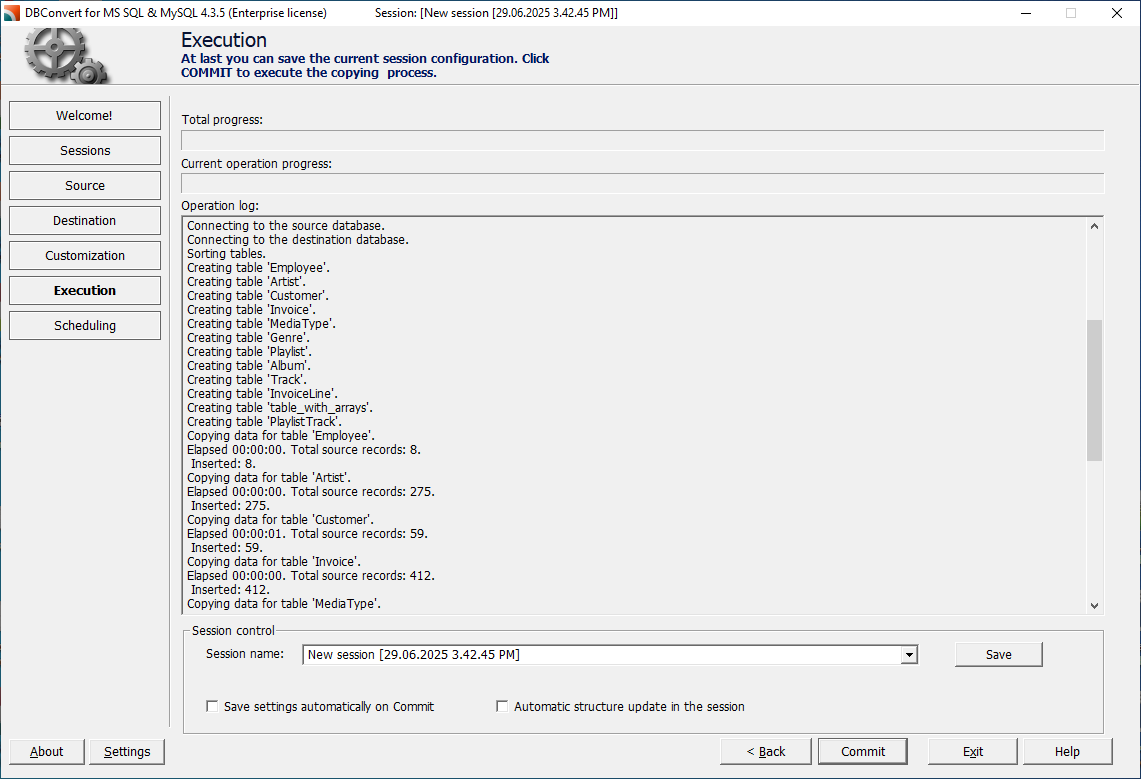
Step 6: Execute Migration
- Run the migration process - DBConvert will transfer database schemas and table data
- Monitor progress through the detailed progress indicators
- Review any warnings or conversion notes during the process
Step 7: Validation
- Verify results by querying the target MySQL database
- Check data integrity and completeness
- Validate row counts match between source and target
- Test application connectivity to the new MySQL database
⚠️ Important Note: Stored procedures and triggers from SQL Server are not automatically converted and must be manually rewritten using MySQL syntax. DBConvert provides detailed logs of what was migrated to help you identify what needs manual conversion.
🔄 Keeping Databases in Sync with DBSync
For environments where ongoing synchronization between SQL Server and MySQL is required—such as maintaining a production SQL Server database alongside a staging or reporting MySQL database—DBSync offers a robust, trigger-based replication solution.
DBSync Workflow:
Setup Phase
- Connect both databases using native clients.
- Configure source and target with proper credentials and access rights
- Specify the target RDBMS to ensure compatibility and proper schema mapping
Synchronization Configuration
- Choose sync direction - one-way (SQL Server to MySQL) or bidirectional synchronization
- Select tables and columns to include in synchronization
- Set synchronization frequency based on your business requirements
Monitoring and Management
- Start the sync process and monitor through the DBSync desktop UI
- Review detailed logs and status updates in real-time
- Handle conflicts using configurable resolution strategies
- Maintain foreign key integrity during synchronization
DBSync Benefits:
- Trigger-based synchronization works effectively without SQL Server Change Data Capture (CDC)
- Compatible with various SQL Server editions including SQL Server Express Edition
- Near real-time or scheduled sync options to match your performance requirements
- Conflict resolution strategies to handle concurrent updates
- Comprehensive logging for troubleshooting and audit purposes
🆚 DBConvert vs AWS DMS & Manual Scripts
When considering how to convert MSSQL to MySQL, you might evaluate alternatives such as AWS Database Migration Service (DMS) or writing custom migration scripts. Here's how DBConvert and DBSync compare:
| Tool | Pros | Cons |
|---|---|---|
| AWS DMS | ✅ Cloud-native deployment ✅ CDC-based real-time sync |
❌ Locked into AWS ecosystem ❌ Complex setup and configuration ❌ Potentially high ongoing costs |
| Manual Scripts | ✅ Full control over migration logic ✅ No licensing costs |
❌ Time-consuming development ❌ High risk of bugs and data loss ❌ No built-in sync support |
| DBConvert/DBSync | ✅ Intuitive GUI and CLI ✅ No vendor lock-in ✅ Works offline or in any cloud environment ✅ Proven data type mapping ✅ Comprehensive error handling |
❌ Windows-only deployment ❌ Commercial licensing required |
Why Choose DBConvert & DBSync? DBConvert and DBSync strike the perfect balance by providing easy-to-use tools that handle schema and data migration without vendor lock-in or cloud dependencies. This makes them especially suitable for teams seeking a straightforward, reliable migration process without the overhead of complex cloud services or risky manual scripting.
🆚 What About MySQL Workbench?
MySQL Workbench is a free, graphical tool that includes a migration wizard supporting Microsoft SQL Server to MySQL conversion. While useful for experimental or very simple migrations, it has significant limitations:
MySQL Workbench Limitations:
- Complex setup requirements including configuring ODBC drivers and SQL Server native client connections
- No real-time synchronization or ongoing data integration capabilities
- Limited conversion support for views, with no support for triggers or stored procedures
- No automation features - no scheduling, command-line interface, or batch operations
- Minimal error handling compared to specialized migration tools
When MySQL Workbench Might Work:
- Quick, one-time migration of very simple database schemas
- Experimental or development environment migrations
- Small databases with minimal complexity
Why DBConvert Is Better:
For production environments, complex schemas, or any scenario requiring ongoing synchronization, DBConvert and DBSync offer significantly more robust, scalable, and reliable solutions with professional support and comprehensive feature sets.
💼 Use Cases for DBConvert & DBSync
Our migration tools excel in various scenarios:
License Cost Reduction
Replace costly SQL Server licenses with free, open-source MySQL to cut database expenses while maintaining full functionality.
Development and Testing Environments
Use DBSync to replicate SQL Server production data to MySQL development or testing environments, enabling teams to work with current data without impacting production systems.
Cloud Migration & High Availability
Migrate databases to cloud providers where MySQL is preferred, such as DigitalOcean, Google Cloud Platform, or AWS RDS for MySQL.
Hybrid Environments
Maintain parallel MS SQL Server and MySQL databases during phased migrations, enabling gradual transition with minimal downtime and risk.
Reporting and Analytics
Sync data from SQL Server to MySQL for dedicated reporting systems, reducing load on production databases while providing real-time analytics capabilities.
🛠 Troubleshooting: When Things Go Wrong
Migration doesn't always go smoothly. Here are common issues you might encounter and their solutions:
Connection Failures
Problem: "Cannot connect to SQL Server" or "MySQL connection refused"
- Check native connection settings - verify server name, port, and credentials
- Verify SQL Server authentication mode - mixed mode required for SQL Server authentication
- Test network ports - verify actual ports in use (SQL Server default: 1433, MySQL default: 3306, but cloud providers like DigitalOcean use different ports)
- Validate user permissions - account needs
db_datareaderat minimum on SQL Server - Check firewall rules - ensure DBConvert/DBSync can reach both servers
Data Transfer Errors
Problem: "Database size limit exceeded" or "Transaction log full"
- Break large tables into chunks - migrate in batches of 10,000-50,000 rows
- Increase MySQL timeout settings - set
wait_timeoutandinteractive_timeouthigher - Clear transaction logs during migration to prevent space issues
- Use TRUNCATE LOG on SQL Server if transaction log grows too large
Data Type Conversion Issues
Problem: "Data truncation" or "Invalid data type" errors
- UNIQUEIDENTIFIER fields: Convert to VARCHAR(36) or CHAR(36) in MySQL
- NVARCHAR with special characters: Ensure UTF-8 character set in MySQL
- Large DECIMAL precision: MySQL supports up to DECIMAL(65,30) vs SQL Server's (38,38)
- DATETIME2 microseconds: MySQL DATETIME only supports 6 decimal places
Performance Problems During Migration
Problem: Migration takes extremely long or times out
- Disable foreign key checks temporarily:
SET FOREIGN_KEY_CHECKS=0; - Increase MySQL buffer pool size for faster writes
- Use bulk insert methods instead of row-by-row transfers
- Run migration during off-peak hours to reduce server load
Rollback Scenarios
Problem: Migration failed and you need to restore
- Restore from pre-migration backups you created (you did create them, right?)
- Document what went wrong for next attempt
- Check available disk space before retry
- Consider migrating smaller data sets first to identify issues
Ongoing Synchronization
- Monitor trigger overhead on the source SQL Server instance
- Review sync logs regularly for any errors or conflicts
- Test failover procedures if using bidirectional synchronization
✅ Conclusion: Migrate Smart, Sync Safe
Converting MSSQL to MySQL is a manageable process when equipped with the right tools and knowledge. DBConvert for one-time migrations and DBSync for continuous, trigger-based synchronization provide the most reliable, user-friendly solution for transferring database schemas and table data with minimal complexity.
Why Choose DBConvert & DBSync:
- Proven reliability with thousands of successful migrations
- Comprehensive data type handling reduces migration errors
- Professional support available for complex migration scenarios
- Cost-effective compared to enterprise migration services
- Time-saving compared to manual scripting approaches
While manual effort is still required to rewrite stored procedures and triggers, DBConvert and DBSync eliminate the most error-prone and time-consuming aspects of database migration and synchronization.
Ready to convert your SQL Server database to MySQL? Try DBConvert for MSSQL to MySQL migration for one-time migrations or DBSync for ongoing synchronization today for a simple, safe, and scalable migration experience. Our tools have helped thousands of organizations successfully transition from expensive proprietary databases to flexible, cost-effective MySQL solutions.
👉 Download your free trial and experience the difference professional migration tools make in your database conversion project.