
What is Database Synchronization?
Database synchronization, or database sync, keeps two or more databases consistent by copying inserts, updates, and deletes between them. Learn insert, update, drop, mixed, bidirectional sync, and CDC replication.
Database synchronization, often shortened to database sync, is the process of keeping
two or more databases consistent by copying changes between them. When a row is
inserted, updated, or deleted in the source database, the same change is applied to the
target database so both systems contain the same current data.
Database sync is used when teams need reporting copies, staging databases, cloud
replicas, cross-database transfers, or recurring updates between different database
engines. It is different from a one-time database migration: migration moves data once,
while synchronization keeps data aligned over time.
A reliable sync process depends on primary keys. Each synchronized table should have a
primary key or another stable unique identifier, because the sync tool needs a way to
match one source row to exactly one target row. Without primary keys, update and delete
synchronization becomes slower and more error-prone.
In this guide we explain the main database synchronization types:
- Insert synchronization
- Update synchronization
- Drop/delete synchronization
- Mixed synchronization
- Bidirectional database synchronization
- CDC replication for real-time sync
Main Types of Database Sync
Insert Synchronization
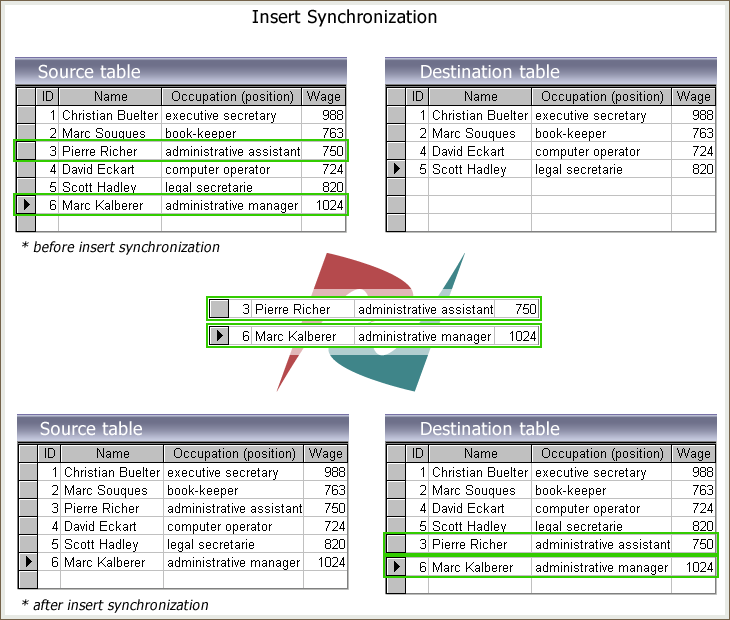
New records from the source table will be copied to the target table if there are no matching records with identical primary key values. As a result of the database synchronization process, the missing rows will be inserted into the target tables.
The following diagram illustrates the "Insert Sync"
Update Synchronization.
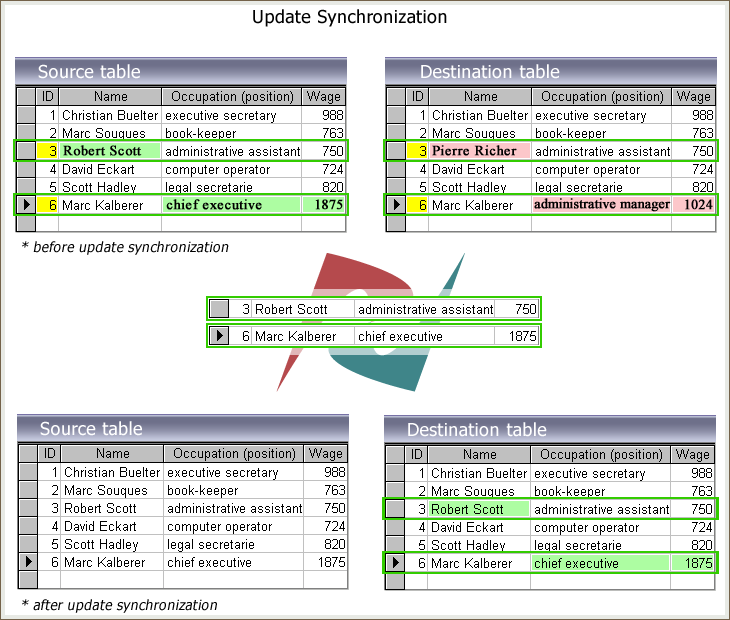
When making changes to the source database, the corresponding changes must be made to the target database. The synchronizer keeps track of the values of the table rows. The changed records will then be replaced in the target tables to confirm the identity between the two tables. As a result of update synchronization, all of your data in the source and destination is constantly updated.
The figure below shows the update synchronization.
Drop Synchronization.
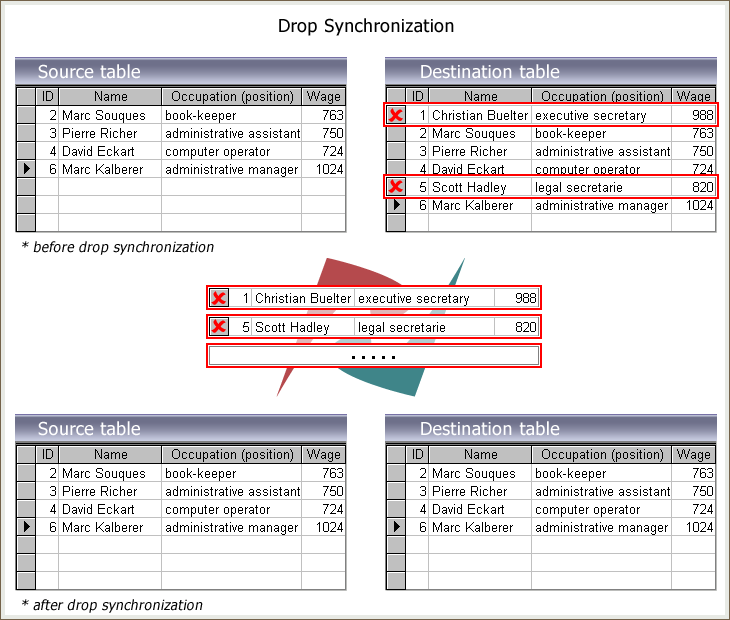
If some records have been removed from the source, the corresponding records must be removed from the destination. These obsolete records will be dropped from the target if they do not exist at the source.
The Drop sync process is shown schematically below.
Mixed Synchronization.
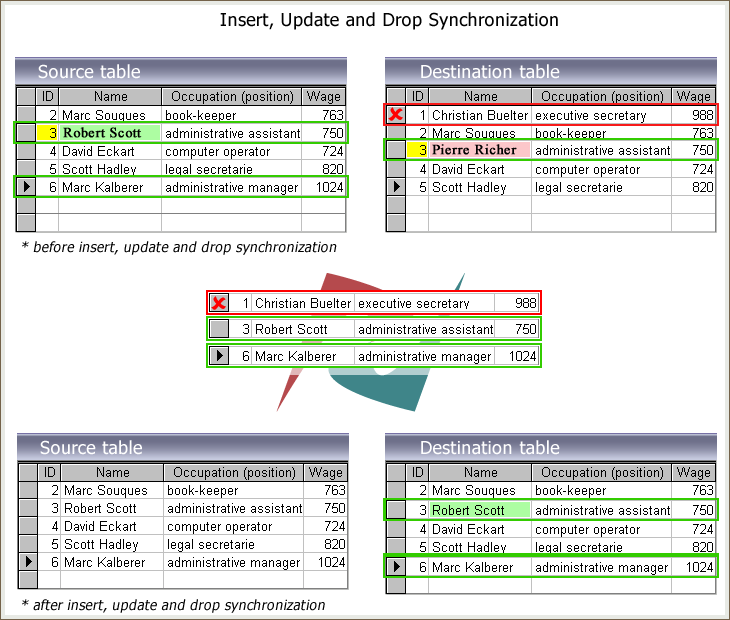
For example, you made changes to your original tables, added completely new records, and removed obsolete rows. To keep your databases up to date, you must add, delete, and update these relevant records in the target database.
Check all the "Insert Sync," "Update Sync," and "Drop Sync" options to get the identical source and target databases.
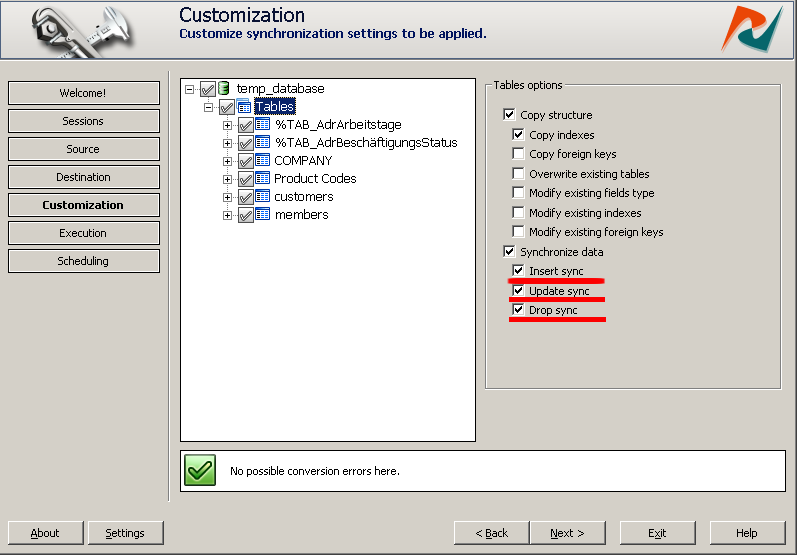
The figure below shows how the insert, update and delete synchronization options in DBSync Tools work together.
Bidirectional Database Synchronization
Bidirectional database synchronization keeps two databases updated in both directions.
Changes made in database A are applied to database B, and changes made in database B
are applied back to database A.
This is useful when two systems must stay active at the same time, for example a
production database and a branch-office database, or two applications that both write
data.
Bidirectional sync needs conflict handling, because the same row can be changed in both
databases before the next sync run. DBSync supports bidirectional synchronization for
many DBConvert database pairs.
Database Sync vs CDC Replication
Classic database synchronization usually runs as a controlled job. It compares source
and target tables, detects inserted, updated, and deleted rows, then applies the
selected changes.
CDC replication, or change data capture, works differently. It reads database change
events continuously and applies them downstream with lower delay.
Next Steps
If you need scheduled database synchronization, use DBSync to compare source and target
tables and apply insert, update, delete, mixed, or bidirectional changes across
supported database pairs.
If you need continuous MySQL and PostgreSQL change data capture, use DBConvert Streams for real-time CDC replication.
- DBSync database synchronization tools: https://dbconvert.com/dbconvert-dbsync/
- DBConvert Studio: https://dbconvert.com/dbconvert-studio/
- DBConvert Streams CDC Replication : https://streams.dbconvert.com/cdc-replication/