
Trigger-based database synchronization
Trigger-based database synchronization reflects changes from one database to another in distributed heterogeneous database environments.
Trigger-based database synchronization keeps track of changes in each table.
DBConvert synchronization software uses a Change Data Capture (CDC) approach to determine, track, and capture data that has changed in the source and target databases.
CDC model data migration is in high demand today because it distributes data across heterogeneous databases with low latency, reliable, and scalable data.
DBSync captures and delivers modified data only as it appears to ensure continuous data synchronization across heterogeneous environments. This significantly speeds up data replication between source and target databases.
Benefits of the trigger-based synchronization:
- Effective for large amounts of data. You don't have to do a full sync every time. The only recent changes will be reflected in the synchronized databases.
- Faster synchronization. Synchronizers with "trigger synchronization" enabled replicate databases much faster because they only process modified records thanks to pre-created triggers.
- Run sync jobs more often. Since only a subset of the databases needs to be synchronized, you can keep the replicated databases up to date.
- Simple configuration. Setting up "trigger-based sync" is pretty straightforward and doesn't require any technical skills at the developer level.
Trigger-based database synchronization is available for both one-way sync and bi-directional synchronization.
How does it work?
- Remote Triggers are created to capture DMLs (Insert, Update, Delete) in each table.
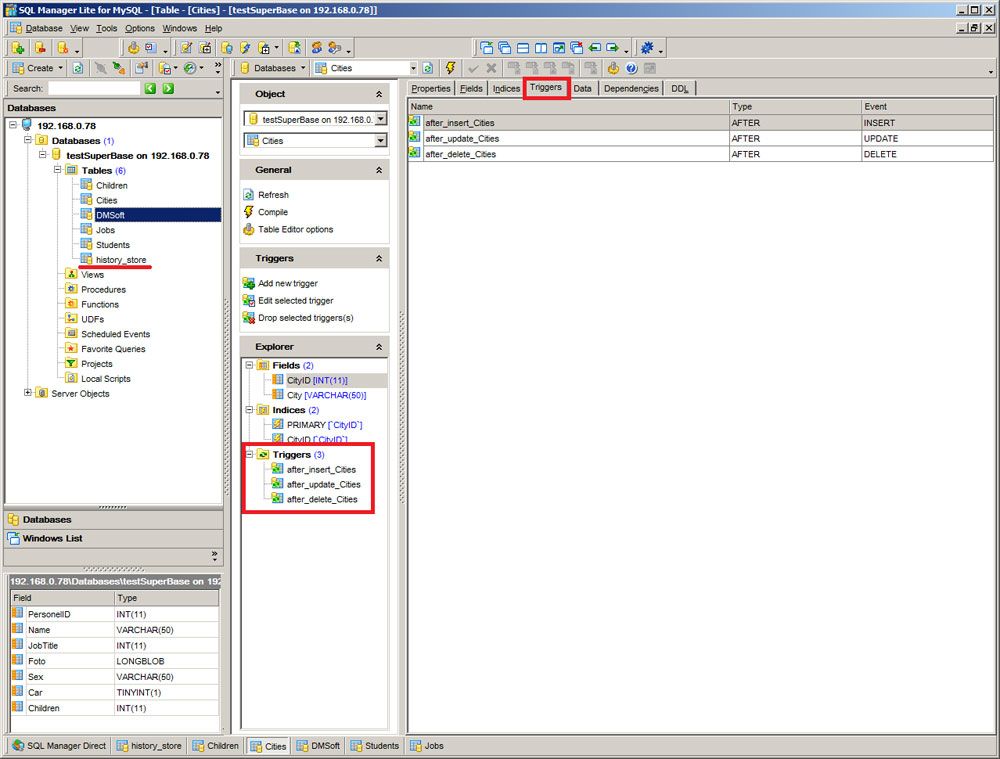
- When the "insert, update or delete a record" event occurs, the corresponded trigger is fired. This record goes to the previously generated shadow tables "history_store."
- Once the DBSync process starts the next time, it reads the records from this "history_store" in the source and destination and synchronizes these records in both the origin and destination DB.
Why are we using a "Trigger-based" rather than a "Transaction Log-based" approach?
Most database management systems manage a transaction log, which records changes made to database content. By scanning and interpreting the contents of the database's transaction log, one can capture the changes made to the database in a non-intrusive manner.
- It used to be tricky to get customers to change their database settings to enable "Transaction Logs" on hosting databases if they are disabled.
- The decision was based on the fact that triggers are available for all modern databases.
Here is an Excerpt From the MySQL web page https://dev.mysql.com/doc/refman/8.0/en/binary-log.html
"Running a server with binary logging enabled makes performance slightly slower. However, the benefits of the binary log in enabling you to set up replication and for restore operations generally outweigh this minor performance decrement."
So for DBConvert products at the time, it seemed like the right way to go.
For clustered databases, this approach is arguably worse than using mySQL binlogs or PostgreSQL Transaction logs.
In any case, it would be interesting to compare the two approaches to determine the winner.
Requirements:
- You must have direct access to synchronized databases with enough rights to create triggers and tables.
- Trigger-based synchronization can only work for tables with a primary key.
Configure triggered database synchronization.
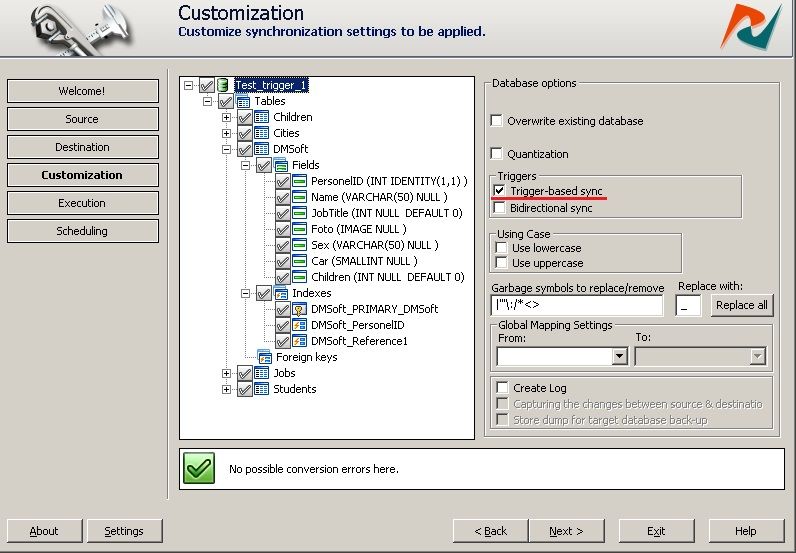
Below we will highlight the essential details about Trigger-based synchronization. This guide shows the options that need to be activated.
The process of setting up "trigger database sync" is divided into TWO steps. If you decide to cancel trigger-based synchronization later, an additional extra step is required.
The process of configuring "Triggered Database Synchronization" is divided into TWO steps. If you decide to cancel the trigger-based sync later, an additional step is required.
Adding Triggers and "history_store" table to both databases
By default, the "trigger sync" option is checked. The synchronization engine collects information about all upcoming changes for each table that participated in the synchronization process in the history_store table. Insert, Update, and Delete triggers are used to track related changes. Please note that the process of creating triggers may take additional time.
Triggers are created for each synchronized table for bidirectional synchronization.
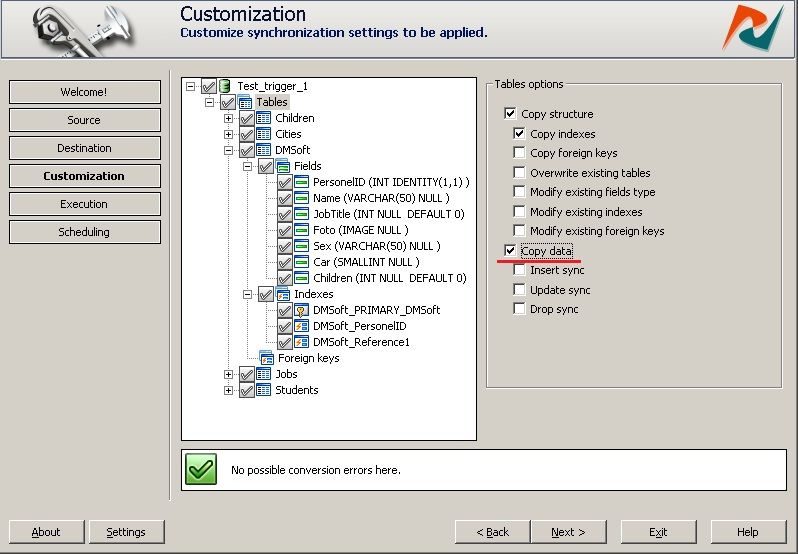
Note: The first time, you should have checked only the "Copy Data" option, but "Insert sync," "Update sync," and "Drop sync" options should be unchecked. Otherwise, the process will take longer.
Here is the trigger creation log:
Process started.
Source database:-- MySQL database --
Host: 192.168.0.78
Port: 3306
User: dmsoft
Password: Yes
Database: testSuperBase
CharSet: utf8
Use SSH: No
Use SSL: No

Destination database:-- MSSQL database --
Host: 192.168.0.78
Port: 1433
User: sa
Password: Yes
Database: Test_trigger_1
CharSet: utf8

Connecting to the source database.
Connecting to the destination database.
Creating history store for testSuperBase
Creating history store for Test_trigger_1
Table 'Children' exists. Skipping creation.
Table 'Cities' exists. Skipping creation.
Table 'DMSoft' exists. Skipping creation.
Table 'Jobs' exists. Skipping creation.
Table 'Students' exists. Skipping creation.
Synchronizing data in table 'Children'.
Synchronizing data in table 'Cities'.
Synchronizing data in table 'DMSoft'.
Synchronizing data in table 'Jobs'.
Synchronizing data in table 'Students'.
Creating trigger 'after_update_Children' for 'Test_trigger_1.Children'
Creating trigger 'after_insert_Children' for 'Test_trigger_1.Children'
Creating trigger 'after_delete_Children' for 'Test_trigger_1.Children'
Creating trigger 'after_update_Cities' for 'Test_trigger_1.Cities'
Creating trigger 'after_insert_Cities' for 'Test_trigger_1.Cities'
Creating trigger 'after_delete_Cities' for 'Test_trigger_1.Cities'
Creating trigger 'after_update_DMSoft' for 'Test_trigger_1.DMSoft'
Creating trigger 'after_insert_DMSoft' for 'Test_trigger_1.DMSoft'
Creating trigger 'after_delete_DMSoft' for 'Test_trigger_1.DMSoft'
Creating trigger 'after_update_Jobs' for 'Test_trigger_1.Jobs'
Creating trigger 'after_insert_Jobs' for 'Test_trigger_1.Jobs'
Creating trigger 'after_delete_Jobs' for 'Test_trigger_1.Jobs'
Creating trigger 'after_update_Students' for 'Test_trigger_1.Students'
Creating trigger 'after_insert_Students' for 'Test_trigger_1.Students'
Creating trigger 'after_delete_Students' for 'Test_trigger_1.Students'
Closing connections.
Process completed successfully.
Total time elapsed - 00:00:03
In the two pictures below, you can see that some new triggers have been added to the synchronized tables after the process is complete.
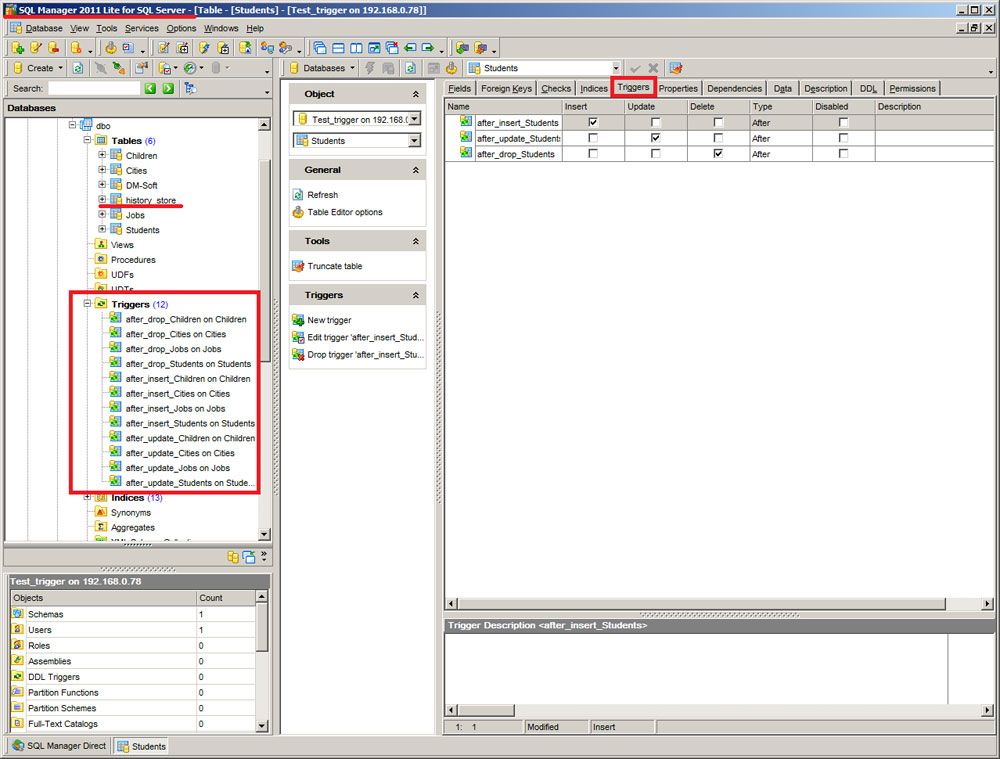
Use Triggers for database sync.
At this point, the newly created triggers start tracking changes made to the source and target databases. You can manually run a database synchronization job at any time or configure the scheduler to synchronize databases automatically.
"History_store" table stores changes in your databases.
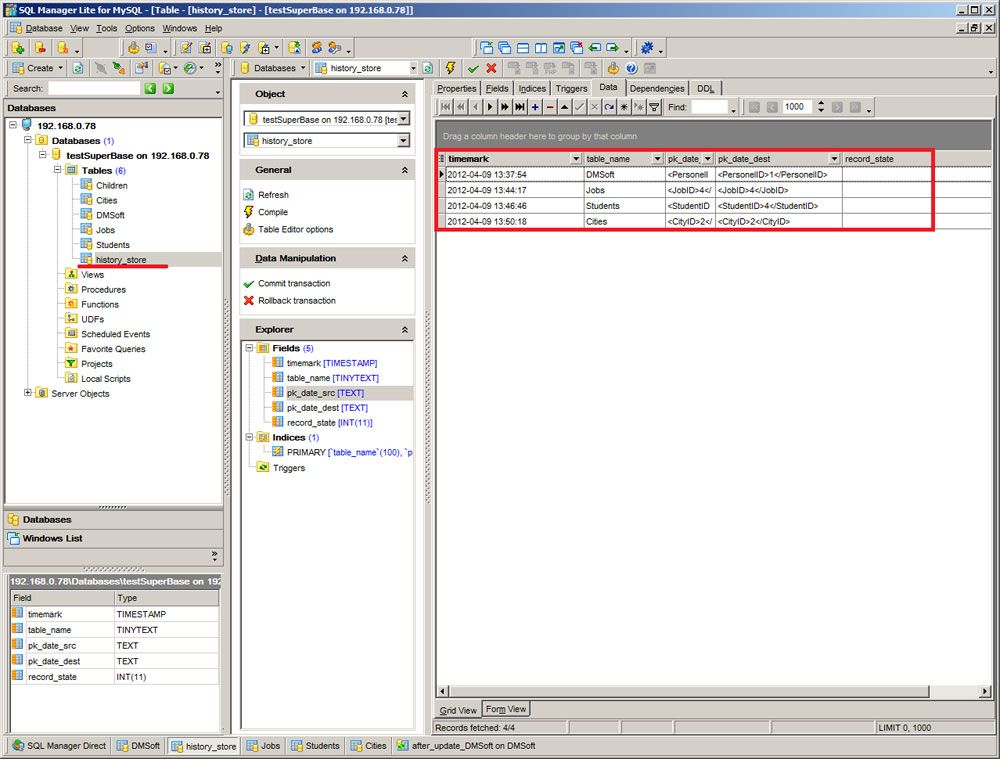
When the session ends, the "History_store" table will be automatically cleared to prepare for the subsequent database change tracking.
You can now choose from three possible synchronization options:
- "Insert,"
- "Update,"
- "Drop,"
allowing triggers to track all changes.
Check out the article on types of database synchronization for details.
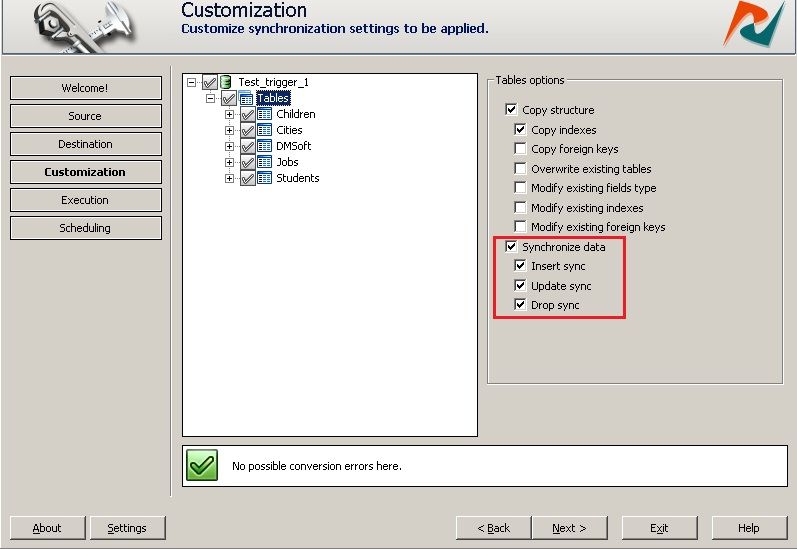
The sync log looks like this:
Process started.
Source database:-- MySQL database --
Host: 192.168.0.78
Port: 3306
User: dmsoft
Password: Yes
Database: testSuperBase
CharSet: utf8
Use SSH: No
Use SSL: No

Destination database:-- MSSQL database --
Host: 192.168.0.78
Port: 1433
User: sa
Password: Yes
Database: Test_trigger_1
CharSet: utf8

Connecting to the source database.
Connecting to the destination database.
Table 'Children' exists. Skipping creation.
Table 'Cities' exists. Skipping creation.
Table 'DMSoft' exists. Skipping creation.
Table 'Jobs' exists. Skipping creation.
Table 'Students' exists. Skipping creation.
Synchronizing data in table 'Children'.
Synchronizing data in table 'Cities'.
Synchronizing data in table 'DMSoft'.
Synchronizing data in table 'Jobs'.
Synchronizing data in table 'Students'.
Closing connections.
Process completed successfully.
Total time elapsed - 00:00:02
Remove Triggers and clean databases.
If you no longer plan to synchronize databases, you can remove the triggers and the "History_store table" from the databases. Just uncheck the "Trigger-based sync" checkbox and commit the session. All service information (shadow tables) will be removed from your synchronized databases.
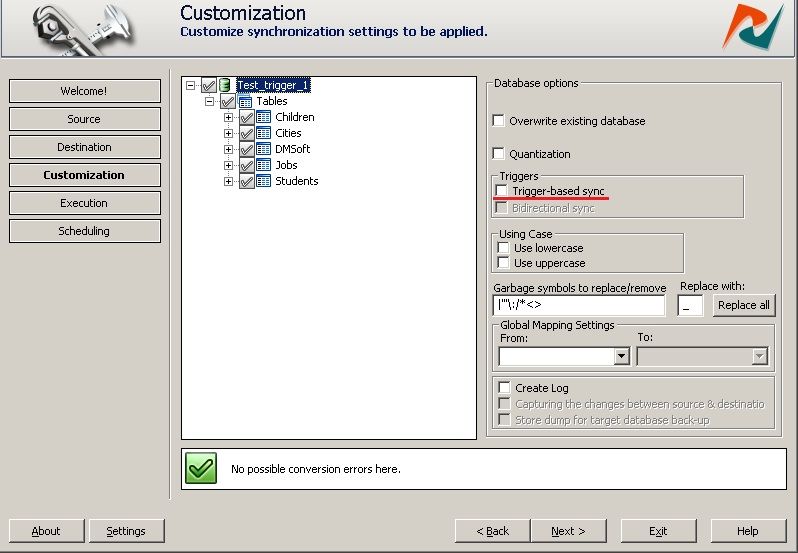
The log will look like this:
Process started.
Source database:-- MySQL database --
Host: 192.168.0.78
Port: 3306
User: dmsoft
Password: Yes
Database: testSuperBase
CharSet: utf8
Use SSH: No
Use SSL: No

Destination database:-- MSSQL database --
Host: 192.168.0.78
Port: 1433
User: sa
Password: Yes
Database: Test_trigger_1
CharSet: utf8

Connecting to the source database.
Connecting to the destination database.
Removing history store for testSuperBase
Removing history store for Test_trigger_1
Table 'Children' exists. Skipping creation.
Table 'Cities' exists. Skipping creation.
Table 'DMSoft' exists. Skipping creation.
Table 'Jobs' exists. Skipping creation.
Table 'Students' exists. Skipping creation.
Synchronizing data in table 'Children'.
Synchronizing data in table 'Cities'.
Synchronizing data in table 'DMSoft'.
Synchronizing data in table 'Jobs'.
Synchronizing data in table 'Students'.
Synchronizing data in table 'Children'.
Synchronizing data in table 'Cities'.
Synchronizing data in table 'DMSoft'.
Synchronizing data in table 'Jobs'.
Synchronizing data in table 'Students'.
Dropping triger 'after_update_Children' for 'testSuperBase'.'Children'
Dropping triger 'after_insert_Children' for 'testSuperBase'.'Children'
Dropping triger 'after_delete_Children' for 'testSuperBase'.'Children'
Dropping triger 'after_update_Children' for 'Test_trigger_1'.'Children'
Dropping triger 'after_insert_Children' for 'Test_trigger_1'.'Children'
Dropping triger 'after_delete_Children' for 'Test_trigger_1'.'Children'
Dropping triger 'after_update_Cities' for 'testSuperBase'.'Cities'
Dropping triger 'after_insert_Cities' for 'testSuperBase'.'Cities'
Dropping triger 'after_delete_Cities' for 'testSuperBase'.'Cities'
Dropping triger 'after_update_Cities' for 'Test_trigger_1'.'Cities'
Dropping triger 'after_insert_Cities' for 'Test_trigger_1'.'Cities'
Dropping triger 'after_delete_Cities' for 'Test_trigger_1'.'Cities'
Dropping triger 'after_update_DMSoft' for 'testSuperBase'.'DMSoft'
Dropping triger 'after_insert_DMSoft' for 'testSuperBase'.'DMSoft'
Dropping triger 'after_delete_DMSoft' for 'testSuperBase'.'DMSoft'
Dropping triger 'after_update_DMSoft' for 'Test_trigger_1'.'DMSoft'
Dropping triger 'after_insert_DMSoft' for 'Test_trigger_1'.'DMSoft'
Dropping triger 'after_delete_DMSoft' for 'Test_trigger_1'.'DMSoft'
Dropping triger 'after_update_Jobs' for 'testSuperBase'.'Jobs'
Dropping triger 'after_insert_Jobs' for 'testSuperBase'.'Jobs'
Dropping triger 'after_delete_Jobs' for 'testSuperBase'.'Jobs'
Dropping triger 'after_update_Jobs' for 'Test_trigger_1'.'Jobs'
Dropping triger 'after_insert_Jobs' for 'Test_trigger_1'.'Jobs'
Dropping triger 'after_delete_Jobs' for 'Test_trigger_1'.'Jobs'
Dropping triger 'after_update_Students' for 'testSuperBase'.'Students'
Dropping triger 'after_insert_Students' for 'testSuperBase'.'Students'
Dropping triger 'after_delete_Students' for 'testSuperBase'.'Students'
Dropping triger 'after_update_Students' for 'Test_trigger_1'.'Students'
Dropping triger 'after_insert_Students' for 'Test_trigger_1'.'Students'
Dropping triger 'after_delete_Students' for 'Test_trigger_1'.'Students'
Closing connections.
Process completed successfully.
Total time elapsed - 00:00:09
Introducing DBConvert Streams.
DBConvert Streams is an innovative cross-platform solution that offers CDC transaction log based synchronization capabilities for databases. With our new cloud-based platform, you can easily capture and replicate changes in real-time.
We are thrilled to officially announce the release of DBConvert Streams, our new cloud-based platform for database migration and real-time replication.